Big Update: In-Game Camera, Spatial Voice, 12 Languages and a Rebuilt VR Menu
Three weeks of heavy development, and this is the biggest batch of changes VR Realms has had. Here's what's new.
You can play right now at www.vr-realms.com. Jump in, build a world, bring your own avatar.
An in-game camera for filming
VR footage usually looks rough because it's just the headset feed, warped at the edges and bobbing with every step. The new camera fixes that. Deploy it from the Camera tab and it becomes your desktop window, so anything you record or stream is a smooth third-person shot while you keep playing in VR.
Park it as a tripod that keeps you in frame, let it drift behind you, or set it orbiting slowly for a reveal. Distance, height and zoom are on sliders, there's a background blur toggle, and the shutter saves a full-resolution photo to your Documents folder.
Voice that works like a real room
Voice used to be one flat mix, where everyone arrived at the same volume whether they stood beside you or across the map. Now it's spatial. Voices fade with distance and get muffled through walls, so a busy hub breaks into actual conversations instead of one overlapping crowd. Walk over to a group, talk, walk away.
It's on by default, with a toggle in Settings if you prefer the old flat mix.
The VR menu, rebuilt
This is the single biggest change to how VR Realms feels. One rail down the side switches between five full pages: Worlds, Avatars, Friends, Instance and Chat. Every list has filters, sorting and search, and you scroll by grabbing the list and dragging it.
The Instance page shows exactly who is in your world, so hosts can manage a room without leaving it. Grab the panel's bar with your pointer from across the room to move it.
Chat, with whispers and speech bubbles
Chat is built in now rather than bolted on. Newest messages at the top, timestamps, and colour coding so a busy room stays readable. Your messages are blue, everyone else green, arrivals and departures orange, whispers pink.
Type /name to whisper someone and you stay in whisper mode until you type /all, or just click a name in chat. Every message also appears as a speech bubble above the speaker, so you can follow a conversation without opening a menu.
There's a word filter on by default, always on in the public hub, and switchable in your own world. Emoji are coming shortly after.
A keyboard that just appears
Point at a text field, click it, and the keyboard opens. No button to find first, and it closes when you're done.
The part we're most pleased with is that this works in worlds we didn't make. If you put an ordinary Unreal text box in your own panel, a keypad on a door or a name entry on a leaderboard, the VR keyboard opens for it automatically. There's no API to call and nothing to wire up.
Twelve languages
The full in-game menu can be switched between English, Spanish, Arabic, Japanese, Korean, Chinese, Dutch, German, Russian, Italian, Polish and French. Pick once and it sticks.
Proper fonts are included, so Japanese, Korean, Chinese and Arabic all render properly, right-to-left included. More languages will follow.
Screens you can build yourself
Your mesh can now be the screen. Tag any mesh VRItem.Screen and video plays directly on it, so you can build a cinema wall, a drive-in, or a stadium jumbotron. Every screen gets a floating control bar with play, pause, stop and a URL button.
Paste a page link from YouTube, Twitch, Vimeo, SoundCloud and others and the screen works out the video for you. Point one at a JSON playlist and you get a browsable menu with categories and paging. Latecomers join at the right moment instead of restarting the video, since the room shares one timeline.
Creators get two default channel types. VRUrl. auto-plays your stream but lets players retune, while VRUrlLock. pins it and hides the controls. Audio ranges work properly across TVs, screens and jukeboxes. Hosts get a Host-Only Media toggle so a movie night can't be hijacked.
Settings, all in one place
Every setting now lives in one panel you can reach without leaving VR, split into six tabs: audio, microphone, graphics, accessibility, comfort and debug.
Audio has separate sliders for master, effects, voices and media, so you can turn a jukebox down without going quiet yourself. Graphics carries the full quality set plus VR render resolution. Comfort covers turning, and hosts get their own section for instance rules. The debug tab shows live FPS and ping.
There's also a UI Size slider from 50 to 200 percent that resizes nameplates and notifications live as you drag.
Shooter modes
Creators build these with tags, no Blueprints. Tag a spot for free-for-all or team deathmatch, drop spawn points, place a scoreboard and hand out rifles, and VR Realms runs the match: health, hit feedback, kills, smart respawns, team balancing and a live scoreboard.
It's server-authoritative and synced for everyone. You can set the kill cap, damage and health per map. Capture points and more are on the same system.
Full-body tracking
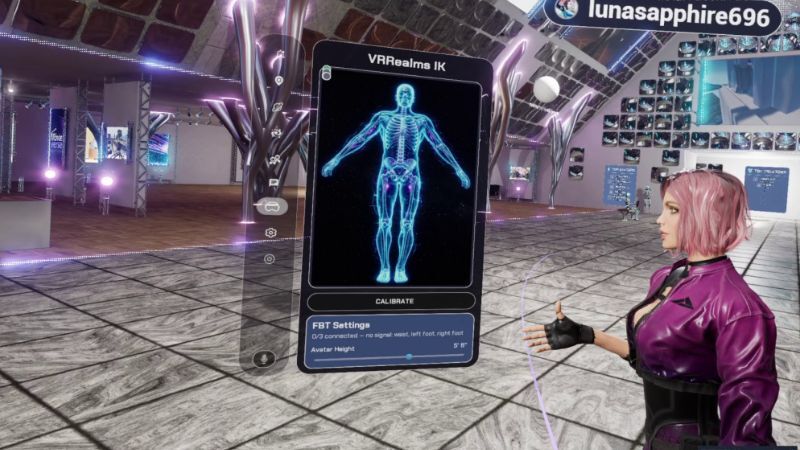
Full-body IK now works on avatars built on the older UE4 skeleton, so many more Workshop and marketplace characters get real feet and hips.
The ice-skating is fixed too. Your legs blend into a natural walk while you move on the stick and snap back to your trackers the instant you stop. Step away and go idle, and calibration re-runs automatically when you come back.
Creator Kit
The kit now compresses your builds with Oodle Kraken, the same setting big Unreal titles ship with. The same map typically packs 25 to 40 percent smaller, so players download your world faster and you're less likely to hit the 700 MB cap. Nothing to configure, and content you've already uploaded keeps working.
One honest tip: if your map is huge, compression is a discount rather than a cure. The usual culprit is 4K textures, which headsets can't resolve anyway. Bulk-set Maximum Texture Size to 1024 and watch hundreds of megabytes disappear.
Turning an Epic MetaHuman into a Workshop avatar now brings the hair across as game-ready hair cards, coloured from your MetaHuman's own dye, with a catchlight in the eyes. Custom clothing from Fab carries its colours too. The uploader also catches oversized preview images up front instead of failing at the end of a long upload.
Fixes
Teleport now works in community maps. It used to need a navigation mesh that Workshop maps never have, so creators get teleport for free with nothing extra to build.
Two community maps published under the template's default name were causing portals to drop people into the wrong world. Map travel now mounts the map you actually picked, so the portal you press is the world you get.
Your avatar height saves and survives world hops and restarts. Desktop starts in fullscreen and remembers your window mode. The world browser shows open sessions reliably, with real progress messages when joining a friend. Nameplates are steady and show your Steam avatar, glowing softly while you talk. Avatar downloads show a live percentage. Community maps using Unreal's default sky no longer render black. Jump is its own button, so you can hop around with a rifle without dropping it.
Reporting
There's a report form at vr-realms.com/report.php for technical bugs and player behaviour, plus a Report a Bug button in Settings. Reports come straight to me rather than disappearing into a channel, and if you leave an email I'll reply once I've looked into it. Reporting someone should never mean taking your headset off first.
Want to try all of this? Head to www.vr-realms.com