Status
SteamPeaks
ChartsSalesUpcomingPatchesEventsCalculator
New on SteamEvery app, DLC and depot the minute Steam creates itAppsEvery app on Steam, newest change firstPackagesSubs and bundles, and what each containsDepotsDepots, manifests and install sizesTagsSteam's user tags and the games under themDevelopers & publishersCompanies and their cataloguesTechnologiesEngines, SDKs and anti-cheat found in the filesChange historyEvery PICS changelist as it lands
SignalsNineteen readings of the whole catalogueCompareAny games side by sideRecordsAll-time peaks and the days they were setReportsWeekly and monthly write-upsAlerts & newsroomWatch a game, get told when it movesSteam statusIs Steam up, right nowWeb API explorerTry the endpoints in the browser
EventsSteam's own events and the sales calendarCalculatorWhat a Steam account is worth, and its pile of shame
/
Sign in
/
SteamPeaks
The ultimate resource for Steam data.
ExploreChartsSalesSales and festsUpcomingPatchesEventsRecordsTrendingSignals
DatabaseAppsPackagesDepotsTagsDevelopersTechnologiesChange history
ToolsCalculatorCompareSearchAlertsSteam statusAPI
SiteMethodologyFAQDiscordSupportSign in via Steam
Not affiliated with Valve or Steam. Game names and artwork belong to their owners. All times UTC.
PrivacyCookiesFair useStatus
Typer SurvivorEventsUpdate #2- Active Dodging and Word Panels
Community

Update #2- Active Dodging and Word Panels

Typer Survivor · published 2 May 2026, 01:10 UTC

All eventsPlayers around this dateRead on Steam

It's been a full week since launch and we've got several updates in store!

#1- Active Dodging

Active dodging has been added to all characters.

This is a new mechanic that allows the player to time a dodge correctly when an enemy gets to the center, effectively mitigating the damage.

If you press any arrow key while your dodge is charged (the winged boot icon to the right of the player) you'll enter a 'dodge' state and you'll see your character crouch. While dodging, enemies getting to the center will be dodged and you won't take damage.

The dodge state is short, and takes a few seconds to recharge, so it is more of a last resort action you can try to practice to save yourself :)

#2- Word Panels

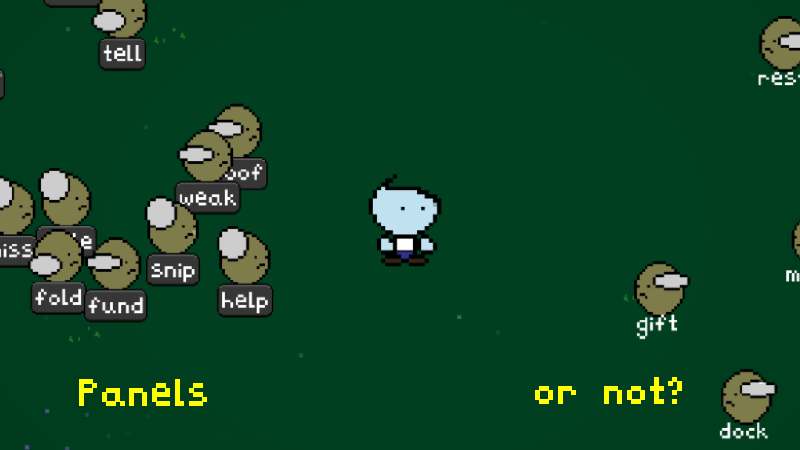
An option to turn on/off enemy 'word panels' has been added to the game, and set on by default.

This gives a gray background behind the enemy word, giving more contrast to the word in case it is difficult to see for some players.

This effect can be turned on/off from the main menu or combat room settings screen.

#3- A few item updates

Characters

Demolitionist- 'Magic Missile' mutation updated.

Stupor Man- all mutations updated.

Items

Vampiric- updated to apply to most actions. Changed from 1Hp per defeat to 20% chance to heal 5 Hp on defeat. Added visuals to show when triggered.

Aftershock- updated visuals and diversified large aoe, lower damage, and lower aoe, higher damage aftershocks.

General

Small tutorial added when first encountering capital letters to indicate need for holding shift

More from Typer Survivor

Other announcements

All events
Community4 May 2026The Dragon Awakens...Today I've got terrifying news with Update #3! -The Dragon Awakens- The boss of the Dragon's Core has been updated with some exciting improvements in mechanic functionality and clarity. Watch out for the shifting colors- they're each deadly in their own way. Good luck, and happy typing! <3 BrambleCorpCommunity28 Apr 2026Difficulty UpdateHey everyone, It's been an exciting launch week with lots of positive feedback and good vibes from many players. Thanks for helping to make Typer Survivor a success! I saw that some of our newer typers could benefit from some lower WPM difficulty settings, so our first update will be the Difficulty Update! In addition to the Easy (40 words per minute), Medium (60 wpm), and Hard (80 wpm) difficu…