📢 Update Notes: Beginner Guide Features, Auto-Drive & Difficulty Options
🔰 Major Changes & Beginner Guides
- Added new beginner assistance guides:
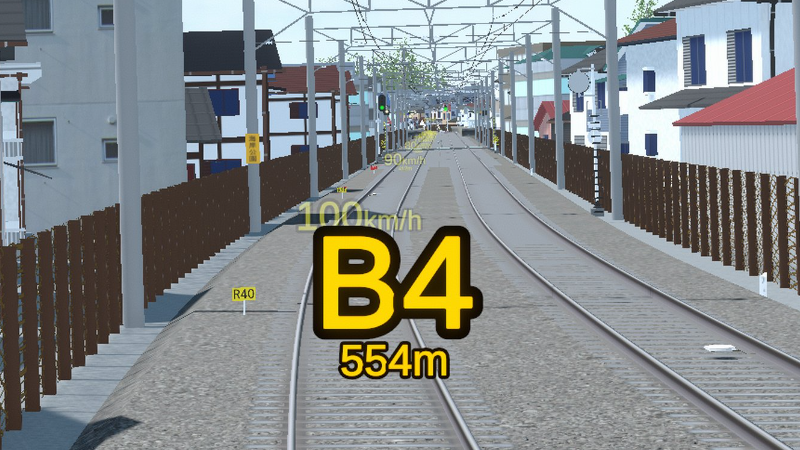
- Target Speed Guide for Stopping: Displays recommended speeds as you approach a stopping mark (can be toggled with the Distance Guide).
- Braking Point Indicator: Displays estimated braking start points.
- 3D Speed Limit Markers: Displays upcoming speed limit start points directly in the 3D world.
📊 Scoring & HP Balance Changes (Guide Implementation)
- Adjusted Stop Position Scoring:
- Previous Formula: 500 - (Stop Error in meters × 100)
- New Formula: 300 - (Stop Error in meters × 100) + No-Guide Bonus (Max 200)
- Stopping without using assistance guides grants a bonus score for each stop!
🛠️ Other Changes & Improvements
- Added "Master Controller Interlock" option to Difficulty Settings.
- Adjusted sound effects when rapidly switching notch positions using key inputs.
- Added shortcuts to Difficulty and Display Settings directly on the pre-departure setup screen.
- Excluded the pause menu UI from screenshots generated when creating bug report files.
- Updated tutorial brake notch instructions to be based on the new braking guide system.
- Enabled wristwatch display during Two-Man operations (use the clock display ON/OFF key toggle).
- Added an option to mute game-side handle sound effects when using an external controller.
*Original text (Japanese)*
■主な変更点
・初心者向けの以下のガイドを追加しました。
-停止位置に向けての速度ガイド(停止位置までの距離ガイドと切り替え可能)
-ブレーキ開始位置目安ガイド
-速度制限開始位置の3D表示
・運転乗務に「自動運転」を追加しました。
・難易度設定の「難易度」の設定での違いをHPの減り具合のみとし、その他の違いを
「開扉可能範囲」、「ATS動作設定」、「制限速度予告距離」(表示設定内)の設定項目に分割しました。
・キー設定に下記を追加しました。
-フルノッチ
-ブレーキ解除
■ガイド追加に伴う採点等の変更について
・停止位置の採点について、下記の通りに変更しました。
ガイドを使わない場合は停車ごとにボーナスが加点されます。
旧:500 – 停止位置誤差(m)×100
新:300 – 停止位置誤差(m)×100+ガイド不使用ボーナス(Max200)
・HPについて、
イージー、ノーマル:従来通り
ハード:加点なし、減点1.5倍
としました。
■その他の変更点
・難易度に「マスコン鎖錠」の項目を追加しました。
・キーボードでのノッチ操作時、一気に操作する系の入力に対する音を調整しました。
・乗務前の画面に難易度設定と表示設定に移動できる項目を追加しました。
・バグ報告ファイル作成時、スクリーンショットにポーズメニューのUIを含めないようにしました。
・チュートリアルのブレーキノッチの指示をブレーキガイドベースにしました。
・ツーマン乗務時でも腕時計を表示できるようにしました。(時計表示ON/OFFのキーをご利用ください)
・外部コントローラ使用時のゲーム側のハンドル音を再生しない設定にできるようにしました
More from TRAIN CREW Demo
Other announcements
Brake Graph Display & Minor Fix Update-Added Brake Graph Display Toggle Keybinding: Added "Toggle Brake Graph ON/OFF" to key settings (unassigned by default). When toggled on during operation, a graph showing Speed on the vertical axis and Distance on the horizontal axis will be displayed. Scoring Penalty Note: If you view the graph during operation, a penalty will be deducted from your "No-Guide Bonus" at a rate of (Seconds viewed…Minor Fix UpdateFixed a bug in Conductor Mode that prevented trains from departing. (Original Japanese) ・車掌モードで出発できない不具合を修正しました。Minor Fix Update-Fixed an issue in Conductor Mode where doors would unintentionally open upon arrival at Shin-Nozaki Station on Train 1541 (回1641 Train). -Implemented a fix for an issue where parts of the driving route map became obscured or cut off on lower-resolution displays. *Originai text (Japanese)* 一部修正のアップデート ・車掌モードで1541列車(回1641列車)新野崎到着時にドアが開いてしまう不具合を修正しました。 ・解像度が小さい画面で運転経路図が一部見えなくなる不具合の対策をしました。