
In order to best prepare for our release on Steam on the 20th, we have decided to disable the Demo version.
You can still get your Diebrary demo at Armor Games, Itch.io, Addicting Games, Kongregate and other portals for free!
We got a few questions about the cookies in web versions - they are there only to save your progress, and you can opt-out of that. We do not collect or store any user information. It's up to you how you want to enjoy our game!
4. What did we have to change? (Color)
Alright, we’re going to get a bit more specific with art terminology here so feel free to leave questions if you are curious about something!
As was mentioned before, we reused a lot of assets to make the pipeline faster. However, just because one thing worked in Loot, doesn’t mean it worked in Diebrary. Characters, enemies and props were the main thing we carried over, but reworking the color palettes across all of those assets was an important part of getting those to look cohesive, like they belonged in the same world. Here is an early look of Diebrary before the color pass and an up to date screenshot after the color pass and with some extra pizazz.
Before (Forest)

After (Forest)

At first glance it might not seem like a huge difference, however, take a closer look at the colors in the environment and on the enemies. The before shot is less saturated, has more blue tones overall and the red is slightly more orange.
In the second screen shot, we’ve taken out as much of the blue as we could and leaned more heavily into the true red/yellow-gold/rich greens. Sticking with those as our primary colors made it easier to come up with color changes for enemies and helped tremendously while making a color pass on the environment props.
These are color swatches our art director, Ben, took from our first color pass and the changes he suggested for the next pass.

First pass colors that include the ultramarine blue tone

After, less blue and that good ol’ green/red/yellow-gold triad
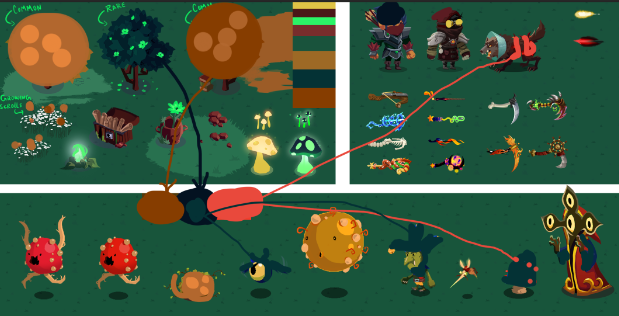

I hope the images above helped with your understanding of this part of our art journey!
5. What did we have to change? (Enemies!)
Fans of this genre (games like Vampire Survivors, Nova Drift, 20 Minutes Till Dawn) know that the bulk of the enemies come from using one model and changing it visually to show that it has gotten tougher than the previous version. Today I am going to use the shamblers as an example of how we achieved this.
First of all, this is what the shambler looked like in Loot. I wanted to make it cuter as a way to separate it from its first life, the “shambling mound”, and turn it into the first enemy you see in Diebrary.
Original Shambling (from Loot)

New Shambler

This is also a good example of how we kept the color palette for enemies to the yellow-gold/red. Dipping into some deep yellow/orange in this case makes sense for the visual progression.
6. New Map!
Initially we were only going to ship with one map, but as luck (and a lot of work!) would have it, we were able to create a new map that has some mechanical differences from the Forest.
The Mountain map features almost all new enemies, props and visual effects. While running up the mountain, you are a bit slower. If you’re running down the mountain, you’re faster! Storms on the left and right sides of the screen block your path, and monsters emerge from within to make your life more difficult. Overall more movement restricted, hopefully more hectic and fun!

7. Thank you for reading!
Unfortunately there are a lot more things to talk about than what will comfortably fit inside a reasonably sized blog post. If you enjoyed reading, from the small amount of history with our other game Loot, to our work on palettes and our work on enemies, characters and weapons, we hope you found something new to learn about! If you have any questions and would like to know more (art post part 3!) OR want us to spotlight another team, please let us know in the comments!
It was a privilege to speak on behalf of the art team for Diebrary and I hope you’ll give the game a shot when it comes to steam on July 20th!
Thanks!
- Shelbo