Status
SteamPeaks
ChartsSalesUpcomingPatchesEventsCalculator
New on SteamEvery app, DLC and depot the minute Steam creates itAppsEvery app on Steam, newest change firstPackagesSubs and bundles, and what each containsDepotsDepots, manifests and install sizesTagsSteam's user tags and the games under themDevelopers & publishersCompanies and their cataloguesTechnologiesEngines, SDKs and anti-cheat found in the filesChange historyEvery PICS changelist as it lands
SignalsNineteen readings of the whole catalogueCompareAny games side by sideRecordsAll-time peaks and the days they were setReportsWeekly and monthly write-upsAlerts & newsroomWatch a game, get told when it movesSteam statusIs Steam up, right nowWeb API explorerTry the endpoints in the browser
EventsSteam's own events and the sales calendarCalculatorWhat a Steam account is worth, and its pile of shame
/
Sign in
/
SteamPeaks
The ultimate resource for Steam data.
ExploreChartsSalesSales and festsUpcomingPatchesEventsRecordsTrendingSignals
DatabaseAppsPackagesDepotsTagsDevelopersTechnologiesChange history
ToolsCalculatorCompareSearchAlertsSteam statusAPI
SiteMethodologyFAQDiscordSupportSign in via Steam
Not affiliated with Valve or Steam. Game names and artwork belong to their owners. All times UTC.
PrivacyCookiesFair useStatus
FWsim - Fireworks Display Simulator›Events›Announcing FWsim v4
Major update

Announcing FWsim v4

FWsim - Fireworks Display Simulator · published 20 months ago · build 17056238

All eventsPlayers around this dateRead on Steam

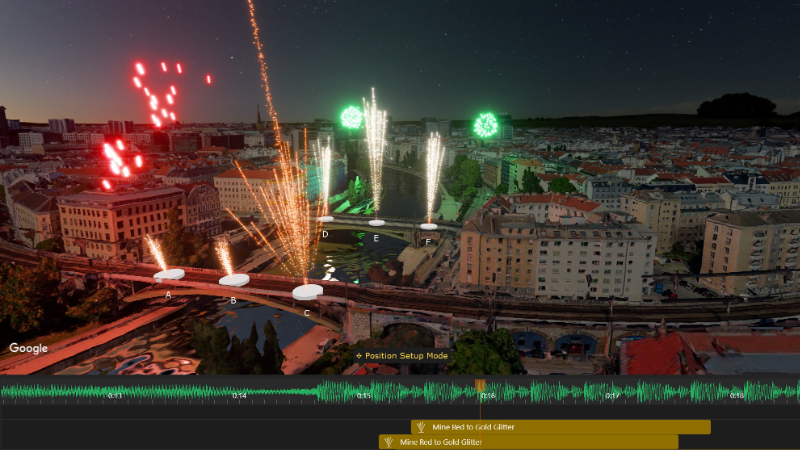
With FWsim v4, planning your shows is now much faster & easier!

Watch on YouTube

Show Editor Improvements


➜ Better display of positions, with 3D cylinders - so you can better see where the positions actually are in 3D space
➜ Put steppers through multiple positions (this allows you, for example, to run a stepper in a circle)
➜ New “Fly Around” camera controls - more efficient & intuitive
➜ Comfortable angle selection in 3D window
➜ Select position first, then add cues
➜ Select multiple positions to add multiple cues
➜ In position setup mode, you can select multiple positions and move them together
➜ Stepper renamed “Sequence”
➜ Toolbox made smaller, so you have more space for your timeline
➜ Now using the CTRL key to select multiple items in the timeline, instead of SHIFT (to match the Windows standard)
➜ When pasting, cues are pasted onto the position that is selected in the 3D window
➜ You can copy shots from a single position, and paste them onto multiple other positions

Effects Improvements


➜ More effects available
➜ Some old effects, which were of lower quality, are now hidden
➜ Adjust gravity for stars
➜ New types of blinking
➜ More colors available
➜ Can now attach ascent effect components to rockets

Let us know how it goes! We look forwards to seeing what you make with it.

More from FWsim - Fireworks Display Simulator

Other announcements

All events
Major update15 Jun 2026FWsim 4.4 - Motorized Stars, Better Performance, and new effects featuresCheck out update 4.4! Here's what's new: ⭐ Graphics improvements · More realistic appearance of stars · Accelerated Rendering (Settings → Graphics) — runs much faster and uses less battery at the same visual quality. Available on NVidia and AMD dedicated graphics cards. · Even without accelerated rendering, this new update should be faster on all systems. · More realistic water reflections ✨ Ef…FWsim - Fireworks DispGame update16 Sep 2025Massive Performance ImprovementIn this update: · Better performance when editing your show, especially on large shows with many cues · New option: “Reverse Order on Timeline” (CTRL + SHIFT + R). Use this when you make a stepper out of single cues and you want to reverse the order. · The timeline now looks much better when you zoom out very far. Your show will look cleaner and it’s easier to make edits even at extreme zoom le…Major update1 Jul 2025FWsim 4.1.1 - Show Editing is now much fasterExciting news! You can now select your favorite effects and then insert them with just one click. This massively speeds up the show design process, so you can focus on your creativity. Furthermore: · Press TAB key to jump forwards to the next beat in the music · When you move the playback cursor, it snaps to beats in the music and to existing cues on the timeline. · You might have two cues over…