Hiya hiya,
If you want to stay in the loop on all our news and updates, we’re now shouting into the void from even more corners of the internet. You might have noticed our slumbering BlueSky account is dusted off and now active. Then our Community Team took the next most natural step and joined Tumblr - because if the gang are going to star in a thousand slow-burn romance fics, we might as well be there to see it.
In other news, some of you on PS5 might have accidentally stumbled into Patch 8 a little early - whoops! If you’re one of the few wondering what the heck is going on, don’t worry. You can roll back to Patch 7 by deleting and reinstalling the game. Full details here, click away. Think of it as a time-travel mechanic.
And with that, the Patch 8 stress test is in fact now live for Xbox, PlayStation, and PC!
If you’ve registered to take part on either PlayStation or PC, look out for an email from us with your game code and details on how to access the stress test.
If you’ve registered through the Xbox Insider Programme, the Baldur’s Gate 3 Stress Test application is now live in the Xbox Insider Hub, for you to download! For more details on this, please click here.
To learn more about how to set up a cross-play lobby and discover the bug fixes arriving in Patch 8, please read on!
Cross-Play
During the Patch 8 stress test, Xbox, PlayStation, and PC players will be able to test out cross-play by either creating or joining a lobby.
If you want to try out cross-play with your friends on other platforms and have now been given access to the stress test but your friends haven’t, you can request extra Patch 8 stress test keys for PlayStation and Steam (PC) by heading to: https://larian.com/account/connected and linking your game account with your Larian account.
Check out the handy video below for a step-by-step on getting set up with cross-play!
After enabling cross-play from the multiplayer online settings, you’ll be able to either create or join your own cross-play multiplayer lobby. Head to the Multiplayer menu, select Cross-Play and create your lobby!
For the Patch 8 stress test, we recommend that console players host a cross-play lobby if wanting to play with a PC player.
You can add friends using the Larian Network by clicking on the + icon from the Create Lobby screen during cross-play set-up. Enter their Larian account username and send the request! Once they have accepted it, you will be able to view them online and invite them to your lobby.
Playing with mods during cross-play:
While we recommend that console players host a cross-play lobby, if you're looking to join a modded PC lobby, the PC host must have less than 100 mods installed on that save and only include mods that are accepted on console and Mac, which are indicated by the “Available on Mac and Console” tag when browsing available mods. Otherwise, a mod mismatch will be detected, and you will not be able to join the host’s game.
Xbox Series S Split-Screen Co-Op
Wanting to play multiplayer a little closer to home? Patch 8 will also bring split-screen to Xbox Series S consoles! If you’re joining the stress test from an Xbox, you’ll be able to try this out early.
Register For The Patch 8 Stress Test
The stress test is now live, and if you’ve already registered on either PlayStation or PC, access details will be sent to your email inbox. If you’re playing on Xbox, you’ll need to download the Xbox Insider Hub App to become an Xbox Insider and join the playtest from the app.
If you haven’t signed up yet, you can still register your interest by clicking on the banner below!
Please note: Access will be granted in waves throughout the testing period. Registering your interest through the web form does not guarantee you will be given access.
Patch 8 Highlights
While some of you will get to try out Patch 8 for yourself, starting today, here’s just some of what you can expect with Patch 8 once it is ready for release!
Highlights
- Photo mode
- 12 new subclasses
- Cross-play
- Xbox Series S split screen
Gameplay
- When you succeed a Perception check, the spotted item will now ping on the minimap and be listed in the combat log.
- Fixed an issue where the special abilities of some of your allies weren't properly provided at the end of the dialogue with them at High Hall.
- Scrolls and potions inside unlocked containers in your party inventory can now be used when rolling in dialogues.
- Neutral and friendly NPCs will no longer become hostile when, outside of combat, they walk into surfaces created during combat that trigger passives (like electrified surfaces triggering Thunderbolt Strike). Take it easy, lads.
- Fixed Freecast being reset when any condition is applied.
- Fixed characters getting stuck when pathfinding via a ladder that's already in use by another companion.
- Fixed a bug with the moving platform in the Gauntlet of Shar that would sometimes leave you behind, causing you to plummet to your death.
Combat
- Fixed an issue causing neutral NPCs to trigger combat for seemingly no reason.
- Cerys will stop getting involved in combats with Minthara from across the region. An eager beaver no longer.
Modding
- Fixed an issue causing you to get stuck at a 0% loading screen when attempting to join a multiplayer session that uses mods.
- The Mod Verification window will now trigger regardless of where the request to connect to a multiplayer game is coming from.
- Replaced the third-party mod warning with clearer messaging.
Performance and Options
- Fixed the ruleset selector not appearing on the 'Alter Custom Mode' screen when accessing the ruleset settings via the multiplayer lobby.
- Improved server performance in the Adamantine Forge.
Scripting and Flow
- Fixed an issue where you could tell Astarion that Gandrel has been looking for him even if Gandrel refused to tell you the name of his prey.
- Fixed a savegame issue where you wouldn't get the appropriate amount of Umbral Gems for the Gauntlet of Shar.
- Minthara now comments on the Emperor's reveal.
- Reminded Minthara that 'knocked out' does not mean 'dead', so she'll more reliably appear in Moonrise Towers.
- You can no longer teleport out of Moonrise while controlling Minthara unless you tell her to stay put.
- Minthara is now willing to talk to you after you tell her to wait in the torture chamber.
- Minthara no longer gets stuck babysitting Thaniel in Act II.
- Fixed an issue where you could talk about Art Cullagh as though he's alive even if he isn't.
- Your character will no longer think Shadowheart is dead if she isn't when talking to Viconia.
- Characters who were in a relationship with Gale when he sacrifices himself in the endgame to defeat the Netherbrain will now receive a tonally appropriate (read: lovey-dovey) letter.
- Fixed a dialogue issue preventing Avatar Gale from talking about the orb to Lae'zel after consuming a magic item.
UI
- Discovered and available (non-hostile, alive, etc.) traders are now shown on the world map regardless of how far away you are from them.
Cinematics
- Shadowheart has agreed to stop repeatedly changing her hair colour during certain intimate moments.
- Tidied up and improved some cinematic animations for characters of different heights if you kiss during the evil ending.
Writing
- Fixed a duplicated dialogue option and the wrong version of another dialogue option appearing in Minthara's main party dialogue.
Patch 8 will bring a multitude of fixes for various crashes and blockers, combat bugs, scripting and flow issues, and more. The full patch notes will be shared once Patch 8 goes live!
Reporting Bugs During The Stress Test
Internal playtesting has been ongoing for several weeks now, and thanks to the introduction of photo mode in Patch 8, our playtesters have discovered new means to highlight some interesting issues.
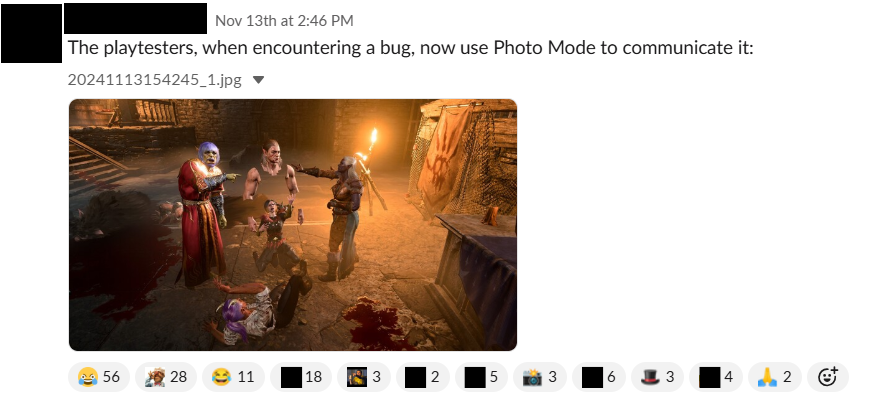
While we don’t expect you to showcase every unexpected bug you run into (please, don’t do that), we would be grateful if you could report any issues you experience in the Patch 8 stress test using the existing bug reporting form. Please make sure to state “Patch 8” in the Game Version field!
Known Issues
As the Patch 8 stress test is a work-in-progress build, we’re aware of some issues, and have listed the ones relevant to the new features coming in Patch 8 below!
Modding
While it’s our hope that supported mods remain mostly unscathed with Patch 8, this stress test also helps us understand how your mods interact with the latest patch and identify any issues ahead of release.
- ImpUI users may find that radial descriptions aren’t visible, and some menu options don’t work as intended. If you are joining us for the stress test, we recommend creating a new save or loading an existing save that does not use ImpUI or any mods that use ImpUI as a dependency.
Photo Mode
- Photo Mode becomes visually corrupted when using Vulkan.
Cross-Play & Multiplayer
- Some lines in the cross-play settings aren’t fully localised.
- Players in a multiplayer lobby can lose movement input after picking up an item.
UX
- Some keyboard hotkeys and controller buttons may stop working after trading with merchants.
Gameplay
Gale refuses to eat his magical items, even after requesting them.
Keep an eye out for updates during the Patch 8 stress test as we continue working on fixing these issues!
Sharing Your Experience
We want to know how you get on with Patch 8, so we have created a short form for you to share your experience with us. If you’ve been accepted into the stress test, look out for the link in your access email!
And with that, we’ll catch you next time.