Hi everyone!
With only a week left until the release, we wanted to share some info about how Deliver At All Costs runs on the Steam Deck.
In our testing, the game performs very well—it’s a great fit for on-the-go action! That said, there are a few things to keep in mind:
- Performance: With default settings, you can expect around 50 FPS. It's possible to boost this to 60 FPS with a few tweaks (see below for details!).
- Text Size: Some UI elements, like dialogue boxes, may appear a bit small and can be hard to read on the Deck’s screen.
- Texture Quality: The highest texture quality is capped at medium due to memory limits. Thankfully, this isn’t really noticeable given the Deck’s smaller display resolution.
Aside from those points, the experience is nearly identical to the PC version!
Want smoother performance? Try these settings:
Disclaimer: The settings described below will not work on the Demo version of the game.
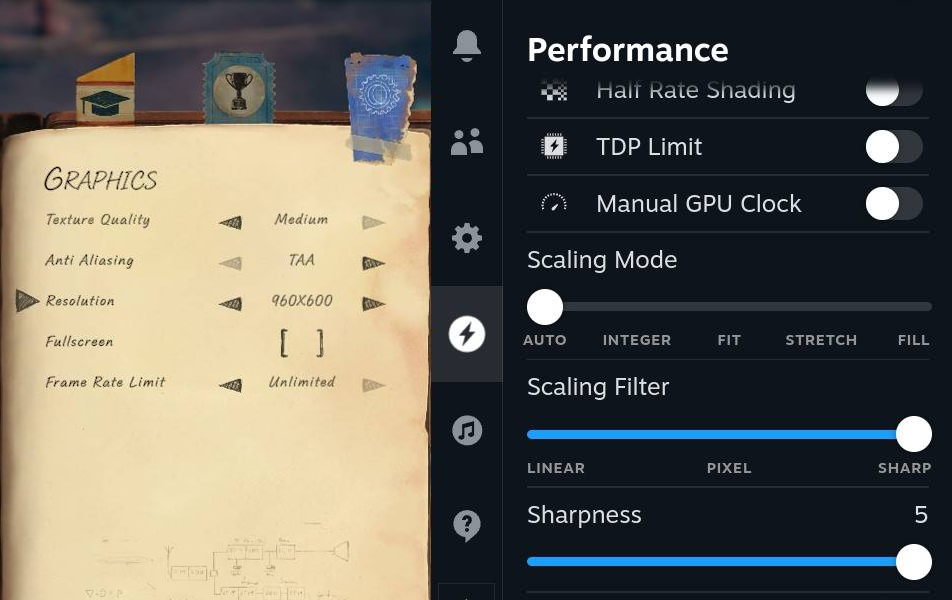
If you're aiming for a consistent 60 FPS and don’t mind a slight dip in image quality, we recommend you to try the following settings:
- Resolution: Set to 960x600 in the in-game graphics settings.
- Fullscreen: Turn off fullscreen mode (this is important for FSR to work!).
- Sharp Scaling: Enable Sharp scaling (FSR) in the Steam Deck's performance menu:
- Press the three dots on the right side of the Steam Deck.
- Tap the lightning bolt icon to open the performance menu.
- Scroll down to Scaling Filter and set it to Sharp (previously called FSR).
See you on May 22nd!
More from Deliver At All Costs
Other announcements
Get 60% off Deliver At All CostsDeliver At All Costs - get 60% off the game before the sale ends on 15th September. Our biggest discount yet! 60% off the Deluxe version - which includes the fantastic soundtrack! Offers may vary or change. Thanks!KONAMI PRESS START Title ShowcaseSurvey underway Pre-Order KONAMI PRESS START SALE is also underway! On sale until September 15 at 10:00 AM (PT) Don't miss out on this opportunity to enjoy KONAMI games!KONAMI Summer Sale 2026 Part 2 is now on!Don't miss out on this opportunity to enjoy KONAMI games! Featured titles! Upcoming Titles!