Patch released - Static Wallpapers, Better Brush Panel, Fixes (Build 1.3.136)
Wallpaper Engine · published
Hey everyone,
today we're releasing a maintenance update with a few feature additions and user interface improvements and bug fixes.
Mass Import of Static Images
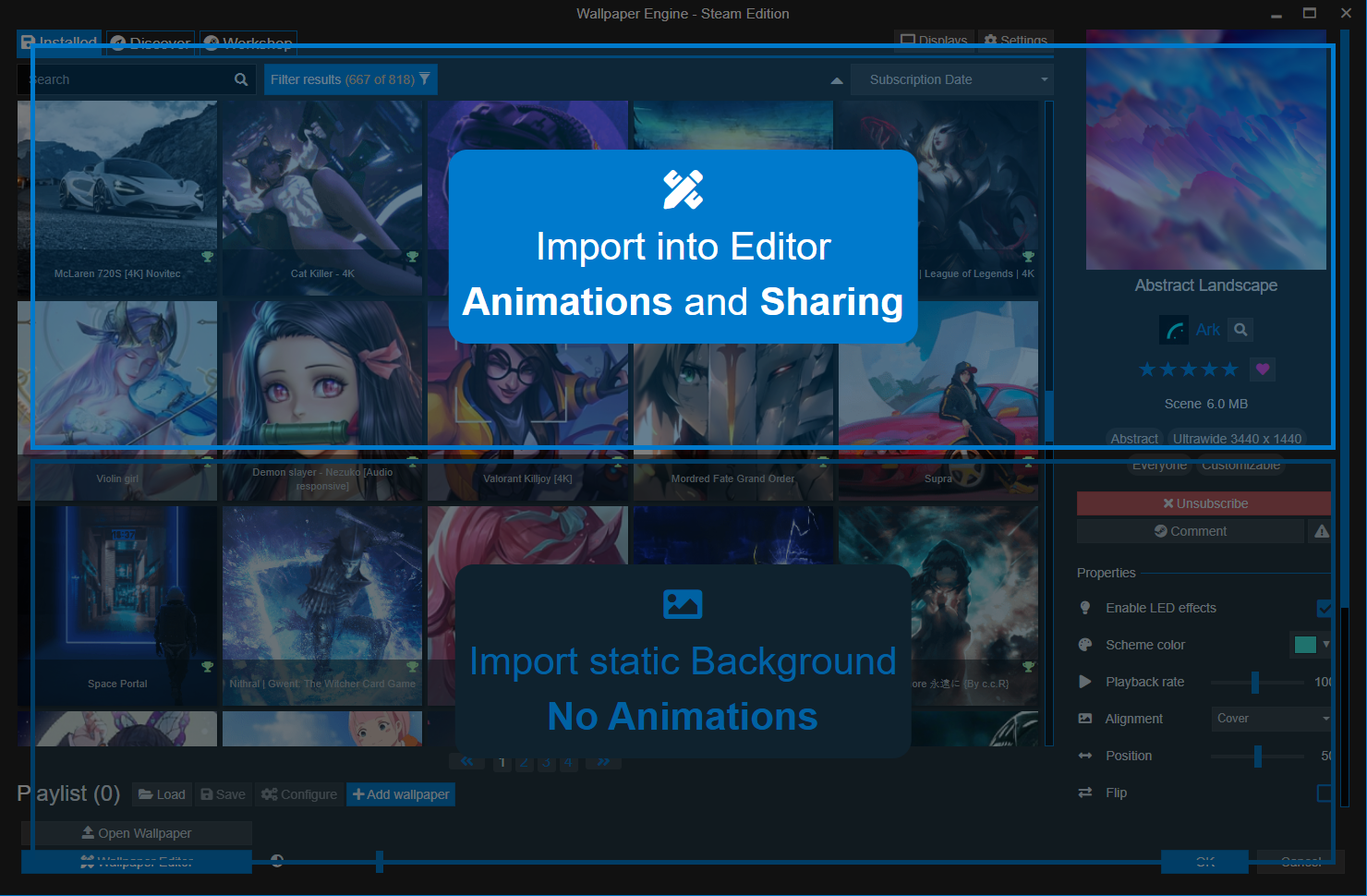
One feature that has been regularly requested by some users over the years is the ability to mass import images without adding animations to them. We have now added the ability to do this so that you can add your private image collection to your playlist without having to go through the Wallpaper Engine editor. Keep in mind that this is only possible for local image files, you cannot mass-publish static wallpapers on the Workshop. We never intended Wallpaper Engine to run images without animations but if you really want to, you can now incorporate private images into a playlist of yours, for example.
The easiest way this can be achieved is to dragging and dropping images into the Installed tab where you are now given the choice to open an image with the editor or to just add it to Wallpaper Engine in its original state.
New Brush User Interface
As part of some exciting upcoming new features in a future release, we have slightly improved the brush tools and given added preview of how changing each option changes the behavior of the brush. The changes highlight some of the lesser known brush features better, such as the different brush types on flow maps:
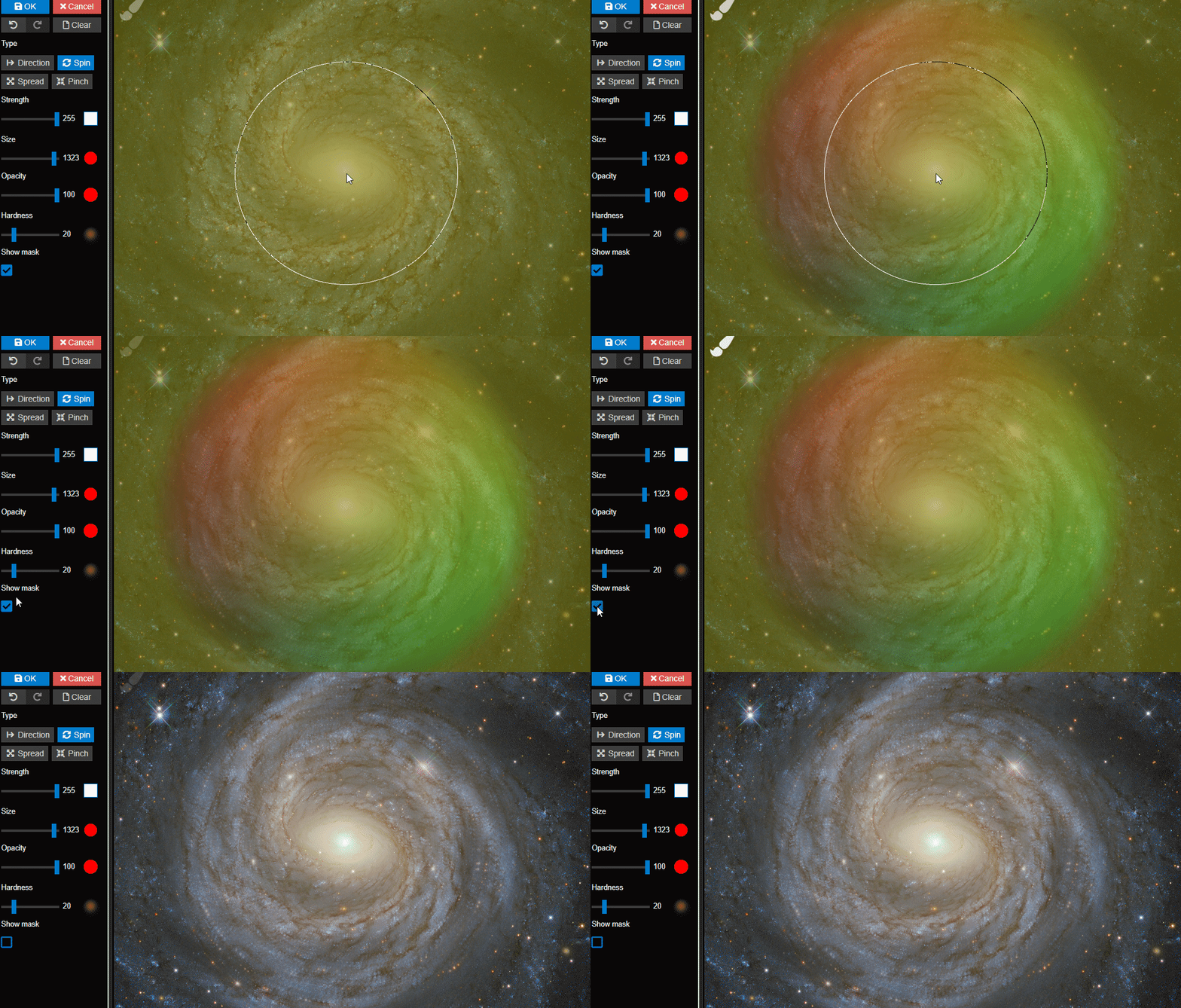
Using a spin type brush on a water flow map allows for circular movement to be created easily.
Full changelog
Additions / Changes
- Added possibility to mass-import static images.
- Added new brush types for flow maps in the editor.
- Added a 2 GB file size limit for video wallpapers published on the Workshop and 1 GB for all types besides videos.
Improvements
- Redesigned brush panel in the editor.
- Improved drag and drop user interface for new wallpapers.
- Added new labels for the Settings and Display settings buttons, removed redundant editor button.
- Redesigned "Open Wallpaper" button to account for new static wallpaper feature.
- Added video wallpaper validation to editor to prevent broken uploads.
- Crashes in Razer Synapse will now automatically disable the LED plugin when safe start is enabled.
Bug Fixes
- Fixed diagnostics tool not saving a log file.
- Fixed a rare decoding error with GIF files.
- Fixed user interface being broken for a very small number of users.
- Fixed particle instance properties disconnecting from editor on refresh.
- Fixed a bug in our "unofficial Steam re-download fixer tool" that caused it to not work for some users.
Support Notes
If you have any questions or issues with the update, please have a look at our help site as it covers the most common issues with application:
help.wallpaperengine.io
Should you run into any issues with the update or Wallpaper Engine in general, you can always write us on our Steam Discussion board and we'll gladly help you out. If you run into any issues or bugs, please post on our forums rather than commenting on the news as it's difficult to provide support in the news comment section.
Razer Synapse Crashes
The latest Razer Synapse update causes Wallpaper Engine to crash at startup when the high-priority startup option is enabled in the Wallpaper Engine settings. On some systems, it also causes crashes when the computer wakes up from hibernation. It is not an issue with your computer and technically not an issue in Wallpaper Engine. We have informed Razer about this and they are currently urgently working on a Razer Synapse fix which is to be expected to be released later this month.
For the time being, most users can fix it by disabling the high priority option for the automatic startup of Wallpaper Engine and instead rely on the normal priority startup only.
Alternatively, you can also disable the "iCUE and Chroma SDK" plugin in the Wallpaper Engine settings if the first attempt does not fix the issue for you.
You can try re-enabling it after the next Razer Synapse update.