Hello Resident Evil fans,
Thanks for your patience as we prepare the PC demo for Resident Evil 7 biohazard; it’s right around the corner! Just to let you know, the team has been working very hard behind the scenes spending extra care and love in optimizing the PC demo to ensure an awesome experience for our PC fans.
While we still have a couple more weeks to go before the PC demo release, we’d like to show you a glimpse of what you can expect under the graphics option menu.
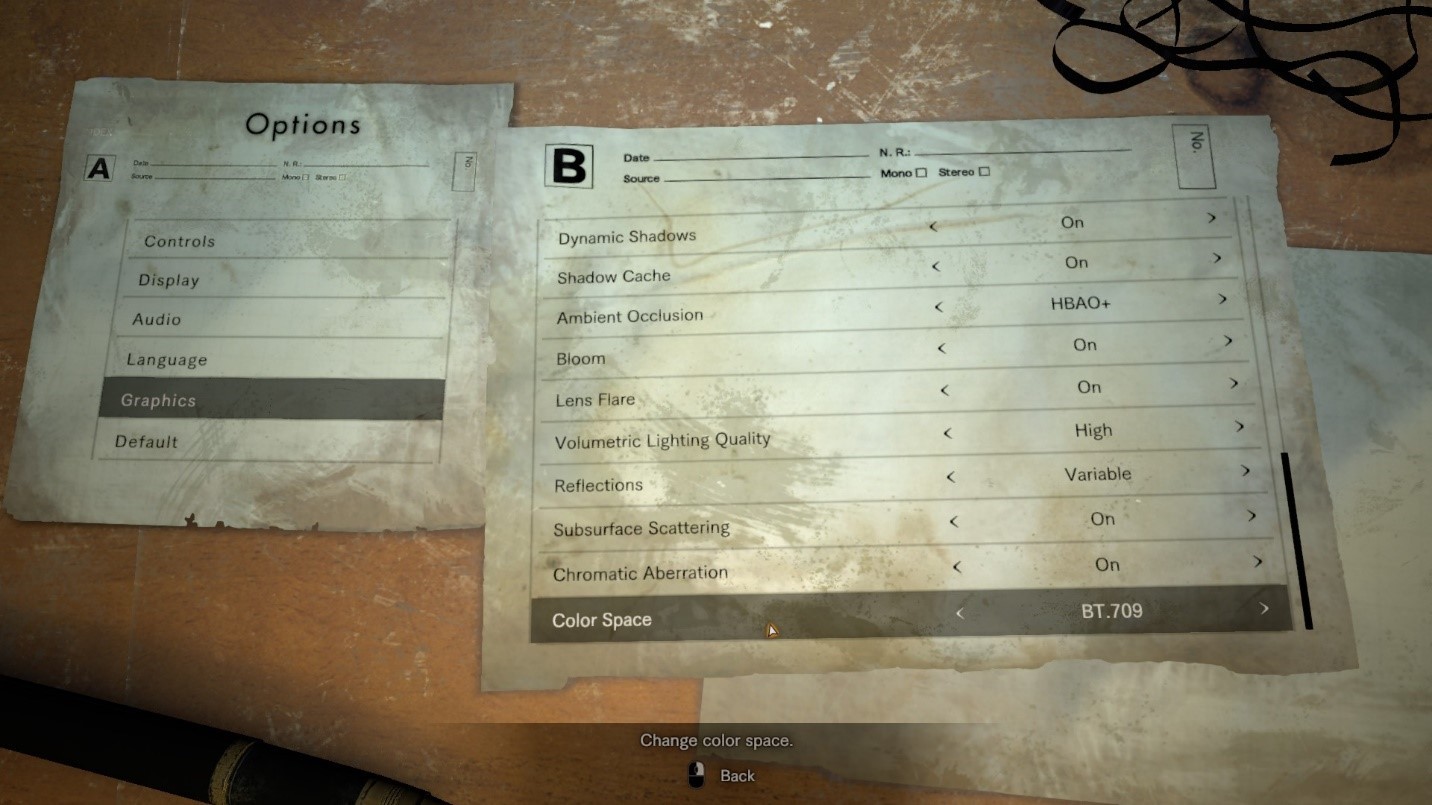
Graphics Options:
- Screen Resolution…self-explanatory here, but the game will list arbitrary resolutions supported by your monitor and Windows desktop environment.
- Refresh Rate…adjustable to frequencies supported by your monitor. Also supports 144Hz high refresh monitors including Nvidia G-Sync.
- Display Mode…Full screen, Windowed
,and Borderless Windowmodes are supported. (*Borderless Window mode removed from demo due to a last-minute bug. To be fixed and added in the final product.) - Field of View…FOV angle can be adjusted here
- Frame Rate…supports 30, 60, and Variable (uncapped)
- V-Sync…ON/OFF
- Rendering Method…Two options available - Normal and Interlaced
- Resolution Scaling…controls the game’s internal rendering resolution. This is akin to upscaling and downsampling of the final video output. Selectable option ranges from 0.5X to 2.0X. 1.0X is 100% 1:1 native output. The higher the number, the better the image quality and more GPU ‘oomph’ required, while lowering it below 1.0 makes the image softer (but also reduces GPU overhead and increases frame rate).
- Texture Quality…option ranges from Very Low to Very High. Higher quality requires additional local video memory.
- Texture Filtering…option ranges from Very Low to Very High. Internally, this is essentially your Trilinear to Anisotropic filter that goes all the way up to 16X.
- Mesh Quality…option ranges between Low to Very High. This option also affects Level-of-Detail (LOD) quality.
- Anti-Aliasing…Selectable options include FXAA, TAA, FXAA+TAA, and SMAA.
- Motion Blur…ON/OFF toggle
- Effects Rendering…Selectable between Low, Medium and High. This controls the intensity and density of certain visual effects.
- Depth of Field…ON/OFF toggle
- Shadow Quality…option ranges from Very Low to Very High.
- Dynamic Shadows…ON/OFF toggle
- Shadow Cache…ON/OFF toggle. When set to ON, shadows for static objects will be cached in video memory.
- Ambient Occlusion…Selectable options include OFF, SSAO (Variable), SSAO, and HBAO+.
- Bloom Effect…ON/OFF toggle
- Lens Flare…ON/OFF toggle
- Volumetric Lighting Quality…Selectable between OFF, Low, and High. This option controls intensity and quality of dynamic lighting including light shafts piercing through window panes and vents.
- Reflections…Selectable between ON, OFF, and Variable. Affects fidelity and quality of screen-space reflections.
- Subsurface Scattering…ON/OFF toggle
- Chromatic Aberration…ON/OFF toggle
- Color Space…Selectable between SRGB and BT.709
That’s all for now, but you can also look forward to other PC-specific customization options we haven’t covered here in the upcoming PC Demo launching on December 19th.
Resident Evil Team
More from Resident Evil 7 Biohazard
Other announcements
Resident Evil Veronica Store Page now open!Survive the deranged terror of Resident Evil Veronica, recently announced for release in 2027. Visit the store page to wishlist and follow for the latest news and updates!Survive the deranged terror of Resident Evil VeronicaSurvive the Deranged Terror Resident Evil Veronica is coming in 2027! This remake of the classic Resident Evil: Code Veronica, set three months after the Raccoon City Incident, preserves the essence of the original game, while introducing modernized gameplay, a reimagined storyline, and vividly detailed graphics. There will be more to unveil, but first enjoy the trailer and stay tuned for futur…Notice of Update DistributionNotice of Update Distribution The following updates have been made to Resident Evil 7 biohazard: - Verified compatibility with Windows 11 - Fixed an issue where, when the Steam language was set to Latin American Spanish, the game would launch with initial in-game language set to English. - Fixed an issue where only the display language would not return to its default setting when selecting “Def…