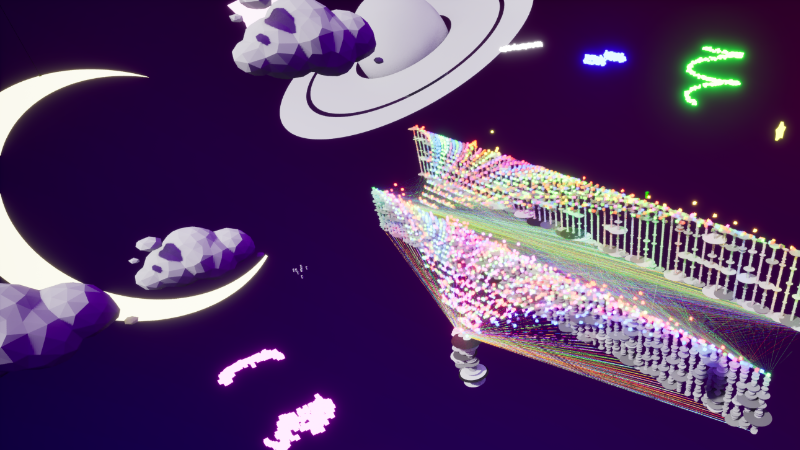
⛲️ The Neural Fountain is Live!! ⛲️
Point-cloud diffusion training — inside First-Person Data Explorer.
• Train on your own point clouds
• See which neurons respond to which shapes
• Step through training and watch reconstruction improve in real time
Point Cloud Diffusion Explorer
The Neural Fountain is a visualization of point-cloud diffusion training.
As the model trains, the explorer shows:
(1) how active each neuron is on average, and
(2) how strongly each neuron’s connections are being updated through backpropagation.
(3) how accurately the model reconstructs each shape at the current training step.
Importantly, activations and gradients are tracked separately for each shape
category in the dataset. This allows the fountain to display how the network
responds differently to each type of geometry during training.
What you’re seeing
• Activation Fountain (arching particles)
Each vertical bar and band of particles corresponds to one neuron in a layer.
The particle color intensity represents that neuron’s average activation strength
for the currently emphasized shape.
During training, each neuron produces an activation value for every point.
To keep the visualization readable, the explorer computes a per-shape,
per-neuron summary:
- group batch samples by shape label
- take the absolute value of each activation
- average across all points of that shape
- store one magnitude per neuron, per shape
These values are tracked independently for each shape category,
allowing you to see which neurons respond most strongly to different geometries
when switching between shape color mappings.
Particle colors correspond to the shape category selected in the UI.
• Gradient Strands (horizontal lines)
These represent learning pressure — how strongly the optimizer is pushing
each neuron’s connections to change for a specific shape.
Backpropagation produces gradients for every weight in the network.
Rendering each connection individually would be visually overwhelming,
so the explorer computes a per-shape summary:
- take the absolute gradient magnitudes
- aggregate them into a single magnitude per neuron
- store one gradient strength per neuron, per shape
Larger gradients indicate that a neuron is still being significantly adjusted
for that shape.
Smaller gradients suggest that portion of the network is stabilizing.
Strand colors also correspond to the selected shape mapping.
At the top of the fountain you will see the training shapes.
At the bottom you will see shapes undergoing a full diffusion reconstruction
using the current model weights.
As training progresses, later iterations should reconstruct more clearly
with lower reconstruction error.
NOTE: The explorer currently supports up to TWO hidden layers (plus one output layer).
-- SourceFile.csv Requirements --
NOTE: There are example data csv files in FPDE/Content/Data/Resources
The source file must be one stacked CSV where each row is a single 3D point:
CloudNumber, index, Shape, X, Y, Z
• CloudNumber: groups rows into separate point clouds
• index: point order within its cloud (recommended: 0..N-1 per CloudNumber)
• Shape: optional label used for per-shape views (recommended)
• X, Y, Z: point coordinates
Tip: You can generate custom SourceFile.csv datasets in any tool that exports CSV
(Python, Excel, Blender/Houdini exporters, etc.).
If using an LLM to help format a CSV, avoid uploading proprietary meshes or unreleased content.
-- Python Script Notes --
The training script was created with AI-assisted coding and is heavily commented.
Safest parameters to edit first are in train_numpy()
(epochs, batch_size, n_points, T, lr, hidden, time_dim, noise schedule).
Advanced edits (model architecture, logging format, extra layers)
may require Unreal-side reader/render changes as well.