Patch released - Creator's Update: Asset Sharing & UI Improvements (Build 1.2.6)
Wallpaper Engine · published
Hey everyone,
Wallpaper Engine 1.2 brings one of the biggest additions to application since its release by adding the sharing of wallpaper assets to the Wallpaper Engine Editor! The update also brings numerous user interface improvements and various other optimizations throughout the application.
Asset Sharing
This update introduces Asset Sharing in the Wallpaper Engine Editor which allows users to share custom effects and resources which can be used to create wallpapers! We consider this to be a complete game changer because it will now be possible for power users to easily share complex effects or other custom wallpaper elements with the rest of the community. Assets can be anything that can be placed into a layer, including SceneScript code and complete custom particle systems, but it also includes sound effects, image files or 3D models.
Browsing Assets
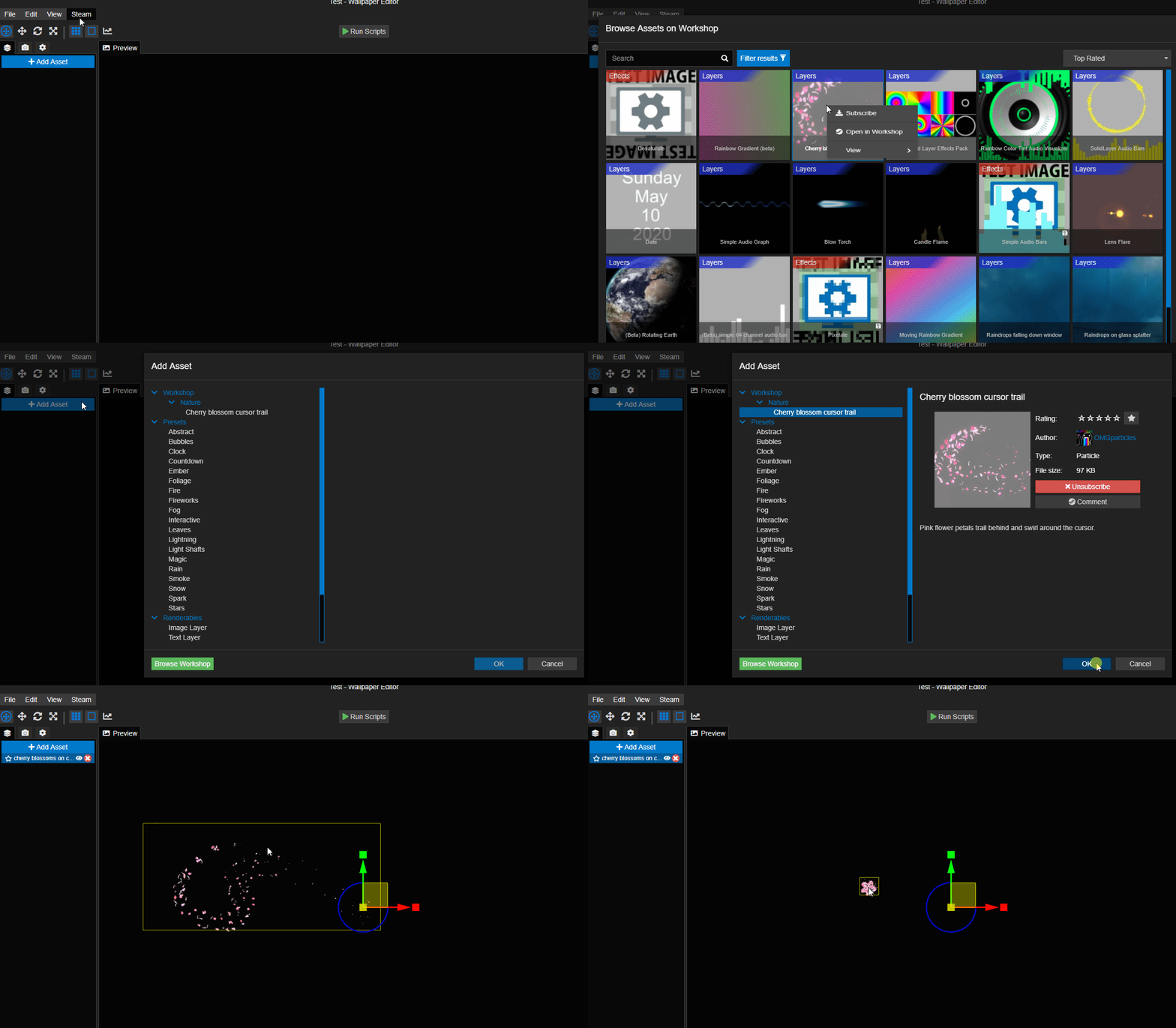
Inside of the Wallpaper Engine Editor, you will now be able to find an asset browser which lets you browse, subscribe and use assets similar to browsing wallpapers. You can find the Browse buttons through the "Steam" menu item in the editor or through the "Browse Workshop" buttons in the "Add asset" and "Add effects" lists:
Asset Packs
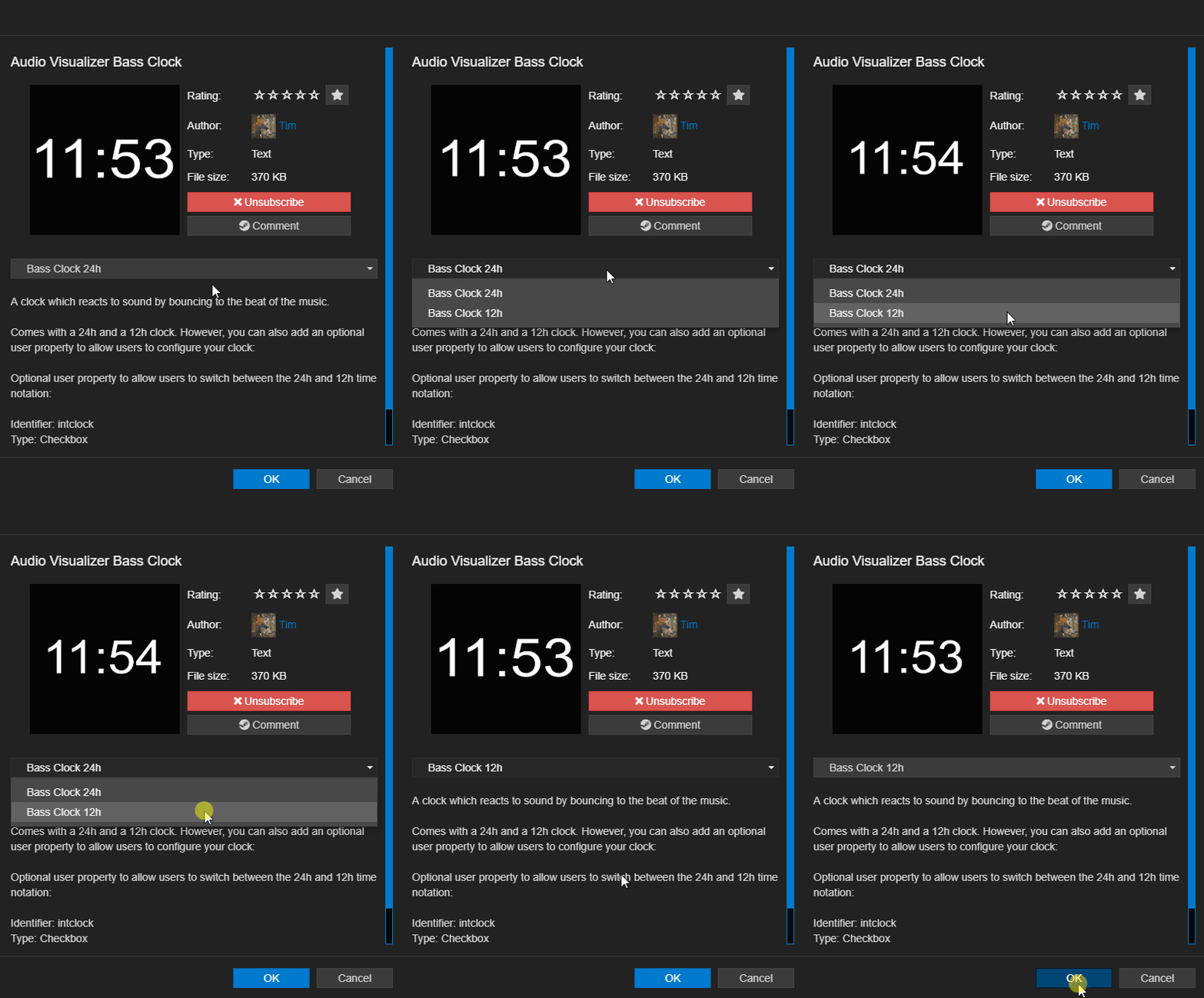
Just like existing assets, community assets can also contain variants of a specific element which we call asset packs. For creators who have subscribed to an item, this will appear like a drop-down in the asset list and allows them to make slight changes to a specific asset:
Asset Creator Mode
If you are interested in publishing your own assets, you first need to enable the asset creator mode via the "View" menu item in which you will now find the "Enable Asset Creation" option. We have added this extra step to ensure newcomers do not accidentally publish wallpapers as assets and to simplify the editor, as the asset creator mode adds a few new buttons in a few places.
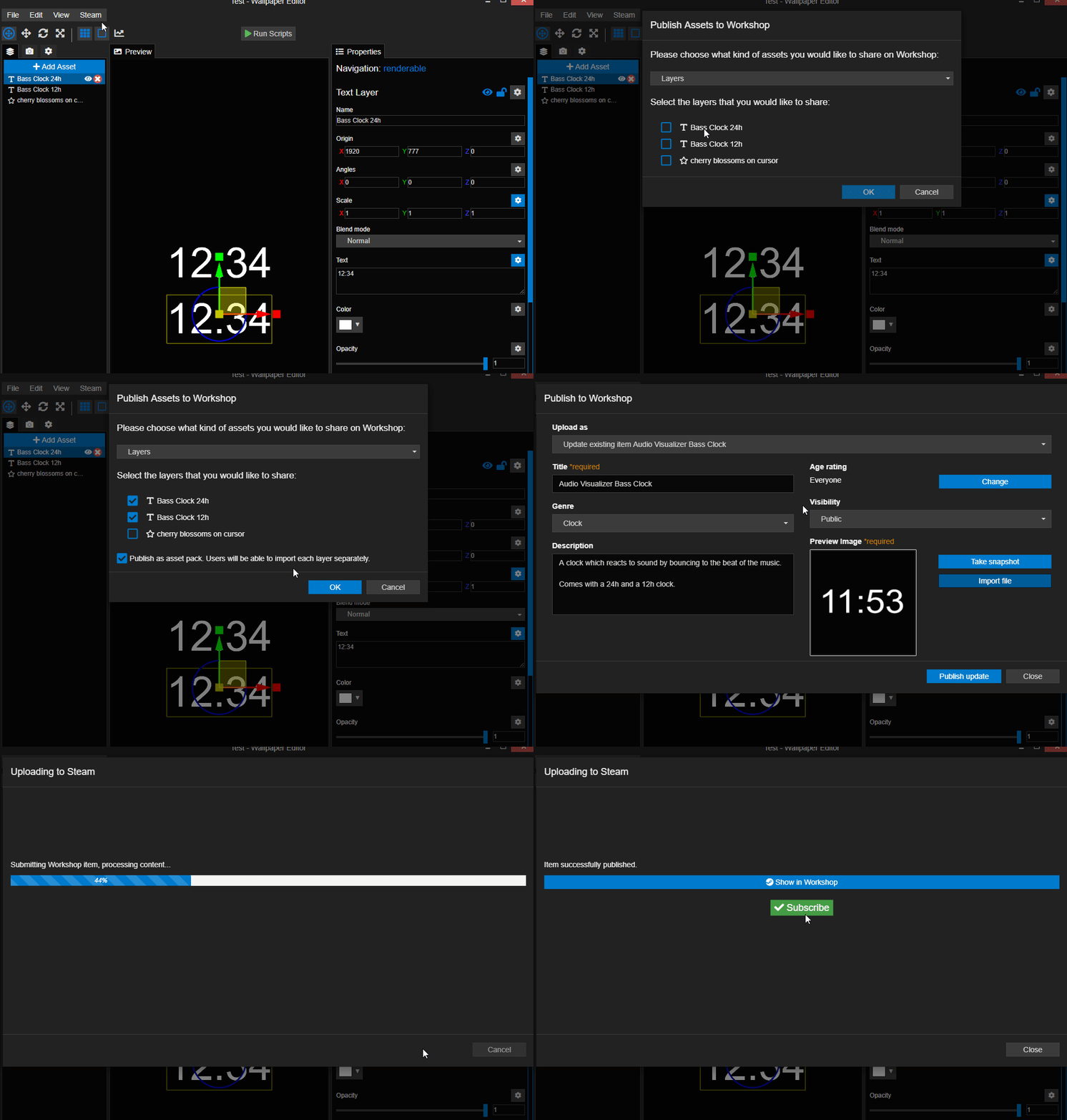
Publishing assets then becomes very easy, rather than clicking on the button to publish your wallpaper, you use the button to publish assets, then select the layers or effects you want to publish. If you select multiple elements, you are given the choice to either publish them as a pack (which allows users to choose between them) or to publish them as a whole so that all layers are always added at the same time.
Shader Editor
In the previous sections, we have talked about sharing custom effects. Effects are fundamentally different from other layers, as these are placed onto layers and up until now, it was not possible to actually create new effects in Wallpaper Engine. With this update, enabling the asset creation mode will create a "New" button in the effects list, allowing users to either create complete effects from scratch or use existing effects as a basis.
The creation of effects requires custom shader programming which only advanced users will be familiar with. However, it only takes a few power users to create something cool for the community which is why we have implemented this and Wallpaper Engine offers a great playground to get into shader programming.
- Click here to check out a beginner shader tutorial for Wallpaper Engine
- Click here to see the reference on shaders and custom effects in Wallpaper Engine
User Interface Improvements
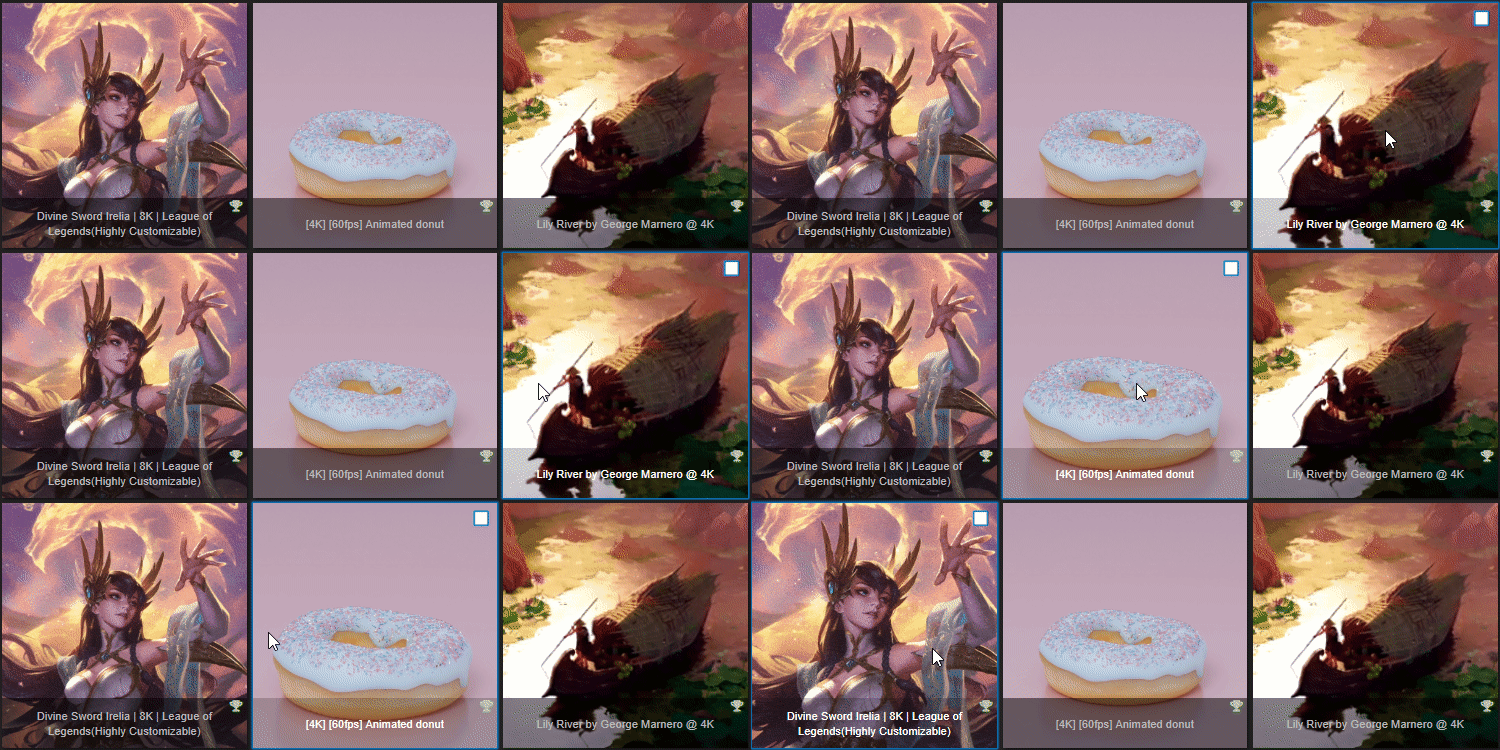
We have also taken some time and improved the Wallpaper Engine user interface. We have re-worked a lot of prominent buttons in the playlist area, the filter section and the wallpaper detail section to make them more easily understandable and give them a more unified look. The wallpaper gallery now also has a more modern hover effect and will zoom into the preview image and fade out the text to give you a clearer view at the preview image:
Video-playback improvements with DirectShow & LAV
We have made some changes to the ways videos are played with the Prefer DirectShow with LAV setting that many users are using for video wallpapers. The video image quality should now be improved on many systems which use DirectShow with LAV. We have also added the "WebM framework" option to the Wallpaper Engine settings which allows you to use .webm videos with hardware acceleration when setting the option to "Prefer Native". Visit our FAQ for more information on how to set this up if you are interested:
New FAQ & Future Documentation
We have launched a new FAQ website which contains detailed steps on how to resolved various Wallpaper Engine issues. The large majority of support requests we receive are about the same issues, so we're hoping that this makes it easier for users to solve any technical issues that arise. One of the problems we are also facing is that Chinese users cannot access the Steam Discussions which had been the previous location of our FAQ. The new website is reachable from mainland China and will be translated into all major Wallpaper Engine languages. The new FAQ can be found here:
help.wallpaperengine.io
In the future we would like to use a similar approach for a comprehensive guide for Wallpaper Engine creators. We already do have a Wiki and guides on Steam but these are hard to navigate and not easy to translate, with our website we will have much more control over how we structure these tutorials. Stay tuned for the new official Wallpaper Engine tutorial series in the near future!
Full changelog
- Added asset sharing functionality
- Added effect editing including HLSL support in editor
- Added optional auto-crop feature for layers with large transparent areas to improve wallpaper performance
- Improved DirectShow with LAV video wallpaper playback
- Re-worked many user interface elements
- Added "items per page" setting to browse window (right-click in the gallery -> View)
- Simplify clock code & create script properties feature to make it easy to choose between 12h / 24h
- Reports now require a comment
- Updated various help links to the new FAQ at help.wallpaperengine.io
- Changed how the user interface reports failed Steam wallpaper downloads
- Added a new "Safe start after hibernation" option which restarts Wallpaper Engine after hibernation, fixes rare graphics card driver crashes
- Translation updates
- New tutorial for combo boxes to toggle layers: Combo Box Tutorial
- Sorted folders by name in browser move menu.
- Added webm framework option to play webms with hardware acceleration.
- Added perspective renering to models in 2D scene wallpapers.
- Fixed audio processing not starting when a script is added that uses it.
- Added script variables to make it easier to tweak existing scripts.
- Added 'solid' layer type for scene wallpapers which is a blank rectangle with custom color and opacity.
- Added easier to access color and opacity option to all image layers.
- Added log clear/auto scroll and auto clear buttons to script log.
- Added image layer alignment options.
- Added 'save as' function to editor.
- Disabled editor input while a project is loading to avoid breaking project files.
- Fixed paint mask not showing up on mirrored image layers.
- Added a custom tool to fix Steam when Steam decides that it wants to re-download everything from Workshop: help.wallpaperengine.io/steam/redownload
Follow-up Patch Build 1.2.18
- Fixed 'audio responsive' and 'other resolution' tag not working in installed tab.
- Fixed re-published script assets not working because workshopid is getting added more than once.
- Fixed default values of properties not sticking when a new script is compiled and bound to the same property.
- Fixed user properties not being applied to snapshot window.
- Fixed snapshot window crash.
- Fixed layers of asset packs being centered relative to position of all layers.
- Added alphabetical sorting to workshop asset groups.
- Fixed an editor crash on undo/redo.
Unresolved third-party issues
There are currently two known issues:
- In the last month, we have received an increasing amount of reports of stuck wallpaper downloads. After investigating the matter with the Steam team, they have published a fix for this problem on the latest Steam beta version. If your Wallpaper Engine downloads get stuck, please switch to the Steam beta, you can follow the official Steam beta guide on how to enable the Steam beta.
- The BattlEye anti-cheat terminates Wallpaper Engine when Nvidia's low-latency mode is enabled globally. On some systems, this does not seem to be easily fixable, you should contact BattlEye support directly, because they are not responsive towards us at all.