If your game crashes on startup and you use Avast, there are a couple of things you could do to fix this:
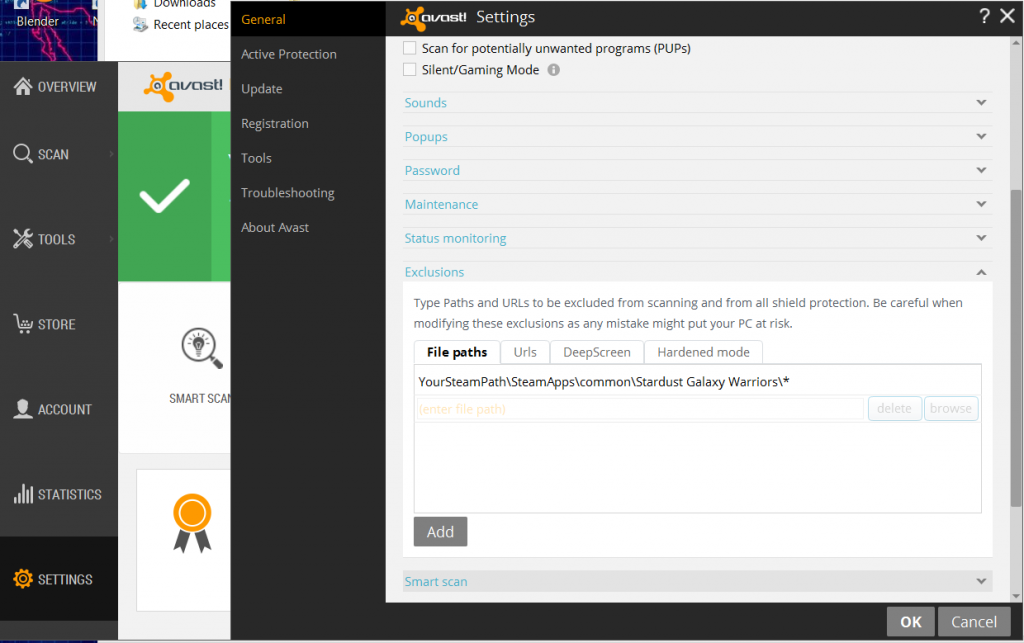
1. Make an exception to Avast allowing Stardust Galaxy Warriors to run.
- Open Avast control panel
- Select Settings > Exeptions
- Browse to the SGW install folder ("YourSteamPath"\SteamApps\common\Stardust Galaxy Warriors\*)
- Press Add
2. If the first one does not work for some reason, this should work:
Disable Avast for a short period of time and launch the game during that time. You can then enable Avast again after the game has launched and the game should work.
If you cannot get it to work with these two steps please check out our support forums here http://vasaraentertainment.com/forums/forum/stardust-galaxy-warriors/support/ and/or send a message to supportstardustgalaxywarriorscom.