Dear Users,
We would like to thank everyone's support towards "A-Train: All Aboard! Tourism."
We have heard all the suggestions from everyone, and we would like to share the information on what will be updated in the coming weeks.
The contents of the update will be as follows.
★ Settings can be changed right from the start of the game
・System settings will be added to the title screen.
・You will be able to access the system settings from the beginning of the tutorial.
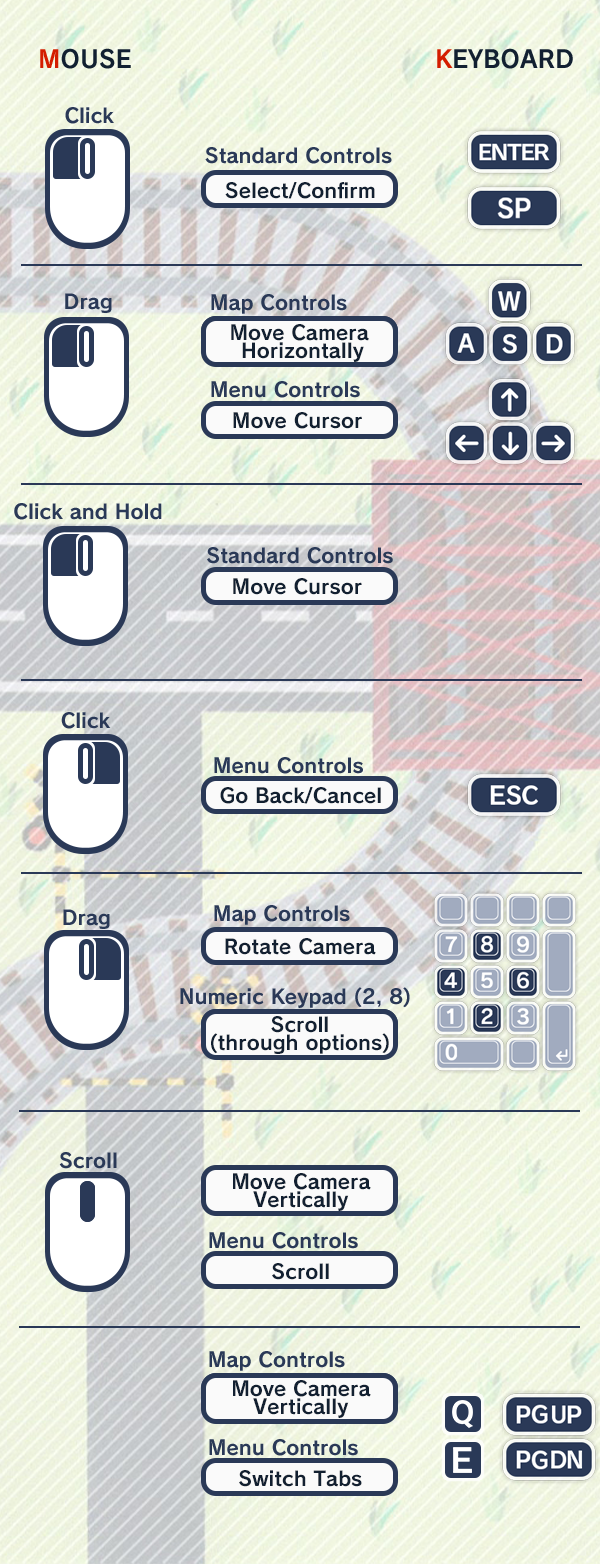
★Operability improvement of the mouse
・Changed "long press to decide" to "one-click to decide" (press the left mouse button and release it without moving between the press and the long press).
・Expanded the setting range of the system's long-press time (10-150%).
・Track and road laying: Go back one by right-click during laying the roads.
・Line and road laying: After laying a slope, you can continue laying the roads by clicking on the map.
About Convenience Controls
Here are some useful operation tips to improve your playing experience.
・Convenient movement
Click where you want to move on the mini-map: teleportation
LT button + left stick: move with double speed
・When you want to return to the main screen immediately while operating in a menu:
Press and hold the right mouse button.
Press and hold the Esc key.
Press and hold the B button.
Press and hold the Back button at the top left of the game screen.
・Display of two or three rows of the main menu:
Drag/swipe the icon menu to the left.
Move the cursor to the menu and press the left key/button.
・Hide UI in the main screen:
Right click + wheel button
BackSpace key
Back button
・Fast forward and rewind conversations:
Click the fast forward and rewind buttons on the lower left
RT button, LT button
・Open "Help" for basic operations and detailed instructions:
Click on the book icon in the upper right corner of the game screen
Menu button
H key
i.e. "Help" Operation Explanation > Mouse & Keyboard
We are keen to provide the best "A-Train: All Aboard! Tourism" to you, so if you have any other feedback, please let us know.
Cheers,
Degica Games team