Thank you for playing Mahjong Soul on Steam!
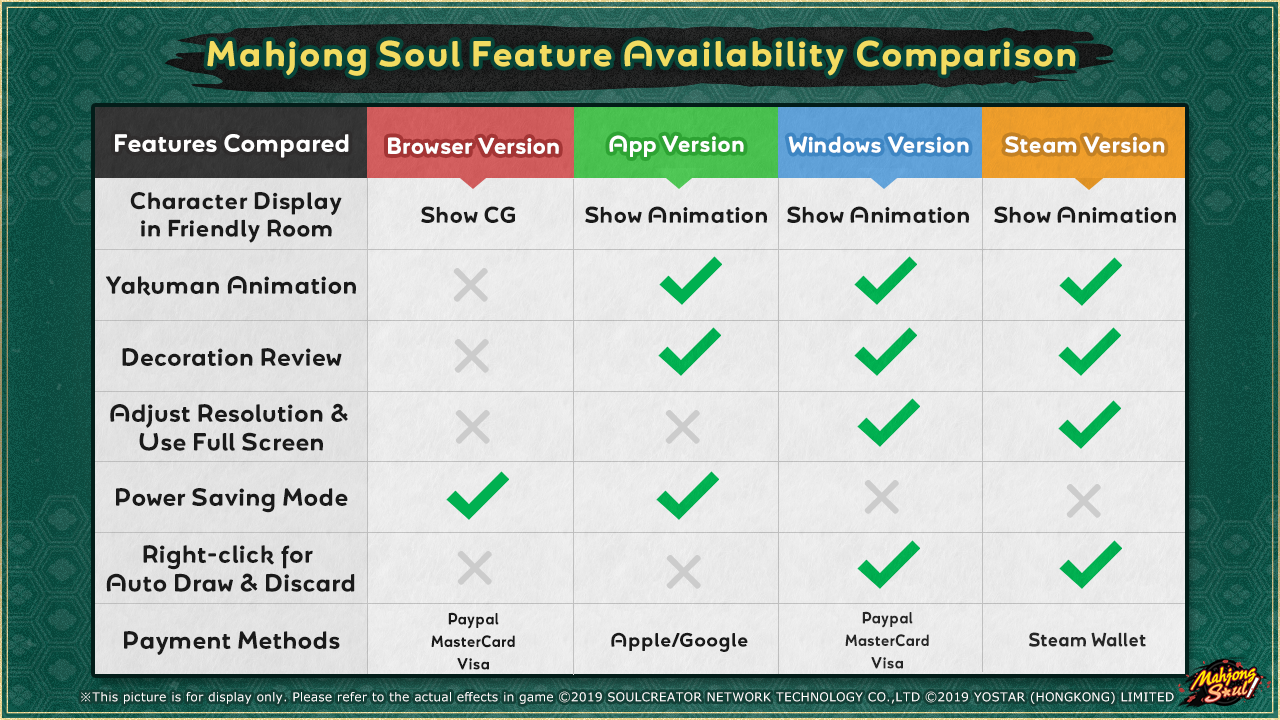
Version Differences & Payment Methods
Common Questions
1. Q: Can I play with my Mahjong Soul account from other platforms (iOS/Android/Browser/Windows Client) on the Steam version of Mahjong Soul?
A: Yes, you can play with your game account from other platforms on the Steam version of Mahjong Soul. Account data (such as rank, characters, skins, etc.) and progress will be synchronized.
2. Q: What login methods are supported for the Steam version of Mahjong Soul?
A: The Steam version of Mahjong Soul currently supports logging in with Yostar (email), Facebook, Apple ID and Google accounts.
If you use a Yostar (email), Facebook, Apple ID or Google account for login, please click on the corresponding icon on the login screen to log in.
* if you use X (Twitter) for login, you can open the Mahjong Soul game on your device and go to Settings > Others > Account Settings to link an email. Then, use that email to log into Mahjong Soul on Steam.
3. Does the Steam version of Mahjong Soul support macOS?
A: Mahjong Soul does not currently support Mac OS. Mac users can play Mahjong Soul via the Browser version.
4. Q: Can I use Jade and Outfit Vouchers obtained on other platforms (iOS/Android/Browser/Windows Client) in the Steam version of Mahjong Soul?
A: The Steam version shares paid Jade/Outfit Vouchers with the Browser and Windows Client version, but not with Android or iOS. However, free Jade/Outfit Vouchers are shared across all platforms.
5. Q: Can players on the Steam version of Mahjong Soul play together with players from other platforms (iOS/Android/Browser/Windows Client)?
A: Yes, they can all play together.
6. Q: I'm a beginner at Riichi Mahjong / I want to introduce Mahjong Soul to my friends. Where can I learn how to play Riichi Mahjong?
A: You can check in-game guide by clicking the "?" icon on the main screen. Or check the official guide "Mahjong Soul Classroom" on the Guides page at Steam
For more questions, please contact us: [email protected]