Picture Questions OUT NOW for ALL! 🖼️ + Workshop Question Pack Ratings! 📊
Trivia Tricks · published

Hello everyone!
Today we have released Workshop V2 to everyone! We'd like to thank everyone who took part in the Beta for helping us check its stability and squash a few bugs.
If you need a reminder of what new features are possible with Workshop V2 then here's a quick run down:

You can now use images when creating questions! This feature massively expands the possibilities for creating questions! Whether it's as simple as naming an actor or solving a complex mathematical formula, the possibilities have been expanded significantly!

Adding an Answer Explanation after the correct answer is revealed is a great way to give greater context to why players may have been tripped up. You can also use this section for sharing interesting facts or force people to read an awful pun!
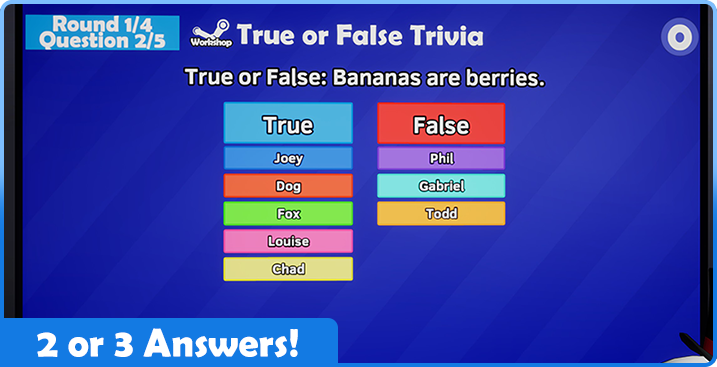
By allowing questions to contain less than 4 answers you now have the possibility to create True or False style questions. Having fewer options can make a question easier or harder! It's also handy if you can't quite think of 4 answers.

Another feature coming with this update is Workshop Ratings! The community review score of packs has been made visible to help players find great Workshop packs to play with. If a pack has received 5 or more ratings then its review score is now displayed in-game. If a pack has a positive rating of 85% or higher then it will gain a larger symbol! You can also see the like-to-dislike ratio when browsing Workshop packs in the Categories Menu. This feature should connect players with great question packs and help creators with discoverability.
If your pack is not quite where you'd like it to be ratings-wise then we've got you covered. Since we've written a ton of base game questions, we’ve learned a thing or two about writing quality trivia! To help boost your ratings we've written this handy Steam guide with tips and tricks for creating engaging questions. Check out the guide here!

Lastly, we've made some UI changes to the lobby menu. Switching between game modes has now been changed to buttons. Hopefully this makes it a bit more obvious you can change the game mode to Co-Op! Clients can also click on these buttons to let the lobby host know you'd like to switch game mode.

Similarly, did you know clients can click on categories to request the host to turn them on or off? If clients do this now then the category background will change colors to help the host keep track of which categories players want to adjust!
Once again, thank you to everyone who took part in the Beta to help get this feature up and running! We hope you enjoy the massively expanded Workshop and can't wait to see what creative packs you’re all cooking up!
Here's a full run down of changes:

- It is now possible to view the community review score of Workshop packs within Trivia Tricks!
- Packs that have a rating of 85% or above are marked with a larger icon.
- The community review score of a pack will not be displayed until it has at least 5 ratings.
- The number of questions from a pack that are required to have been seen before being prompted to rate it has been lowered from 10 to 5.

- When clients suggest a pack to turn on/off in the Categories Menu, the selected category will now change color.
- The method in which players change game modes between Standard and Co-Op now uses buttons instead.
- Clients can now request what game mode they would like to play in a similar fashion to how they can suggest categories.
- The "Most Likes" option in the Workshop Browse Menu has been removed. As this option would sort by total “like” count we felt this would cause confusion with the shown review percentage.
- Added the option to filter the Workshop Browse menu to the last 2 weeks of activity. This has also been set as the default, as opposed to 1 week.
- Fixed a bug where the Bits that were thrown by Twitch characters wouldn't despawn correctly.
- Fixed an issue where players could request to play locked categories.
- Fixed an issue where the error messages for Picture Questions would sometimes flicker.
- Fixed a bug where players could suggest Workshop categories during Vs Boss Mode.
- Fixed a bug where, if the Categories Menu failed to search for Workshop packs, players would have to leave and recreate the lobby to try the search again.
Thank you for all your feedback during the beta! Like what we’re doing? Hit the thumbs up below this news post! Have more detailed thoughts? Consider leaving a Steam Review letting us know what you think. Have a great idea you want to see implemented? Come chat with us devs in the Official Discord! Thank you for following Trivia Tricks!