Major update
You Asked, We Listened - Some Long-Awaited Updates!
MediBang Paint for Desktop · published
Gradient Maps
We have heard MediBang Artists asking for this feature and worked hard this year to make it happen ✨ Now you can enjoy experimenting with 20 lovingly created gradient presets, and also make your own using MediBang Paint for Steam's exclusive new Gradient Map tool 😍
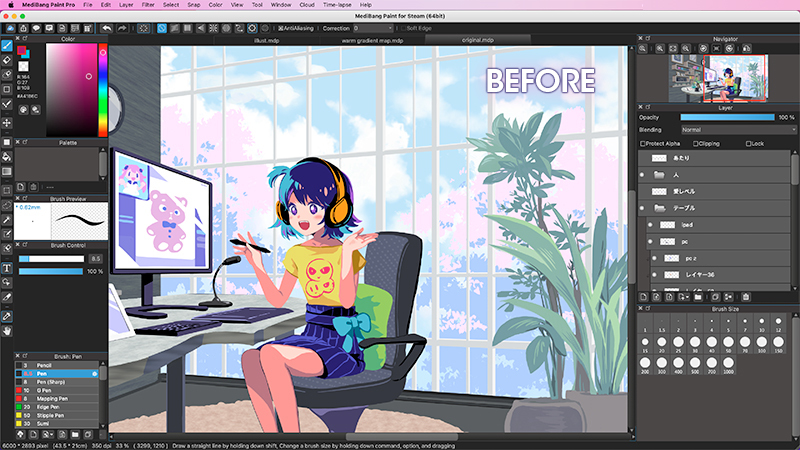
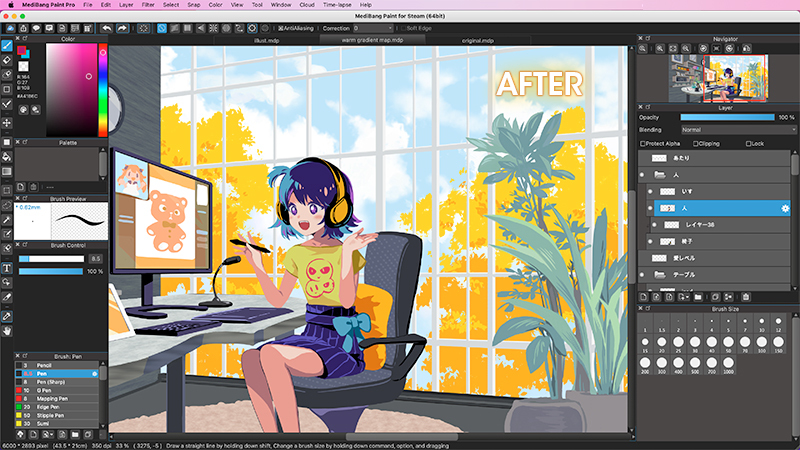
- To customize the colors in a new gradient map, just single click on the anchor points to change the color, or adjust the gradient further by double clicking to create a new anchor point.
- Or, if you would rather customize the preset gradient maps, that's also easy in this new update. Drag the hue bar or type in a number between 0 and 360 to change the hue of the selected gradient however you want before saving it to use for next time. 🌈
- The Gradient Map tool also allows you to control the blend mode of the layer it's applied to, with all of MediBang Paint's standard blend modes available to use!
- This tool comes in handy not only for changing the entire color schemes of an illustration, but also fine details. If you want to change the color scheme for just one part of your selected layer, use any of the selection tool (MagicWand works best for this) and open the Gradient Map tool from the Filter tab to adjust the colors as needed. 🪄

Onion Skin Mode (with new export options!)
We also know MediBang users have been clamoring for some animation tools, so we added Onion Skinning to the program!
For those of you who aren't familiar with the term, Onion Skinning is a 2D animation technique used when animating to see several frames at once. It's the best way to ensure that your animation is smoothly lined up while working. "Onion Skinning" gets its name from the vegetable of the same name, since both Onion Skin layers and the vegetable peels are both semi-transparent! 🧅

- You can activate this new feature from the View tab in the Menu. When Onion Skin Mode is activated, you will be able to see other layers highlighted in different colors while drawing on your active layer.
- Add a new layer to draw a new frame while observing the layer below, and just repeat until you're finished animating.
- You can preview your animation as a GIF with "autoplay" from the View tab.
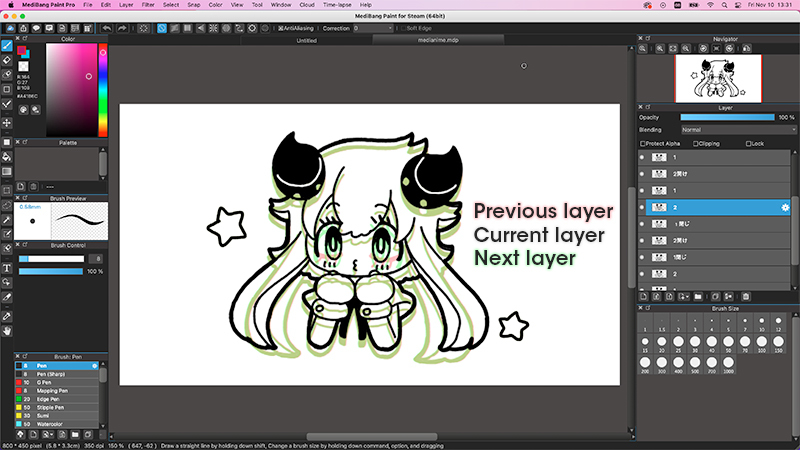
- With Onion Skin Mode activated, you can then export your layers into a sequence of PNG images from the Files tab. We recommend this format for artists who want to create animated GIFs perfect for online use. 🎞
- Or select Export Layers (MP4) from the Files tap to export your animation to a video that you can easily upload anywhere you'd like! 📹
We here at MediBang Inc. truly appreciate our artist's patience as we work to bring you a better version of our software.
From now until December 5th you can get MediBang Paint for Steam for $49.99, take this chance to join the MediBang Artist community today!
https://store.steampowered.com/app/2485190/MediBang_Paint_for_Steam/
More from MediBang Paint for Desktop
Other announcements
v32.7- Improved the ability to cancel trimming. - Fixed a bug where layer data was lost when saving with unconfirmed transformations. - Fixed a bug that could cause crashes on the cloud brush screen. - Improved the display layout for long team names. - Fixed an issue where language selection could not be done while the canvas was open (restarting after selection will reflect the changes).Create More Freely This Summer.🎨 The MediBang Paint for Desktop Summer Sale is here! Now only $34.99 (regular price $49.99, 30% OFF). A full-featured, one-time purchase painting software packed with powerful tools, including a wide variety of brushes, materials, and Gradient Maps. Perfect for illustrations and manga creation alike. If you've been looking for an affordable way to build a comfortable PC drawing environment, n…v32.5- If ""Enable anti-aliasing on startup"" in the settings screen is OFF, the app will now restore the anti-aliasing ON/OFF state from the last time the app was closed when it is launched. - Fixed a bug that occasionally prevented batch export of comics from working correctly.