Backup the savedata before May 8, Volcano Princess Patch Note V1.00.14
Volcano Princess · published
Hello everyone, as the game's savedata system still needs some time to debug and adapt, we decided to shut down the game's Steam Cloud function on May 8. If you are playing the game in multiple computers, please backup the savedata.
Savedata path: Press Win+R, type AppData and press Enter
enter \LocalLow\EggHatcher\VolcanoPrincess
All the files under this folder are savedata.
We will continue to fix existing problems and discuss and modify the extensive feedback and suggestions from everyone. Thank you for your support and patience!
Please shut down the Steam Cloud of Volcano Princess Because of a bug that may break the savedata .
The devs are still looking for a way to fix it, for now PLEASE MAKE SURE to follow these step before you start the game:
【BUT if you already started game and the savedata runs well, please only refer to Step2 to turn off the Steam Cloud!】
1. Uninstall the DEMO version (if any)
2. Turn off the Steam Cloud function
Library => right click Volcano Princess => Properties => General => Cancel the 3rd tick (cloud archive)
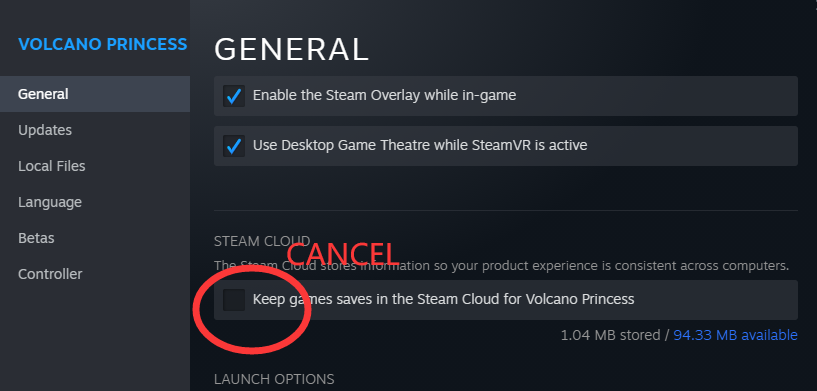
3. DELETE EVERYTHING in this folder before you start a new game:
【SYSTEM DISK】\Users【Your Windows Username】\AppData\LocalLow\EggHatcher\VolcanoPrincess
(or copy this to the address line and press enter: %APPDATA%\..\LocalLow\EggHatcher\VolcanoPrincess)
4. Start the game.
v.1.00.14
New features:
- Added key to accelerate dialogue function.
- Add the space bar to enter the next sentence dialogue function.
- New identifier: When selecting the ending, the already unlocked ending will have a special identifier to avoid entering duplicate ending disagreements.
Bug fix:
- Fixed an issue with blank images displaying incorrectly in the Benson CG album of the collection
The following bugs are still under locating:
*Exploration ending interface freeze, the level of adventure may stuck.
*Savedata system re-construction
Thank you support! If you meet any bugs, please submit a Gle Form. And welcome to our Discord!