Patch released - New Iris Effect, Resolution Preferences & More (Build 1.5.2)
Wallpaper Engine · published
Hey everyone, today we're releasing Wallpaper Engine 1.5. With this update we are introducing some important changes to how resolution tags are handled and we're bringing a brand new effect to the wallpaper editor. Aside from that, we have made various minor improvements to the app and ironed out a few bugs.
New Effect: Iris Movement
We have created a new effect called Iris Movement, which allows wallpaper creators to create realistic eye movements with relative ease. Multiple effects can also be stacked to create synchronized eye and head movements, such as shown in the example below:
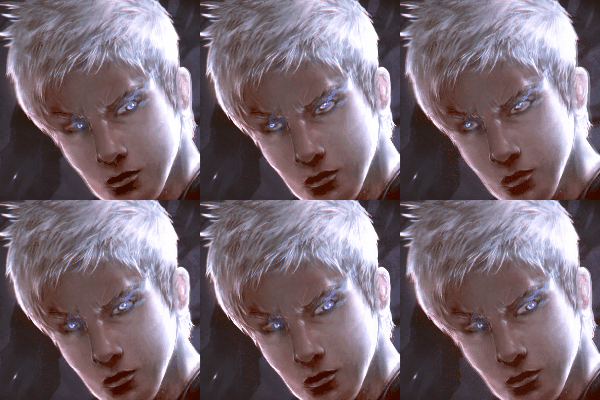
A similar effect was already possible to achieve with the use of tweaked versions of the Shake effect, however, this new effect simplifies the process significantly and makes this type of effect much more easy to use for casual users.
Detailed documentation and a quick-start guide on how to achieve the effect as shown in the preview image above can be found on our designer documentation website.
Wallpaper Resolution Recommendations
This update also contains some significant changes on how we handle resolutions on new projects and a new resolution suggestion feature.
Automatic Image Resizing and Cropping
When importing a new image into the editor that does not match any real screen resolution, Wallpaper Engine will now automatically suggest to crop and resize the image for you to the optimal resolution. Overly large images have a negative impact on the performance of wallpapers and they are tagged as Other Resolution which is not particularly helpful when looking for wallpapers.
This feature especially useful and convenient for casual and new users of the app who are more likely to import images with resolutions that do not match any real resolutions For example, if importing an image with a resolution of 6000 x 4000 pixels will cause Wallpaper Engine to suggest to resize it to 3840x2160 which is what is commonly found on many 4K UHD displays. This ensures the wallpaper is tagged properly and can also significantly improve performance.

On an image sized 1920 x 1285, Wallpaper Engine will not suggest to crop it to Full HD.
This update also introduces a new Editor Settings menu where you can disable the automatic resizing of wallpaper images if you are regularly importing larger images on purpose (for example, for parallax effects or similar). The new editor settings also offer a way to turn off autosaving for most actions if you just quickly want to test something in the editor.
New Dynamic Resolution Tag
Some wallpaper types such as 3D scenes, web and application wallpapers tend to dynamically scale on any resolution. Previously they have been categorized as Other resolution which meant they would be grouped together with improperly sized wallpapers. To differentiate these wallpapers better, we are now introducing a dynamic resolution tag that is enabled by default. In the near future, we will automatically change the tags on all relevant wallpapers from our end. However, in the long run this will be a significant improvement to the resolution tags and make it easier to find high-quality submissions that scale well across all screen resolutions.
Automatic Resolution Filter Suggestions
Another feature we have added is a new automatic resolution filter suggestion. In the Resolution filter section, you will now find a new button that opens a new Resolution Settings menu. When enabling the Recommended option, Wallpaper Engine will automatically select and store resolutions that make sense for your screen setup.
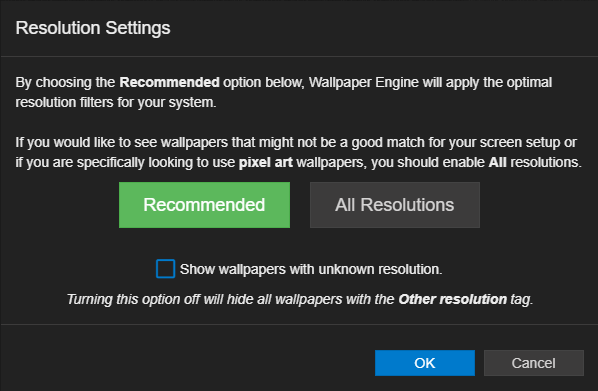
We hope this feature will make it easier to find wallpapers that match a specific screen setup. We found that many users tend to only set the exact resolution of their screen in the resolution settings while it may make sense to slightly expand this list. For example, a 2560x1440 screen will usually also work really well with 3440x1440 wallpapers, so it makes sense to enable both options in these cases. We built a large list of sensible resolution recommendations so that you can turn them on at the click of a button. Of course all of this is optional, you can ignore this feature entirely and stay in full control over your filter settings just like before if you wish to do so.
Other than that, we have improved various little things around the app, such as the restructured settings menu, a new ultra quality performance preset and the ability to select a source display when using the display clone functionality:
Full changelog
Additions / Changes
- Added new eye movement effect for animating the iris of a character.
- Added automatic crop & resize when importing an image for a new scene wallpaper.
- Added editor options menu to allow disabling auto saving and automatic image resizing.
- Added new resolution tag options and grouping.
- Redesigned the advanced material settings button on individual layers.
- Added new dynamic resolution tag for 3D and web wallpapers.
- Added new UI quality/performance options to disable GIFs to improve performance.
- Made wallpaper settings copy between monitors when the copy/swap menu is used.
- Restructured the Wallpaper Engine settings to make them easier to navigate.
- Added support for Workshop presets on scene wallpapers.
- Added preview image option to general project settings and improved refreshing behavior of preview image.
- Improved menu for property bindings to separate removal of scripts, animations and user properties better.
- Added keyframe update button when auto keying is disabled.
- Added hotkeys to toggle auto-keying in timeline animations.
- Added option to specify source display for wallpaper cloning across multiple screens.
- Added copy wallpaper URL button to browser.
- Added ultra quality preset with post-processing set to ultra and FPS set to 30 by default.
- Added new config backup system that keeps backups of the config for the last 7 days of use.
- Added more hotkeys to change the brush size, hardness and opacity on the fly.
- Added brush hotkey preview to easily see the hardness and opacity while changing it with the hotkeys.
- Made brush sizes editable and changed brush size restriction to 9999 when editing or using hotkeys.
- Added rotation controls for X and Y axes to puppet warp animation gizmo.
- Updated various libraries used by Wallpaper Engine to improve performance and stability.
- Added Farsi language, community translated by Behnam Ka, thank you!
Bug Fixes
- Fixed cursor DPI scaling when windows are dragged between screens of different DPI.
- Fixed cursor flickering when it's changed to pointer or text cursor.
- Fixed script properties on certain object properties not saving correctly.
- Fixed audio processing flag in wallpapers not being saved correctly.
- Fixed bone z ordering not always working correctly.
- Fixed sound playback in scene wallpapers not stopping or playing correctly when controlled from scripts in certain situations.
- Fixed animation panel popping up in the center if log and assets window were closed before.
- Fixed high memory consumption when particle systems are used that spawn thousands of child system objects each frame.
- Fixed crash when puppets are used with too many bones and effects on the same layer.
- Fixed fonts not being uploaded when engine.registerAsset is used.
- Fixed font import not showing .otf files.
- Fixed particle instance control points not being deleted when control point is changed to follow the cursor instead of using a fixed position.
- Fixed various languages never being pre-selected as default language during the initial setup screen.
Hotfix 1.5.42 Changelog
- Fixed color options resetting on video wallpapers.
- Fixed failing preset publishing for wallpapers tagged with "dynamic resolution".
- Added notification system for Steam server downtimes.
- Added missing translations, especially for certain Steam errors.
Support Notes
If you have any questions or issues with the update, please have a look at our help site as it covers the most common issues with application: