DIY Discovery! Nom Nom Galaxy Update Ver. 1.04
Nom Nom Galaxy - Original Soundtrack · published
Astroworkers, we have returned! Today’s update includes the ability to make and play on custom planets, a feature requested by many! Yes, you can now design your own stages to share with friends! Here we’ll explain the steps necessary to carve out your own section of the galaxy.
Basics
To create a custom planet:
1) Open the custom planets folder located within your Nom Nom Galaxy folder (Steam\steamapps\common\NomNomGalaxy\custom_planets)
2) Create a new folder here for your custom planet. Folder names can include standard alphanumeric characters as well as spaces, hyphens (-), underscores (_), and the pound sign (#).

3) The custom planets folder contains a file named NomNomGalaxy_palette.pdf which shows what pixel colors correspond to what map features.

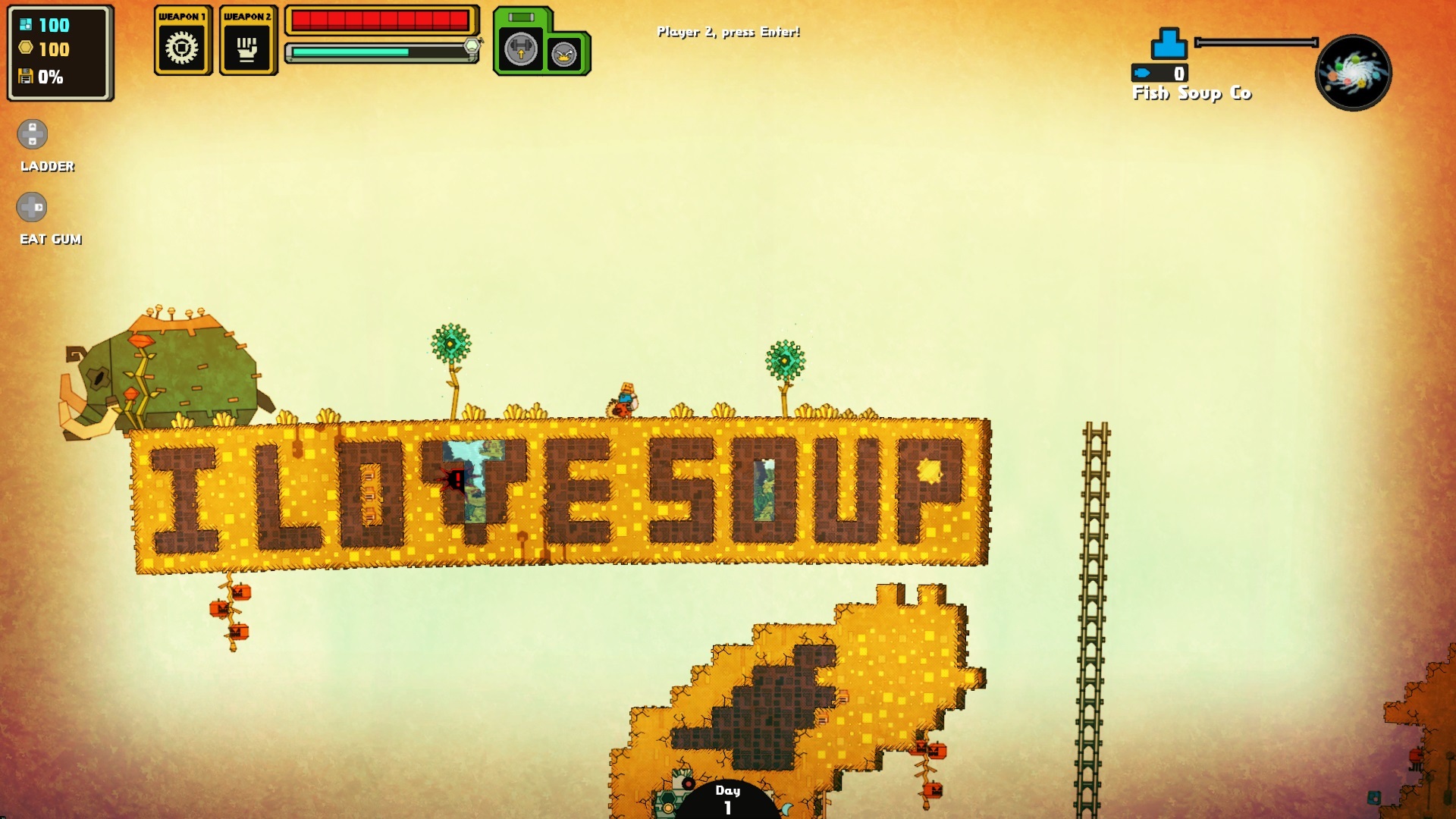
Using the color palette info, make your own planet in an image editor like MS Paint. One pixel corresponds to one map tile, and different pixel colors correspond to different kinds of map tiles. For example, black pixels are standard terrain, grey pixels are stone blocks, and blue pixels are water.

The placement of rare plants, animal nests, and certain creatures is determined by single pixels. Note that some require a certain amount of space for proper placement. In the above screenshot the orange pixel representing a mammoth is placed above the "I love soup" platform due to its large size.
4) Save your custom planet as a PNG file and add “_map” to the end of the file name (example: “Custom Planet_map.png” for a stage called “Custom Planet”).
5) Restart Nom Nom Galaxy and your new stage should appear in the list of custom planets accessible via the SoupCo Planet Database planet.

Tips
Your planet design may not work well (or at all) on your first attempt, but don’t give up! Trial and error are key. There are also a few things you can do to build a better world:
-As a general guideline, maps shouldn’t exceed 160,000 pixels. For example, current maps include sizes such as 400x400, 320x500, and 250x640.
-The planet background and foreground colors are currently randomized, so if you're not happy with the results try changing a pixel. One small change may do the trick.
- Make sure the bottom layer of your planet is filled in. While it’s possible to make floating islands (as demonstrated in one of the samples included), you’ll still need sturdy ground.
- Give yourself enough matter. No matter how lovely your planet is, you won’t be able to build an equally lovely factory without enough raw materials.
- Remember, factories aren’t waterproof! Getting water in your factory can shut everything down. Of course, you might think of a way to overcome it...
Post your best creations! We’ll be on the lookout for strange and interesting planets to share on Twitter and Facebook!

We've also made a number of improvements and bug fixes!
Control Improvments:
- Added mouse support for the maintenance menu (options are now clickable).
- Added mouse support for the company name entry field at the start of the game.
- Added ability to plant ingredients with the X button (Xbox format controller).
- Added ability to rotate construction parts with the mouse wheel.
- Added ability to close the office menu with the same key used to open it.
UI Improvements:
- Updated on-screen UI hint for “Throw” to the left mouse button to help clarify that throwing direction is determined by pointer position when using mouse and keyboard.
- Newly acquired gum is now sorted with the same type instead of being added in chronological order.
Other:
- Changed Fever Time music.
Fixes:
- Fixed an issue that caused players to get stuck in the tutorial.
- Fixed an issue where players could join a multiplayer session before a second controller option was available.
- Fixed an issue with the options menu displaying invalid resolutions for the active display in multiple-monitor setups.
- Fixed an issue where attempting to click options at the bottom of the key bindings menu could inadvertently select a list item in the background instead.
- Fixed an issue in which the game would crash at startup when the settings file wasn’t deserialized properly.
- Fixed an issue where the game would crash when the window was resized.
- Fixed an issue found to desync multiplayer sessions.
- Fixed minor localization issues.
- Fixed other miscellaneous bugs.
We hope this update enhances your SoupCo profit margins to the max!