Patch released - Easier Anime Filter, Script Sharing & Fixes (Build 1.3.75)
Wallpaper Engine · published
Hey everyone,
we have just released Wallpaper Engine 1.3.75 which brings a number of improvements to the application and the editor and contains some important bug fixes.
Anime Filter
One of the changes we want to highlight is the new anime filter we have added to the application. Right now, about one quarter of wallpapers on Wallpaper Engine is anime. It was always possible to filter this out using the tag filters but this seems to not have been clear enough for a lot of users which is why we have created a simple way to hide this type of content. One issue of the past was also that that some similar categories such as MMD (Miku-Miku Dance) were also often overlooked, the new anime filter takes this into account and hides these other categories as well.
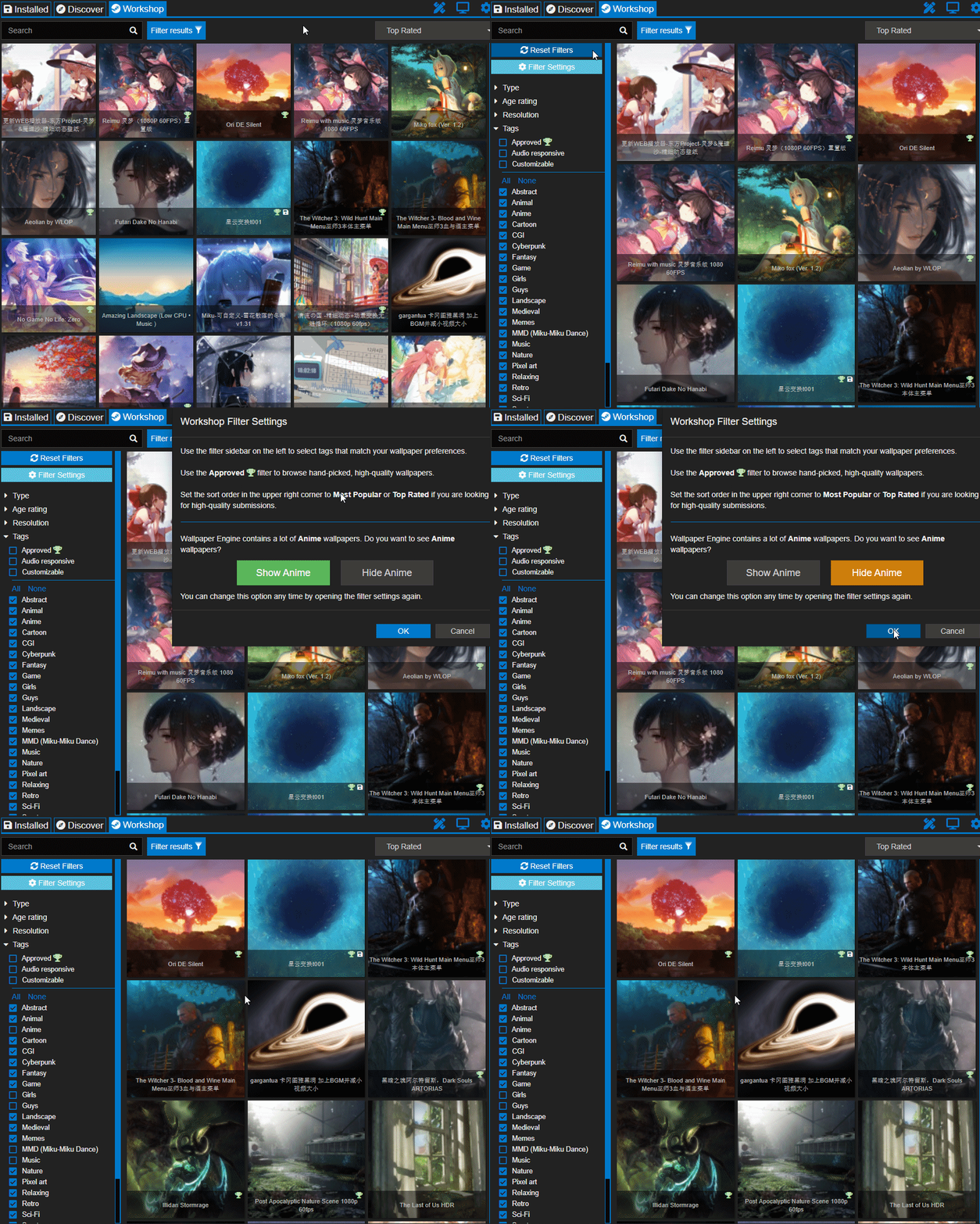
New users will now be asked if they would like to see or hide anime content when visiting the Workshop tab for the first time. For existing users, this option will be automatically checked depending on if the Anime filter is turned off or on the first time you use the app after installing the update. You can always access this by using the "Filter Settings" button in the filter sidebar as shown in the short video clip below.
From our testing this greatly reduces the amount of anime content even though it's certainly not perfect. If you use the Show Anime option, Wallpaper Engine will be just like it was before and nothing will change for you at all.
Your choice will also be remembered even when using the Reset Filters button, as we think it's important your preferences will be saved over a longer period of time. You can always just temporarily enable the anime tags again if you would like to take a peek into the anime sections after all.
If you come across content that is not tagged correctly, you can actually use the report functionality in the application to suggest a new tag, this helps to keep the Wallpaper Engine Workshop organized.
Constructive feedback is, as always, greatly appreciated. Please keep in mind that Wallpaper Engine caters to a global audience and we always try our best to find compromises to make different user groups happy which is not always easy, especially as we are partially limited by Steam itself.
Editor Improvements
We have made a few quality-of-life improvements in the Wallpaper Engine editor. One new feature is the ability to share SceneScript code snippets in the Workshop, which allows for easier sharing of more complex scripts with users and should help to make SceneScript more accessible to users who lack the knowledge to create scripts themselves.
In addition to that, we have reworked the foliage sway effect which now allows for more realistic wind sway effects on elements like trees and clothing. Due to popular demand, we have also added the ability to add up to 6 blend textures to the Blend effect. With some clever SceneScript usage, this allows for easier "time of day" wallpapers to be created in the future, we expect to see some cool implementations of this and will also prepare a tutorial for this in the near future.
Stay tuned for more updates in the future, we plan to add some very exciting new features to the Wallpaper Engine editor with the next major update.
You can find the complete changelog with all changes and bug fixes below:
Full changelog
Additions
- Created simple Anime filter interface in Workshop tab
- Added SceneScript asset sharing in Workshop
- Added multiple blend textures to blend effect to make it easier to create background images depending on the time of day
- Added zoom amount to scene options (which can be used in combination with SceneScript)
Improvements
- Improved per pixel foliage sway effect
- Increased max brush size to 2000 to make it easier to paint effects on 4K wallpapers
- Added automatic highlighting of log tab when a script error occurs in the editor
- Made user property key field editable while creating new user properties
- Excluded .git directories on file import for web wallpapers
- Changed scene templates to allow transformation of base layer
- Improved asset publishing warning text
- Updated Corsair CUE SDK to 3.0.355.0 for extended iCUE hardware support
- Translation updates. New complete community translations for Slovenian (Thanks Aljaž!)
Bug Fixes
- Fixed rare issue where Scene wallpapers would be shown as gray backgrounds on the 64 Bit version of Wallpaper Engine
- Fixed wallpaper window creation when multiple scene wallpapers are used ("failed to create scene window" bug)
- Fixed media overlay showing when using web wallpapers
- Fixed pause function stopping sound playback rather than pausing it
- Fixed crash with invalid font files
- Disabled video in-memory feature on 32-Bit version if video files are so large that it will likely lead to crashes on 32-bit (>512MB)
Support Notes
If you have any questions or issues with the update, please have a look at our help site as it covers the most common issues with application:
help.wallpaperengine.io
Should you run into any issues with the update or Wallpaper Engine in general, you can always write us on our Steam Discussion board and we'll gladly help you out. If you run into any issues or bugs, please post on our forums rather than commenting on the news as it's difficult to provide support in the news comment section.