Patch Released - Wallpaper Flipping, Mute per Monitor & Much More (Build 1.3.2)
Wallpaper Engine · published
Hey everyone,
we're happy to release Wallpaper Engine 1.3. The update brings a large number of new features, performance improvements and various bug fixes.
Scene Wallpaper Flipping
One of the update highlights is the new ability to flip Scene wallpapers. You can now click on the Flip button in the properties list of your Scene wallpapers and it will flip the wallpaper horizontally. This was a common feature request and may be useful if you feel like a wallpaper might suite your room better in a flipped state or if you are using multiple monitors and want to use the same wallpaper twice, facing different directions. Keep in mind that due to technical limitations, this is only possible for Scene wallpapers.
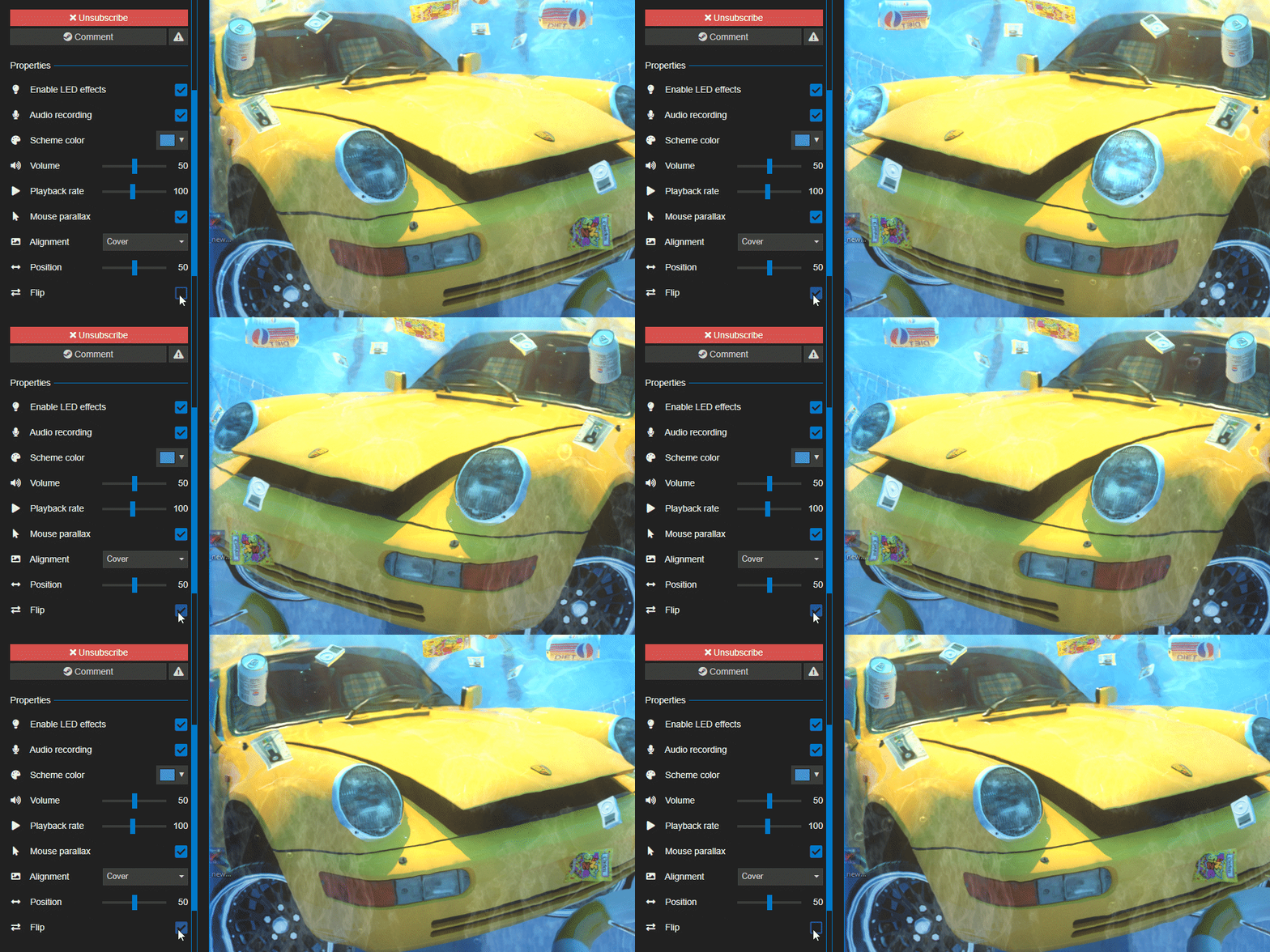
(Swimming Pool Car wallpaper by 孟婆干杯)
Launching Wallpapers per Application
We have extended the Application rules of Wallpaper Engine so that it's now possible to open a wallpaper, a playlist or a complete multi-monitor profile when a certain .exe is launched on your system. This lets you choose the right wallpapers for what you are doing at a given time. For example, this allows you to automatically open an audio visualizer whenever you launch your favorite music player or switch to a less distracting wallpaper on your secondary monitor whenever you launch a certain game.
This option can be found as part of the Application Rules, keep in mind that for multi-monitor setups, you need to assign a profile to an executable which defines which wallpapers are visible on which screen.
Improved Multi-Monitor Experience
This update improves the ability to configure multi-monitor setups and adds some quality-of-life improvements to these types of setups. We have reworked the multi-monitor setup and added a mute button to each monitor (speaker icon in the lower left corner of each screen). This effectively lets users choose a main monitor responsible for playing audio rather than wallpapers across all monitors producing sound at the same time.
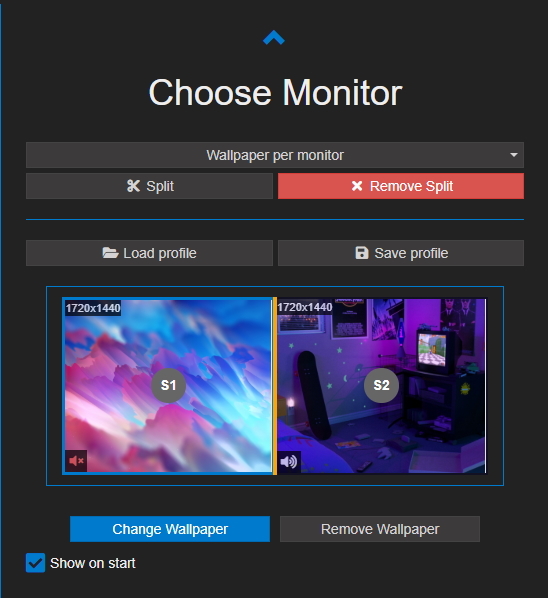
Users of Razer Chroma and Corsair iCUE hardware are now also able to choose a monitor within the LED plugin which is responsible for the colors sent to their hardware. Previously the main monitor was forced to be responsible here though this may not have always been what users wanted.
Another change we have made is that Scene wallpapers with a parallax effect are now limited to the constraints of the screen they are on. Previously, if you had moved your mouse across multiple monitors, wallpapers with a parallax effect would often break. We think this change will increase the popularity of wallpapers with parallax effects on multi-monitor setups.
Local Author Blocking
A frequent request we have received over the years was to add the blocking of individual authors. One issue with this is that Steam does not support this kind of functionality but due to the demand for this, we have now implemented a local blocking functionality in Wallpaper Engine. You can now right-click on a wallpaper to block its author, which will always move all wallpapers to the bottom of the search results page and darken them. It's not possible for us to remove authors from the results altogether but this should be a good compromise. The following screenshot shows a row of blocked wallpapers at the bottom:
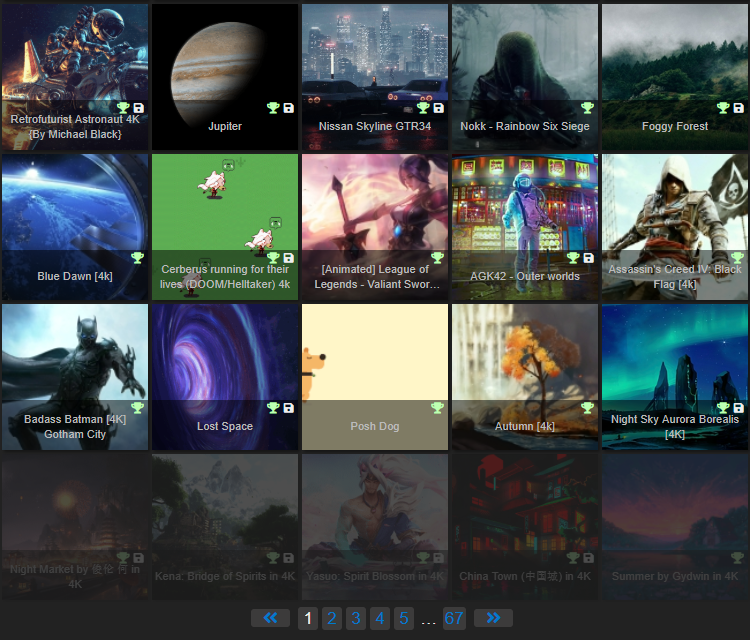
Be sure to check out historyk's wallpapers rather than blocking them as in the screenshot above! :eaglegag:
User Interface Improvements
As with the previous updates, we have made improvements all throughout the user interface of Wallpaper Engine. The most noticeable change of this update is the revised wallpaper info section on the right-hand side which has been cleaned up and modernized according to some user feedback we have received.
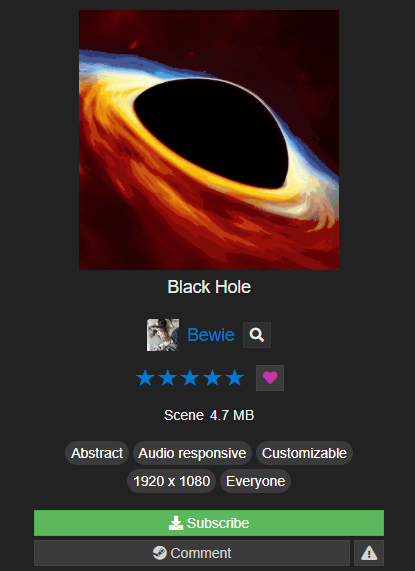
Other user interface changes include a new page selection when clicking on the "..." button in the pagination in the wallpaper search and a new rotary control for certain effects in the editor that use a direction. We have also improved the playlist section for users with very long playlists by adding the ability to scroll through it while hovering over the corners with the mouse and support for scrolling with the mouse wheel through the playlist.
This release also contains significant updates to the translations of some languages which we hope improves the usability for users with limited English skills.
Removal of DirectX 9 and OpenGL & Library Updates
Starting this update, we're phasing out DirectX 9 and OpenGL. They were implemented early-on in the development of Wallpaper Engine but were never intended to be a primary feature as DirectX 10 & 11 are superior in every way (DirectX 10 has been part of the minimal system requirements for Wallpaper Engine since the beginning). Since DirectX 9 and OpenGL are rather buggy and do have some issues with rendering wallpapers properly, we have decided to fully remove them. This will only affect a small number of users who have manually enabled either of them through an advanced option in the settings. Starting this update, users will be unable to select these options in the settings and in a follow-up update we will be removing both interfaces from the application altogether.
We have also updated various libraries that Wallpaper Engine uses which brought along some measurable performance improvements for certain wallpaper elements. We have also updated CEF (the basis for web-based wallpapers) to its latest version now. This means you can now use the latest web-features in your wallpapers and this solves quite a few bugs related to web wallpapers. One downside is that you will now not be able to use Flash as part of your wallpapers anymore, though this should only affect a handful of people at best. With this new CEF update automatic muting of web wallpapers is now possible and web wallpapers will not steal focus anymore when they're used in a playlist.
If, for some reason, you are one of the few people who really need OpenGL, DirectX 9 or Flash for your wallpapers, we have now created a permanent Wallpaper Engine 1.2 release that can be enabled in the Steam properties of Wallpaper Engine. This way you can use Wallpaper Engine 1.2 with these deprecated features forever, though we officially do not support it anymore and recommend everyone to let Steam update Wallpaper Engine as usual.
Full changelog
Additions
- Added flipping to scene wallpapers.
- Added easier-to-use foliage sway effect.
- Added auto muting to web wallpapers.
- Added new rotary control for certain effects in the editor that use a direction.
- Added hover auto scroll and mouse wheel support to playlist.
- Added mute per monitor button in monitor selection.
- Added LED source monitor selection.
- Added plugin delay loading to fix startup issues with Razer/Corsair utilities.
- Added user block list to fade and ignore wallpapers by selected users.
- Added pagination page selection when clicking on "..." button in pagination.
- Added view all projects button to editor welcome dialog.
- Added search filter to open project in editor.
- Added dark skin and LED options to initial welcome dialog.
- Added load wallpaper rules for application rules.
- Added black tray icon for Win10 light theme.
Improvements
- Updated to new C++ version to improve particle simulation CPU usage.
- Updated new CEF version 4103
- Updated FreeImage, harfbuzz and freetype libraries.
- Removed DirectX 9 and OpenGL options unless they were already selected - they will be completely removed soon!
- Improved video switching by hiding the window to avoid black flashes.
- Experimental support for high-contrast mode on Windows 10 and no requirement for animation-in-windows option of Windows.
- Improved wallpaper details UI and title bar.
- Improved high-priority reliability (you need to toggle this off and on to take advantage of it).
- Improved fade animation by blocking it until the new wallpaper has loaded.
- Improved and largely updated translations for many languages.
Bug Fixes
- Fixed rare issue with rating sorting in installed tab
- Fixed invalid particle system crash.
- Fixed local wallpapers rarely not loading.
- Fixed certain playlist settings only being available for timer based playlists.
- Fixed parallax on multi monitor to break wallpapers when mouse goes out of the viewport.
- Fixed web wallpapers stealing focus on load.
- Fixed corrupt colors in UI due to old CEF version.
- Fixed wrong time zones on web wallpapers in some regions of Brazil and Russia due to old CEF version.
- Fixed voting and fav buttons in editor browser.
- Fixed text layer composition with effects copying background with wrong offset.
Hotfix 1.3.8
- Fixed Wallpaper Engine settings being unusable if Windows font scaling is enabled
Hotfix 1.3.16
- Fixed an issue with Web wallpapers not pausing
- Fixed an issue with Razer LED hardware not working for Web wallpapers
- Fixed video loops not working under certain conditions
Hotfix 1.3.19
- Added splitting support to LED monitor detection.
- Fixed video audio being muted in editor.
- Made favorite icon color a bit lighter.
- Added direct show codec pack detection to diagnostics.
- Fixed sounds not staying muted in editor.
- Fixed volume slider spamming SceneScript change events.
- Disabled UWP font-scaling that was introduced as part of CEF update.
Hotfix 1.3.28
- Fixed issue with CORS headers in web wallpapers
- Fixed rare crash in application rules
- Fixed scene run time not resetting per wallpaper.
- Improved video looping under certain conditions
- Improved monitor selection modal user interface slightly
- Fixed VHS opacity mask
- Added unique cache locations for each monitor, each UI window, play in window and editor preview/snapshot.
- Added apply wallpaper error handling if background program is in different state than UI.
- Added additional LED and monitor restore events to session unlock.
- Disabled context menu in web pop up view.
Support Notes
If you have any questions or issues with the update, please have a look at our help site as it covers the most common issues with application:
help.wallpaperengine.io
Should you run into any issues with the update or Wallpaper Engine in general, you can always write us on our Steam Discussion board and we'll gladly help you out.