Status
SteamPeaks
ChartsSalesUpcomingPatchesEventsCalculator
New on SteamEvery app, DLC and depot the minute Steam creates itAppsEvery app on Steam, newest change firstPackagesSubs and bundles, and what each containsDepotsDepots, manifests and install sizesTagsSteam's user tags and the games under themDevelopers & publishersCompanies and their cataloguesTechnologiesEngines, SDKs and anti-cheat found in the filesChange historyEvery PICS changelist as it lands
SignalsNineteen readings of the whole catalogueCompareAny games side by sideRecordsAll-time peaks and the days they were setReportsWeekly and monthly write-upsAlerts & newsroomWatch a game, get told when it movesSteam statusIs Steam up, right nowWeb API explorerTry the endpoints in the browser
EventsSteam's own events and the sales calendarCalculatorWhat a Steam account is worth, and its pile of shame
/
Sign in
/
SteamPeaks
The ultimate resource for Steam data.
ExploreChartsSalesSales and festsUpcomingPatchesEventsRecordsTrendingSignals
DatabaseAppsPackagesDepotsTagsDevelopersTechnologiesChange history
ToolsCalculatorCompareSearchAlertsSteam statusAPI
SiteMethodologyFAQDiscordSupportSign in via Steam
Not affiliated with Valve or Steam. Game names and artwork belong to their owners. All times UTC.
PrivacyCookiesFair useStatus
PAGAN PEAK VREventsOculus Performance Update and Quest Support
Game update

Oculus Performance Update and Quest Support

PAGAN PEAK VR · published 25 Jun 2020, 17:35 UTC

All eventsPlayers around this dateRead on Steam

For those of you wishing to play PAGAN PEAK VR on your Quest, please follow the instructions below:

Running Pagan Peak VR on Oculus Quest via Oculus Link cable:

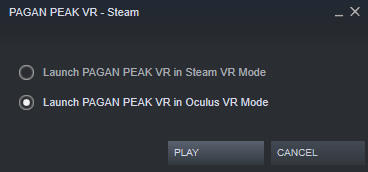
Please make sure to connect your Quest and open the Oculus app before opening Steam VR and ensure that your Quest is detected correctly in the Oculus App. Then start up Steam VR and launch the game. When prompted to choose in which mode you wish to launch Pagan Peak VR
please make sure you select Oculus VR mode.
WINDOWS MIXED REALITY USERS:
If you find yourself to be drifting in the game without pressing down the thumbstick please note that this is a hardware issue due to differentiation in manufacturing of the WMR thumbstick. To reduce drifting you can adjust the Thumbstick Deadline Value in Steam VR under:
Settings->Controllers->Edit Thumbstick Settings

patch notes
___________
- general performance update
- native Oculus support added
- official Support of Oculus Quest via Virtual Desktop and Oculus Link
- fixed input bug related to movement of vive wands
- fixed minor graphics bugs
- fixed bugs related player repositioning when moving out of bounds

More from PAGAN PEAK VR

Other announcements

All events
Major update9 Oct 2020HALLOWEEN UPDATEIn celebration of Halloween and the upcoming winter season we have provided a dark content update for PAGAN PEAK VR. We wish you the best of luck escaping the Krampus Killer and his Trolls. Patch Notes: · New enemies and traps await · Performance and graphics improvements · It is now possible to skip the intro and cinematic sequencesPAGAN PEAK VRGame update4 Dec 2019Update: German Language SupportYou can now select the German language in the menu settings. Happy Krampus Day!Game update16 Nov 2019Performance Update and WMR supportHey everyone, This update adds Windows Mixed Reality support and addresses issues that some users experienced. In particular: · Hand movement has now been improved. · Overall performance has been improved. · The grip button on Valve Knuckles controllers can now be used to grab objects. · The visual quality of the "normal graphics" setting for Rift S has been improved. Thanks for playing, stay t…