Patch Released - Scene Scripting, Editor Snap Layout and lots of Improvements & Fixes (Build 1.1.154)
Wallpaper Engine · published
Read this for common Steam/Anti-Virus/unrelated issues
Verification issue while updating
Content file locked / Disk write error / Content encrypted
Steamworks unavailable
If you still have any issues with Steam's update process or your anti-virus deleting Wallpaper Engine or something else, please make a thread after following this link to get help: https://steamcommunity.com/app/431960/discussions/1/
Hey all,
This update brings JavaScript support to scene wallpapers (SceneScript), a new snap layout for the editor and countless general fixes and improvements.
SceneScript
You can now bind scripts to most properties in a scene wallpaper to change their values over time or even create/remove layers at will.
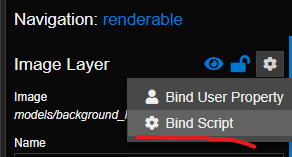
This allows you to build your own logic for animation and interaction of everything. There is also access to the audio response data and the mouse cursor, which you can freely integrate into any animations via scripts now. Check out this sample wallpaper that uses scripting:
https://steamcommunity.com/sharedfiles/filedetails/?id=1712475860
For example, this script will play a sound that was placed in the scene when its layer is clicked:
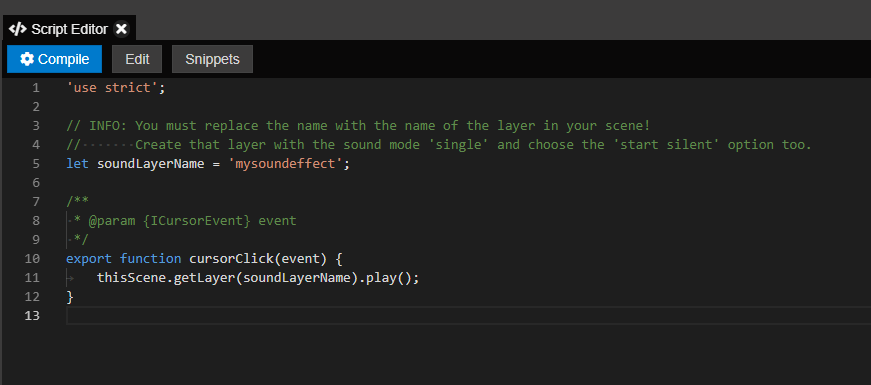
You can find the documentation for SceneScript here including a few tutorials that explain sample script snippets like these:
Color shift over time
Drag & drop layer
Play sound on click
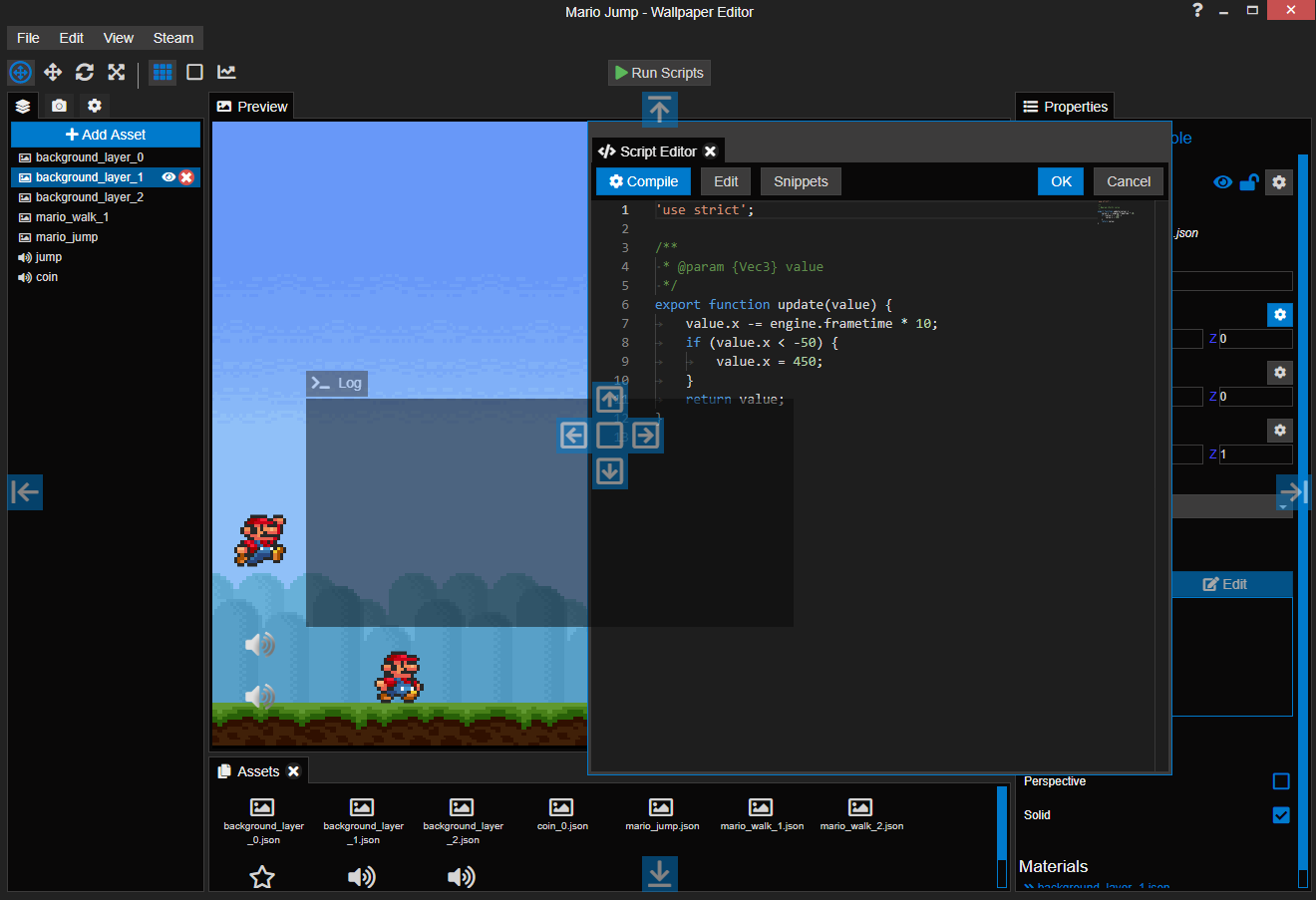
ADVANCED: Mario Jump
The code editor that is built into Wallpaper Engine has auto completion (wherever possible) and comes with a few snippets that you can just apply with a click. There is also a new log window where you can easily debug any errors occuring in your scripts by simply clicking on them.

Better User Properties
Scenes now support the combo box user property as a binding for the visibility of layers. So instead of having a bunch of checkboxes, you can just make a single combo box for all your options.
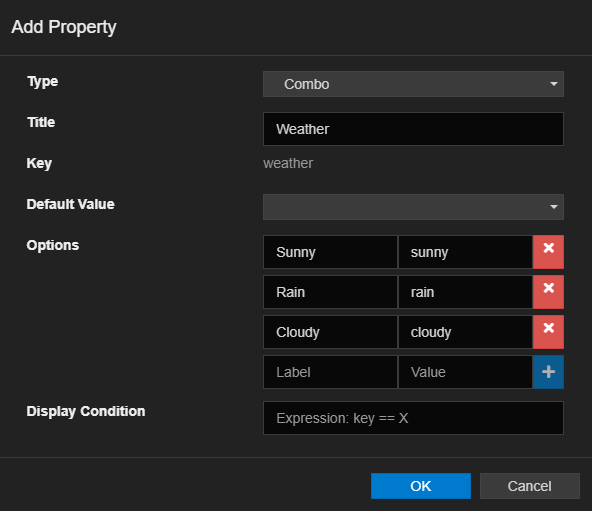
Then attach the visibility of a layer to a particular option:
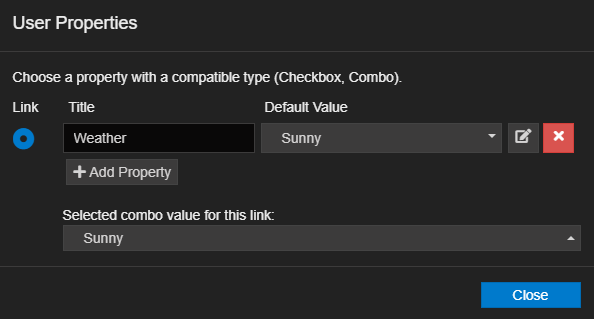
It's also possible to use either a checkbox or the combo box as a binding on the visibility of image effects directly now, so you don't need to create separate layers anymore if you just wanted to let the user toggle an effect on or off.
Mixing 3D and 2D
It's now possible to import models into 2D wallpapers and images and particles into 3D wallpapers. However, certain functions are still incomplete, like the cursor interaction with particles in 3D or perspective rendering for models in 2D wallpapers. Image layers can now optionally render with perspective in 2D wallpapers though and the same will be enabled for models in the future.
Editor Snap Layout
All windows in the editor can be moved and resized now and some optional ones can be closed and restored (assets, log, script editor). The layout of all persistent windows will also be saved when you close the editor. Just drag and drop the title card of a panel to snap it into place or to turn it into a floating window.
Better Audio Recording Compatibility with Virtual 7.1 Headsets
Wallpaper Engine will finally be able to deal better with audio drivers that augment the Windows audio system, including utilities from Razer, Nahimic, Alienware and more. Razer in particular has actively worked with us to find a workaround for this issue and we have seen greatly improved compatibility with their products already, so a big shout-out to the team at Razer, thanks!
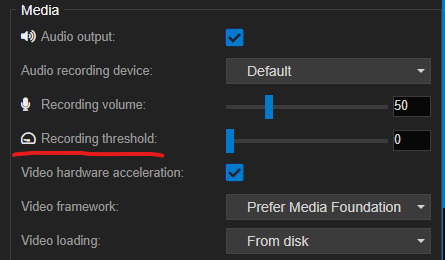
A new recording threshold slider has also been added next to the recording device that allows you to eliminate noise recorded by analog devices like 'Stereo Mix':
New GIF Decoder
GIFs now use a better and much, much faster decoder. They will also show a warning in the editor if their unpacked size is unreasonable for a GIF - you can still use them, but one way or another the performance may be compromised. This new decoder may allow me to implement realtime decoding for GIFs in the future which may be more viable for huge GIFs - a tradeoff between CPU and VRAM usage which you would be able to choose between then.
Also, you can import a sequence of images now by simply selecting multiple images that have the same resolution. They will have the same performance as GIFs later but their quality will be better.
Broken Installation Detection
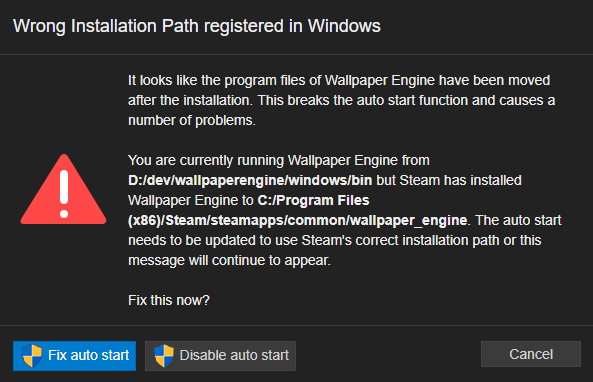
Wallpaper Engine will now figure out if you have it installed twice and it's being started from the wrong location (wrong as in: not where Steam thinks it's installed to). A lot of people seem to move the installation files, because unfortunately Steam always allows this even when a proper uninstall is needed, but doing so will inevitably break the auto start function and cause other random issues. Steam gives Wallpaper Engine no chance of adjusting the auto start automatically, so this can only be fixed in hindsight if the files get moved by Steam.
Now this dialog makes it much easier to reset the auto start to the correct location if you move the files around.
Since this patch introduces a lot of new and complicated features, the next update will likely just focus on bug fixing. After that, you can refer to the roadmap to see more features that are going to be added: https://steamcommunity.com/app/431960/discussions/0/1500126447391526102/
Full changelog
Additions
- EDITOR
- Added scene JavaScript support via Google V8.
- Added custom snap layout system to editor.
- Added monaco editor for scripts and later shaders to the editor.
- Added user property and script binding to image layer effect visibility.
- Added combo boxes and text inputs to scene user properties.
- Added image layer perspective rendering checkbox.
- Added support for image sequence import of separate files.
- Added new, faster GIF decoder.
- Added warning about GIFs that are too large and might crash the compiler.
- Added nearz/farz/fov options to 3D scenes.
- Added effect upgrade warning when new effect files are going to overwrite older effect files.
- Improved reflection effect with blending options.
- Added single playback mode and start silent flag to sound layer.
- Added support for combo user property links to checkboxes/visibility toggle.
- Added user property slider for vec component properties.
- OTHER
- Added auto start warning if Wallpaper Engine is being started from a different path than Steam installed it to.
- Added audio recording workarounds for several audio DLL hooks.
- Added an export variable to all binaries to hopefully disable injection of certain OSDs that break everything.
- Added dual/triple screen 1440p/2160p tags.
- Added dwm dynamnic coloring warning about not reverting when disabled.
- Added 'Relevance' Workshop browsing option like on Steam - only visible while entering a text.
- Added audio response recording threshold option for users with inputs that constantly produce noise.
- Added double installation warning if run path doesn't match Steam install path.
- Added support for sprite sheets as animated image layers like GIFs.
Fixes
- Fixed random sounds not playing anymore after first playback without explicit reset.
- Fixed image/model import not creating main sub directories if they were deleted.
- Fixed audio listener crash on some systems where the driver doesn't behave right according to the Windows API.
- Fixed static child particles not being reinstantiated in editor when props get changed.
- Fixed playlist ignoring user/session pausing and user stop hotkey.
- Fixed paint brush crash after scene reload.
- Fixed web input for capital and special characters (hopefully).
- Fixed wallpaper clone mode not using largest monitor as source monitor.
- Fixed hash signs in local URL wallpapers causing the URL to not open.
- Fixed customization tag being added to submissions due to schemecolor references in clear material.
- Fixed no animation warning showing up for GIFs.
- Fixed lots of effect paint textures not defaulting to a sensible value when starting to paint.
- Fixed safe start not activating when there are certain events causing it to refresh on boot.
Misc
- Improved clone/stretch pause behavior.
- Added nvshare to diagnostics to warn about mouse lag.
- Updated info about DX9 install path because Valve changed the path.
- Disabled broken Steam wallpapers from showing up when they were deleted manually.
- Disabled initial Aero and high contrast warning if for whatever reason it still appears to be working.
- Changed xray to use more comprehensible size slider (although this makes the math perform worse).
- Updated AngularJS used by UI to 1.6 and increased performance by disabling some debug things.
- Made web wallpaper logging dependent on global log level setting (to reduce disk writes on buggy wallpapers).
- Made all wallpapers that have "R18", "R-18" or "18+" in the name default to 'mature' tag before even prompting the user to choose the right tag.
- Added hack to reload monitor configuration after a small delay after sleep/monitor turn on because drivers are buggy and unreliable.
- Updated AssImp model importer to most recent version from GitHub.
- Updated Steamworks SDK to 1.44.
------------------------------------
Hotfix 2019-04-17 / Build 1.1.165
- Fixed image layers that were set to be sprite sheets before support for sprite sheets was added.
- Fixed removal button of camera paths.
- Fixed particle instance UI options de-syncing with wallpaper and having no effect anymore.
- Forced shader rebuilt after new effect import.
- Added option to skip effect upgrade.
- Added image sequence duration in filenames.
- Added more definitive clone wallpaper management when monitor aspect ratios are incompatible.