MELIGO Creator v1.2.13 (Beta) Update Notes
MELIGO Creator · published
Hello, this is the MELIGO team.
The MELIGO Creator v1.2.13 (Beta) update was released on October 30, 2026.
This update has been released on the Steam beta branch first. The default version stays at v1.2.12.
New Features
- Background List Management
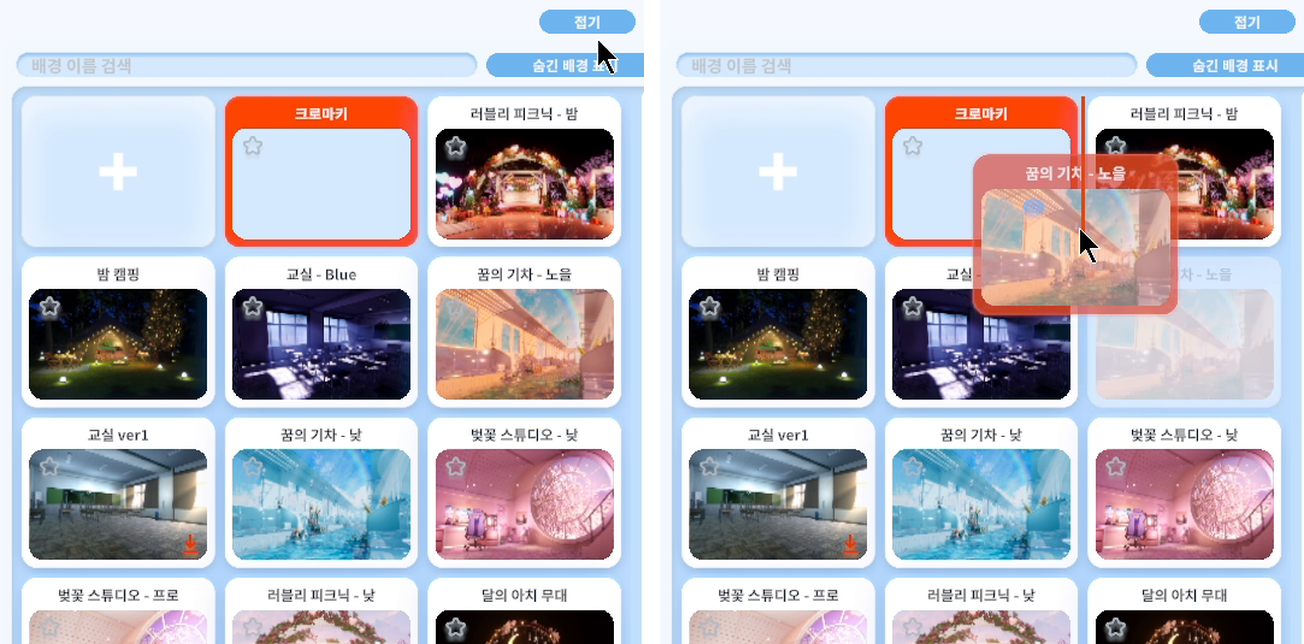
Find and organize backgrounds quickly, even when you have many. - Background - Select background
Expand, search, reorder and hide backgrounds in the list.
- Expand: open the list in a larger view to see everything at once
- Search: find backgrounds by name
- Reorder: drag a background to the position you want
- Hide: hide a card with its eye icon, and view it again with 'Show hidden'

Set up your character's lighting separately from the background lighting.
You can keep the background's lighting from being applied to the character.
- Exclude background lights/probes from character: excludes the background's lights and light probes
- Exclude background ambient light from character: excludes the background's ambient light
Character and prop lights you placed yourself are still applied.
With lights/probes excluded, extra shadow processing and GPU memory may be needed depending on the character's shader.
Left: default / Right: background lighting excluded + a light placed manually

You can now fine-tune every value of each post-processing effect.
The detailed settings include the following.
- Add / remove effects: add with '+', remove with the trash icon
- Favorites: star a value to adjust it directly in the Post-processing panel outside
- Find effects: search by effect name, or use the All / Basic / Nilo / Pota / Extra tabs
- Terminology: show effect names as technical terms or in Korean
- Effect groups: turn the Basic / Nilo / Pota / Extra groups on or off
- LUT: load a LUT image with the Color Lookup (LUT) effect to change the color tone
PotaToon effect defaults are set automatically based on the NiloToon settings.
A confirmation window appears before resetting or removing an effect.
In the light settings, you can turn shadows on or off and adjust the shadow mode (Hard/Soft) and shadow strength.
For Directional lights, you can adjust the direction with horizontal and vertical sliders.
Improvements
- Collapsing and Expanding Settings Sections
Settings sections now open and close smoothly without their contents being squashed.
Collapsed sections are no longer drawn, reducing the load of the settings window.
How to Use the Beta
- Steam - Library - MELIGO Creator - gear icon - Properties - Game Versions & Betas - select 'beta'
- To return to the default version, select 'None' on the same screen.