Demo Update: Easier Controls, Duty Fixes and Combat Stability
须弥仙业 · published
Sect leaders, Demo Build 26327955 is now live. Thank you for the screenshots and reproduction steps. Here is what is included in this update.
Controls and interface
- Added a collapsible horizontal toolbar inside the cave realm, with shortcuts to storage, disciples, buildings and settings. Fixed several unresponsive shortcuts.
- Audio Settings and Game Options now look like section headings rather than clickable buttons. Added a Settings label beneath the gear icon.
- Improved desktop size, transparency, normal-window/always-on-top options and switching between desktop and immersive modes. Moving the desktop realm now softens its edges; dragging it near its original position snaps it back into place.
- Added mouse-wheel realm switching and larger switching arrows. Building placement now shows a ground grid and valid/blocked placement indicators.
- Separated pop-up layout from the realm display area: shrinking the realm no longer shrinks pop-ups with it or clips them to the realm boundary.
Filters, location shortcuts and auto-recruitment
- Added inventory categories and sorting, and fixed blank drop-down options. Item names and quantities now sit below the artwork, with more space between cards.
- The disciple roster supports sorting by cultivation realm, joining time and lifespan, plus talent and idle/on-duty filters. Cards show duty status and provide a shortcut to the disciple's location.
- Added realm and rarity filters/sorting for artifacts, divine weapons and spirit beasts. Spirit Beast Mountain also provides a location shortcut when viewing a beast.
- The toolbar's building directory lists placed buildings by realm and lets you locate them. Locked buildings remain visible in the purchase catalog with their unlock requirements.
- Auto-recruitment supports a specified number of attempts or recruitment until full. Existing costs, cooldowns and capacity limits apply. It waits when Spirit Stones are insufficient and never automatically dismisses disciples.
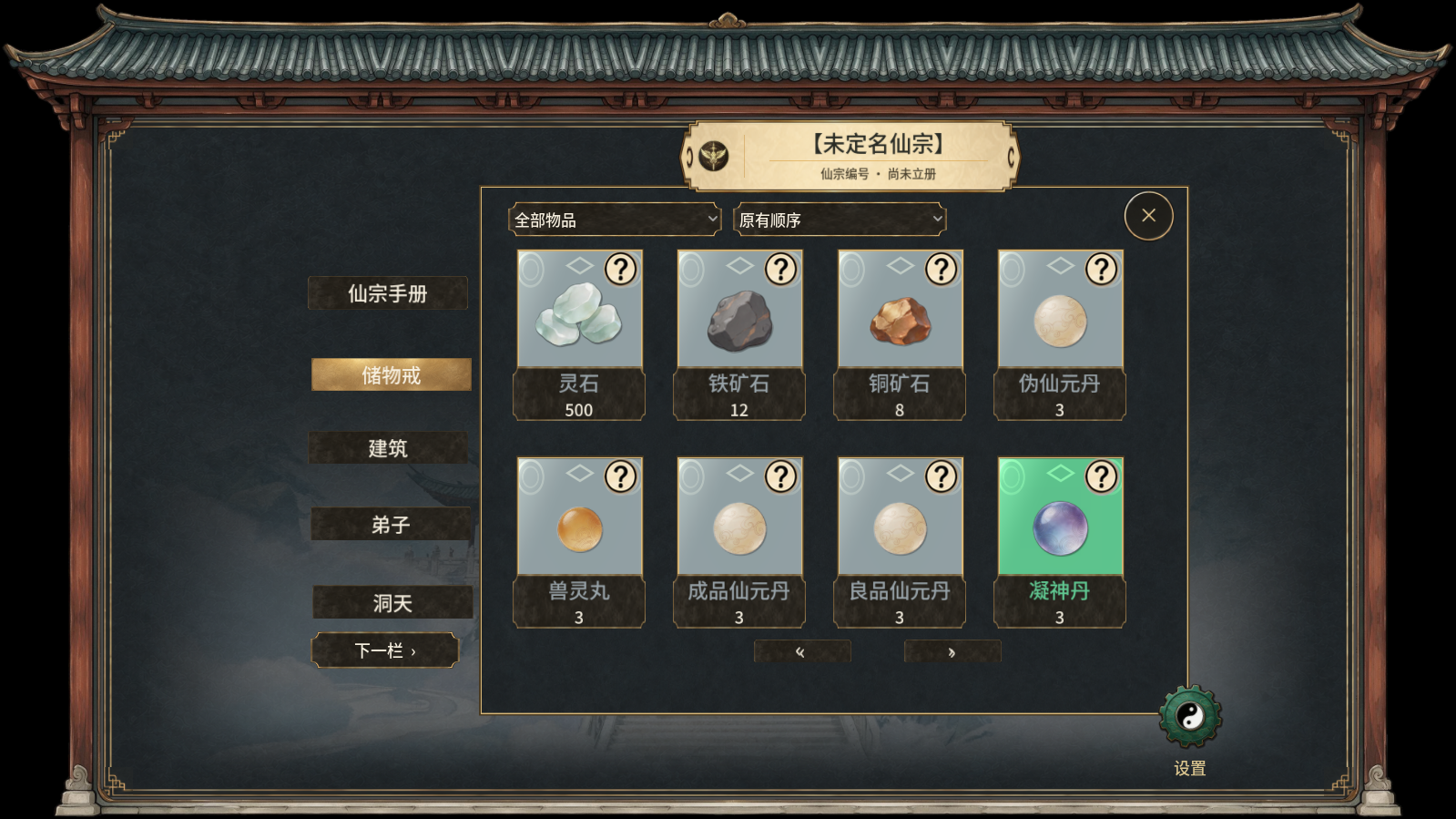
Inventory: names and quantities appear below the item artwork.

Building directory: find and locate placed buildings by realm. Screenshots show the Simplified Chinese interface.
Duties, dragging and production
- Improved cross-realm dragging of buildings, household objects, characters and spirit beasts in immersive mode. Moving an entire building preserves its assigned workers and jobs; dragging a worker away individually removes that character from the duty.
- A bound spirit beast moved to another realm on its own now displays a reminder to follow its owner. It follows when the owner changes realms.
- Fixed inconsistencies between duty records and characters in the world, including replaced market managers retaining their title, a formation-guarding sect leader wandering in another realm, and roster reordering causing the wrong character to be selected.
- Added a step-down action at the Treasure Pavilion. Both the Steward's Office and Guardian Altar allow defenders to step down during preparation; assignments remain locked during combat.
- Fixed reclaiming and placing the herb garden repeatedly granting extra spirit fields. Existing fields and their growth progress are preserved.
- Fixed the Earth-grade alchemy furnace and its worker sinking during production. Adjusted retreat portraits and handling for leaving retreat early.
- Increased mining output speed and added an iron-ore guarantee: after three consecutive non-iron drops, the next drop is iron. Loot can now be collected by moving the pointer over it, with a larger pickup range.
Learning rules, tutorial and combat fixes
- Restored the rule of one Immortal Method (仙法) and one Immortal Art (仙术) per cultivation realm for each cultivator. Learning another in an already-filled realm now displays a message and does not consume a new scroll.
- For identifiable duplicate same-realm Immortal Art entries in older saves, the earliest entry is retained and the corresponding extra scrolls are returned to the sect's scripture library. Reloading the save does not grant the refund again.
- Made names in character speech bubbles larger and easier to read, and included cultivation realm. Deceased characters can no longer participate in dual cultivation.
- Tutorial arrows follow the actual sect leader. Fixed selection highlights pointing to ineligible characters when choosing combat defenders and formation guardians.
- Fixed floating poses in some sparring and guardian Dao Body animations, body cultivators being knocked progressively off-screen against the Changlin gatekeeper beast, and missing gatekeeper health bars.
- Fixed Treasure Pavilion descriptions extending beyond the screen and identified crashes during Demon Tide settlement and post-battle resource cleanup.
Frame rate and effects
- Added a 15 FPS option. The default is now 30 FPS when no preference is set; saved choices are preserved.
- Added graphics-quality and realm-weather, combat-effect and persistent-effect settings. Disabling weather releases its weather nodes; enabling it rebuilds them.
- Improved Demon Tide preloading, duplicate resource preparation and post-battle cleanup.
An FPS cap primarily reduces CPU/GPU work per second; it does not necessarily reduce memory occupied by loaded textures. The realm-effects switch currently covers weather overlays, not every bird, floating pavilion or independent light. Memory usage in scenes with all effects enabled still needs further optimization.
Please let Steam finish updating the Demo before launching it. If you encounter another issue, please include the scene, steps and screenshots in your report.