Update 0.1.9.1
Seoul, The Night · published · build 26206325
Update 0.1.9.1 is out for both the main game and the Playtest. It came right after 0.1.9, so this post covers what changed in both 0.1.9 and 0.1.9.1. You can carry on with a night you started in 0.1.8 right where you left off. Of the 4 known issues we listed in the 0.1.8 notes, 3 are now fixed. The one still open, along with newly found issues, is listed under Known issues at the end.
The phone screen during calls
Until now, the voice level bar on the phone screen moved during a call whether or not anyone was speaking, and pressing anywhere on the screen ended the call. If another call came in on the same phone while you were talking, it didn't show on the screen and was left as a missed call.
Now the bar moves with the actual voice, and pressing elsewhere on the screen no longer ends the call. You end it with the red end call button. When another call comes in on the same phone, it appears at the top of the screen as a waiting call, and you can choose whether to end the current call and take it. While you're on a call, you can also go back to another call you put on hold earlier, or answer a ringing desk phone.
Calls often come in on top of each other during the night, so we made the screen show who is waiting.
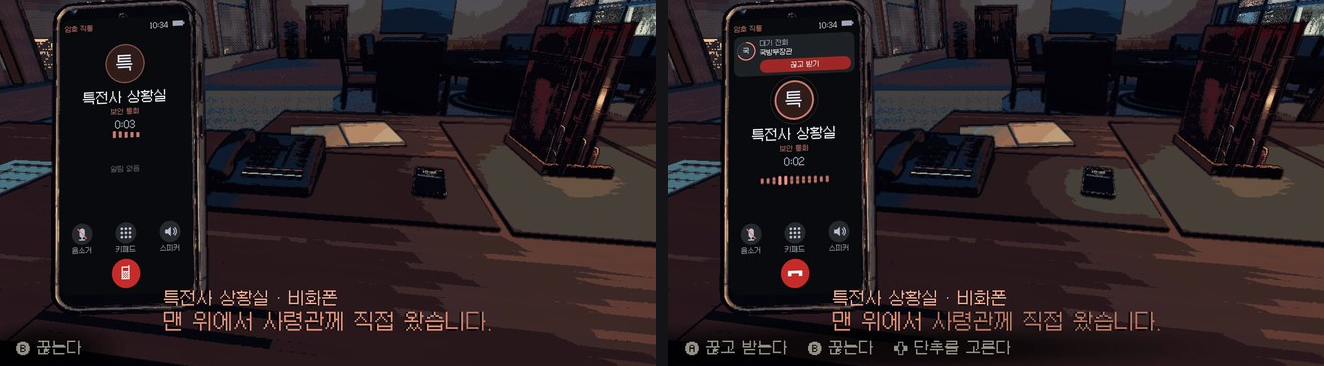
Left is before, right is now. Both show the game in Korean.
Switching languages during a night
Until now, if you changed the language in the SETTINGS binder partway through a night, approval documents that had already arrived changed only the labels printed on the form. The subject, body, options and list of annexes stayed in the earlier language.
Now those documents are redrawn in the language you choose. A seal you've already pressed stays where it is, and the time the document arrived and its deadline stay the same.
You read an approval document through before you press your seal on it, so we made sure you can read it in the language you chose.

Left is before, right is now. Both show the same document after switching from Korean to English.
While the game loads
Until now, after you started the game, nothing on the screen moved until the first screen appeared. On a Mac, this took a long time the first time you started the game, and buttons you pressed in the meantime sometimes did something you didn't intend.
Now a seal mark appears in the middle of the screen and moves while the game loads, and buttons pressed during loading are ignored. Going from the night to the daytime room also takes about half as long as in 0.1.9. On our test machine, it went from 6.1 seconds to 3.0 seconds.
We wanted it to be clear, even while you wait on the first launch, that the game hasn't frozen.
Other new things
- There are now 9 Steam achievements, 3 of them hidden. Achievements whose conditions your earlier saves already meet unlock right away on the title screen.
- Your Steam friends now see the in-game clock time and what you're doing in one line on their friends list, and the same line appears in your Discord activity. You can turn this off with SHARE ACTIVITY on the DUTY LOG sheet of the SETTINGS binder.
- When you bring the seal over an approval document, it hovers above the spot where it will land and casts a seal-shaped shadow on the paper.
- The command phone and the secure phone have new models, and the text on their screens is sharper.
- In call subtitles, words that appear in the records of that night are shown in bold, and when the speaker says them, they press into the line like a stamp.
- Each sheet of the SETTINGS binder now has a colored tab.
- Tags at the end of annex lines, such as and , are now off by default. You can turn them on with "Layer tags" on the DISPLAY sheet of the SETTINGS binder.
- A large jar painted with an old picture now stands in the right corner of the office.
- In the close-up view of the wall screens, the direction buttons follow the layout of the wall, and LB and RB (Q and E on a keyboard) go through the screens in order. On the broadcast screen, LB and RB go through all 6 channels before moving on to the next screen.
Other fixes
- Fixed being unable to quit the game on the title screen and in the prologue. Press Esc (B or START on a gamepad) to open the DUTY LOG sheet of the SETTINGS binder, where you can choose QUIT GAME. In the prologue you can also choose RESUME or SKIP INTRO, and holding Esc (B on a gamepad) still skips the intro right away, as before.
- The keyboard and mouse now count as one way of playing. Clicking the mouse while you're using the keyboard no longer changes the prompts at the bottom of the screen, and DEVICE on the HANDS sheet of the SETTINGS binder now has one "Keyboard & Mouse" choice in place of separate keyboard and mouse choices.
- Calls now use the same amount of in-game time in every language, so the same choices lead to the same night whatever language you play in.
- Fixed the call time on the phone screen going back to 0:00 with every sentence, and the progress bar and subtitles flickering in the intro.
- Fixed the first approval document of the prologue being hidden behind the black bars, and orange dots of light showing over the blinds in the daytime room.
- Fixed the prompt line at the bottom running off the screen on Steam Deck with LARGE TEXT on.
Languages
- In Simplified Chinese, the annex text that showed in English is now translated into Simplified Chinese.
- In English, Japanese, Traditional Chinese and Polish, items in the SETTINGS binder that showed in Korean are now translated.
- When the SETTINGS binder uses the English or Japanese layout, its description text is now larger, the same size as in the Korean layout.
- In English and Polish annexes, words no longer break at random points.
- The 4 tracing paper tabs on the board in the daytime room now appear in your language instead of always in Korean.
- Korean text now breaks lines only at spaces, not in the middle of a word.
Known issues
- On a Mac, the first launch still takes about 20 seconds before the first screen appears (it can take longer on some machines). The seal mark in the middle keeps moving while you wait. If it pauses now and then, the game hasn't frozen, so please give it a moment.
- All translations are drafts that native speakers haven't reviewed yet. Some screens still show Korean, and some lines are cut off with an ellipsis.
- If you change the language partway through a night and then go to the daytime room, a few lines on the slips in the rack may stay in the earlier language.
If something looks wrong or reads oddly, please tell us on the REPORTS sheet at the back of the SETTINGS binder in the game, or in Steam Discussions.