HyperION 1.1.6.0 — Reliable from the first sound
major updateHyperION DAW · published · build 26192813

HyperION DAW 1.1.6.0 — Reliable from the first sound
HyperION 1.1.6.0 is the biggest update since launch, and most of it was shaped by your reviews and bug reports.
Reliability. Audio starts on every Windows setup. Songs open from File > Open and from drag and drop. Every save explains itself.
New creative tools:
- the HyperAmp guitar amp and six new vocal and mix plug-ins;
- HyperTune Smart Correct;
- HyperSpectral, the spectral repair editor, with one-click Enhance;
- Smart Match, which fits any clip to a reference.
Production and workflow:
- new drum kits and 497 royalty-free sounds;
- deeper arrangement and piano-roll editing;
- generators that give a new idea on every press;
- a reorganised Photo Editor and a faster Video Editor;
- MasterLab mastering;
- a smoother, lighter interface.
At a glance

HyperAmp: five amps, four pedals, movable mics, 45 presets

Seven new plug-ins for vocals and mix

HyperSpectral (Ultimate): see and repair sound

Smart Match (Ultimate): tempo, structure and key from a reference

HyperTune Smart Correct

Clip Inspector and clean time stretch

Drum Pad Style, 17 styles and new kits

Photo and Video Editor in one window
Before and after
Every image is a real screenshot: on the left 1.1.5.0, on the right 1.1.6.0.




Sound on every setup
- HyperION now opens the audio device the way Windows expects. The default Windows Audio driver is used instead of a silent fallback to DirectSound.
- If the microphone is unavailable, or runs at a different sample rate than the speakers, playback starts on the output alone instead of staying silent.
- If no output can be opened, HyperION tells you why and how to fix it.
- A slow first launch (unpacking the sound library, a busy disk or an antivirus scan) used to skip the audio engine and leave the whole session silent. Audio now always starts once the workspace is ready.
- The first Play in Song mode is no longer silent. Patterns finish preparing in the background, shown by a thin progress line under Play. Playback starts as soon as they are ready, and the interface does not freeze.
- Browser previews synced to the project tempo no longer warble.
- Stopping and playing again, or jumping to a new position, now restarts notes that are already sounding there.
Open, drop and import anything
- File > Open now opens projects, audio (WAV, AIFF, FLAC, MP3, OGG, M4A, AAC and more) and MIDI. Songs are added to the project instead of being hidden behind a project-only filter.
- Drag and drop:
- Audio dropped on the arrangement, a track lane or an empty project lands on an audio track. A new one is created when needed.
- Dropping audio on an instrument's lane no longer replaces its sound. Dropping on the track's name header still loads it as a one-shot.
- A .hyperion project, a DAWproject or a MIDI file dropped on the window is opened or imported.
- OGG files are accepted everywhere.
Saves you can trust
- When a save fails, HyperION names the folder and the reason Windows gave, for example Controlled folder access blocking Documents.
- If Documents cannot be written, settings, caches and new projects move to a writable folder automatically.
- Closing a new project you never changed no longer asks to save. The empty folder HyperION created for it goes to the Recycle Bin.
- The default drum-pad sounds can no longer be overwritten by an older copy of the sound library.
- Free plan allowances (each per device):
- 20 project saves, 20 audio exports, 20 MIDI exports, 20 DAWproject exports and 20 project packages.
- An allowance is used only by a manual action that actually writes its file. Failed or cancelled saves and exports are returned, and autosave never uses one.
- The remaining allowance is shown before you save or export.
- Importing and opening files is unlimited.
Seven new plug-ins
- HyperAmp guitar amp simulator:
- five amps and four pedals (overdrive, boost, distortion, fuzz);
- gate, cabinets with movable A/B microphones and a room mic;
- analog delay, reverb and tuner;
- user impulse responses and 45 presets.
Stock plug-ins, deeper
- VoiceForge Voice Shift: shift a voice up to ±12 semitones, with four presets.
- DeResonator Dynamic: a resonance tracker that follows the singer.
- AutoTone:
- AUTO KEY listens to the vocal and sets its key and scale;
- cleaner sound in the Standard and Low Latency modes, with corrections that start on time.
HyperTune
- Smart Correct (Auto) tunes a whole vocal in one pass:
- Natural, Tight or Hard presets;
- pitch-centre, drift, vibrato and timing amounts;
- key detection, formant protection and a selected notes only option;
- a Transitions control for smooth note-to-note glides.
- Live preview, one undo step.
Arrangement and editing
- Time stretch and splitting:
- Pitch-locked time stretch is phase-aligned, with no chorus or phasing.
- Stretching a trimmed clip keeps the material you hear.
- Split is undoable, cuts with zero fades and moves warp markers.
- Automatic crossfades are stored separately and never grow untouched fades.
Piano roll, MIDI and instruments
- Expression Paint: paint the selected expression curve across notes. Hold Shift to link them with glides.
- Linking notes: drag from one note to another, with magnetic targets and large handles. Right-click gives quick shapes: bend, scoop, fall, vibrato, swell, fade and flat.
- Drawing: drag sideways for length and vertically for pitch. The last length is remembered.
- Note colour button, with colours for each musical role.
- Instrument Suite is multi-timbral: up to 16 parts on separate MIDI channels.
- MIDI Out channel menus and stock sidechain switching are fixed.
Photo Editor · Standard and Ultimate
- Professional layout:
- a full menu bar;
- a tool options bar that follows the active tool;
- grouped tools;
- familiar shortcuts (Ctrl+T, Ctrl+J, Ctrl+G, [ ], R and more).
Video Editor · Standard and Ultimate
- One-row editing bar: split, trim, duplicate, mirror, rotate, reverse, crop, speed, snap and zoom, plus an aspect-ratio menu.
- J/K/L playback, last-frame scrubbing, cleaner chroma key and a faster preview.
- Photo and Video Editor switch inside the same window.
Generators, Song Starter and drums
- Same settings, new idea: every generator now gives a different result on each press, and Song Starter produces no duplicates.
- Song Starter:
- Section transitions (riser, noise build, sweep, reverse cymbal, downlifter, impact, sub drop) with real recorded crash and impact sounds.
- Add Drop gets a lead-in and a hit.
AI tools
- Smart Match (Ultimate) matches a clip to a reference by sections, tempo, groove and key.
- Stops are copied only where the whole mix stops.
- The rhythm no longer drifts.
- Sustained sounds no longer dip before each beat.
- Watch every step in the studio: reference, clip, layers, structure, arrangement, render and self-check.
MasterLab and AI Mastering
- New mastering chain with EQ, glue and punch compression, exciter, mono-bass imager and a look-ahead true-peak limiter.
- BS.1770 loudness metering (LUFS, LRA, true peak) and a LUFS-target assistant.
- AI Mastering offers six real mastering styles.
Faster and smoother
- The playhead and follow scrolling are driven by your display's refresh rate and move in whole pixels. There is no shimmer on the arrangement, piano roll or step sequencer.
- Memory and startup:
- about half the idle memory;
- faster startup with large plug-in libraries;
- no white flash when menus and windows open;
- autosave waits while you play.
Stability
- Plug-ins:
- A crash with very small blurred shapes is fixed.
- Plug-in chains are now protected while they prepare and restore their state.
- A plug-in that fails is reported instead of taking HyperION down.
Sounds and licences

AI-generated samples have been replaced. Earlier versions included factory samples generated with Suno. With 1.1.6.0 they are all removed. The Factory Samples library, the loops and the default drum kit are now built only from recordings released under CC0 1.0 (public domain) and from HyperION's own sound synthesis. The sample library contains no AI-generated audio.
What CC0 means for you: you can use HyperION's sounds in your music and projects royalty-free, including commercial releases. Attribution is not required. The only limit: you may not resell or share the HyperION sample files themselves as a standalone sample library.
New in this version:
- Mixpit sample packs (CC0, mixpit.nl): 19 genre packs, 497 sounds (drums, bass, keys, strings, pads, leads and vocal chops), with 217 instrument presets and the new default Kick, Snare, Clap and Hat.
- Default drums and transitions: our own synthesis plus CC0 recordings from the Libre Sample Pack, VS Chamber Orchestra Community Edition (VSCO 2 CE) and BigSoundBank.
- Photo and Video Editor content:
- Kenney (kenney.nl) CC0 packs: 400 images (particles, light masks, smoke, splats, game icons) and 300 sound effects (impacts, interface, sci-fi, digital, casino);
- HyperION's own brushes, titles, looks, motion presets, video overlays, colour swatches and gradients, released as CC0.
The full list of sources, authors and links is installed with the program in Licenses/SAMPLE_CONTENT_CREDITS.txt. Thanks to everyone who shares their work under CC0: VSCO, VCSL, Karoryfer Samples, SFZ Instruments, the Libre Sample Pack, Mixpit, BigSoundBank and Kenney.
Everything else
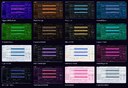
16 of the built-in themes, captured in 1.1.6.0
- Window size: HyperION opens filling your screen, works down to 1024×640 and remembers its window size and monitor.
- Look:
- a new interface font (Inter);
- sharper logos and vector toolbar icons;
- themed cursors;
- a redesigned Welcome screen that lists recent projects instantly.