A home of your own: Home Loft
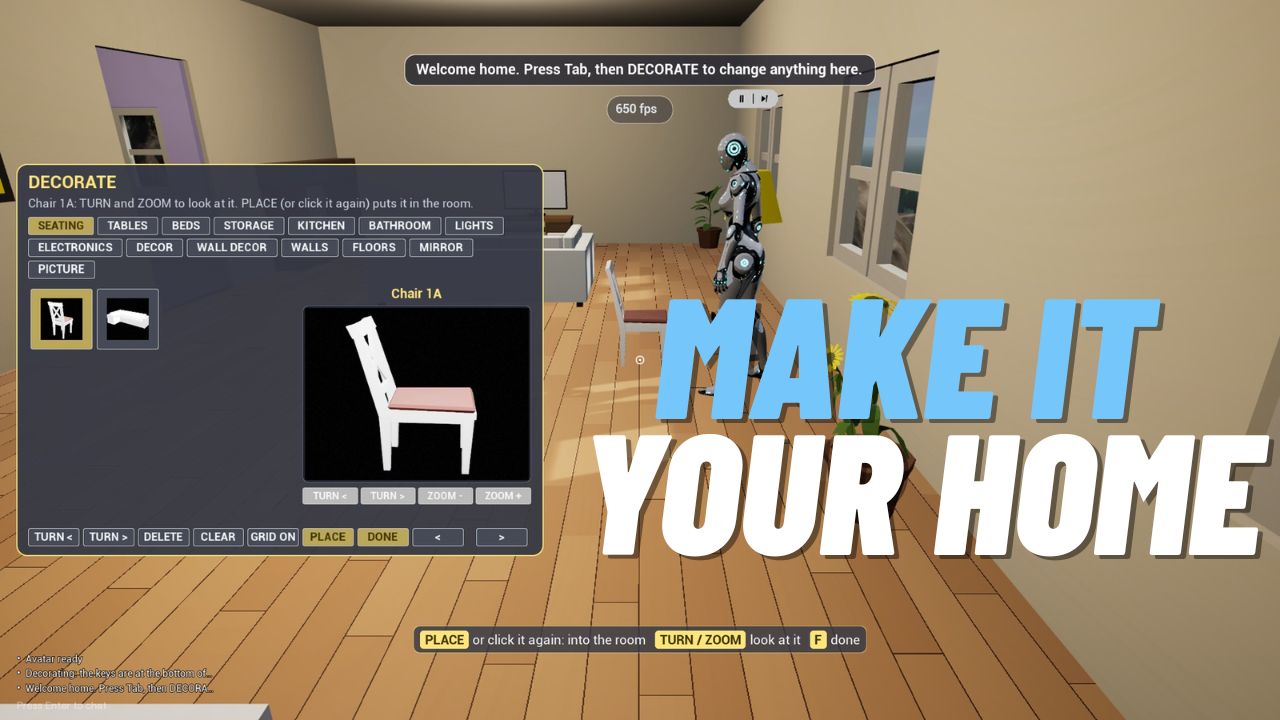
- Home Loft is a new home you can decorate any way you like. Find it at the top of Worlds, in the gold frame.
- Press MAKE THIS MY HOME in the quick menu. From then on HOME takes you there, and the game opens in it.
- It starts empty. Press STARTER SET on the decorate panel to furnish it in one go, or fill it piece by piece.
- Changed your mind? USE STARTER HOME in the quick menu takes you back. It asks first, because your layout is cleared.
Decorate
- Open the quick menu and pick DECORATE (on desktop, press B). A panel shows every piece with a picture, and a turning preview you can spin and zoom.
- Place, move and turn furniture, raise it off the floor or onto a shelf, and snap it to a grid.
- Change the wallpaper and the floor of each room.
- Make mirrors and picture frames: click one corner on a wall, then the opposite corner. Click a picture to give it an image from a web link.
- Nixie lives with you. Move her anywhere, or send her away and bring her back from the panel.
- In VR, point and pull the trigger. While you place something, your thumbstick raises and turns it. You can also pick pieces up with your hands.
- Your layout is saved to your account, so it follows you to any PC.
- Every piece is free while Home Loft is new.
Friends at home
- Your home is open to your Steam friends only, and it stays out of the Worlds list.
- Friends in your home can decorate it with you. Turn that off with the FRIENDS button on the decorate panel.
- Pictures from the web are shown to visitors only in a Steam friend's home.
Also new
- New players can now pick Box a Bot as their first mission, beside Fight a Bot and Run a Lap.
- Featured worlds sit at the top of the Worlds list with a gold frame.