Build 26294765
buildCraftomation 101: Programming & Craft · unstable, public · first seen
Update 1.0.14: a big optimisation, and 157 robots no longer lag
https://store.steampowered.com/app/1724140/Craftomation_101_Programming__Craft/
Hello mates!
This is Kolya, the programmer of Craftomation 101, and Sasha, our tester. Usually Oleg writes these posts, but this patch is all ours, so we'll tell you about it ourselves.
If this is the first time you've heard of us: Craftomation 101 is a game about visual programming and automation. You land on a frozen planet with one hungry robot, put programs together from code blocks, and the robots follow them: they gather resources, craft, keep the bonfires burning, build more robots and slowly bring the planet back to life. The further you go, the more robots you have, and sooner or later there are hundreds of them.
Here's the game trailer, so you can see what it looks like:
And hundreds of robots is exactly what this patch is about. Version 1.0.14 is a big optimisation we've been working on for several months, plus a long list of fixes. There are almost no new features. But on big factories the game now runs about three times faster, and it starts several times faster if you have a lot of saves. Below: what exactly we did, which part of it was silly, and why Sasha now hunts bugs together with an AI.
"Try playing when you have 100 robots"
Kolya speaking
Under the post about update 1.0.12, a player called Тринитротолуол wrote that the new modes were all nonsense, because with 100+ robots the game starts to lag SO badly. That hurt, but it's fair. And it's not the only comment like that.
Our studio computers are decent, and even on them a hundred robots is already a test. Players can have any computer at all, and we want the game to run smoothly on every one of them.
We've had one save for testing for a long time: it has 157 robots, and 121 of them are running programs all the time. That save had been sitting with us since March. We knew it was slow and never got around to it. This time we did. All the numbers below come from it: the same save, the same computer, the release build, which is the one you get.

Why you can't just make a game faster
When a game lags, you want to believe there's one bad line somewhere in the code: fix it and everything flies ten times faster. We had no such line. A lot of things run in the game at the same time: robots, their programs, bonfires, the cold, plants, the interface. First I had to find the slowest places (there turned out to be several), and then work out for each of them how to speed it up without breaking anything. You can't do it by brute force. In the end it took three stages.
Stage 1. Robots stopped looking for a road where there isn't one
First, why a robot needs to find a path at all. You don't draw its route by hand: you say "go to the bonfire" or "find a stone", and it finds the way on its own. And it has to do that often, because the map changes all the time. Tiles freeze and thaw. Robots drop items that others have to walk around. Someone mines a resource, and a new path opens up. The more robots and objects there are, the more of these searches happen and the harder the processor has to work.

When I started measuring, it turned out that pathfinding spent almost all of its time (about 95%) on failed attempts. A robot was looking for a road to a target it could never reach: behind a wall, on an island, in the ice. And to find out there was no road, it went through the whole reachable map. Every time, for every robot.

Now the game remembers in advance which parts of the map are connected to each other at all. If the target is in a different part, the answer "there's no road" comes right away, with no search. Robots run along the same paths, and the map doesn't change that often, so remembering this is cheap and the gain is huge. The game gives exactly the same answers as before: I checked it on forty thousand of these refusals, with zero mismatches.
While I was at it, I threw out a lot of work that ran every frame even though it gave the same result every frame. I also found something unexpected: the robot list on the left was drawing all its rows, even the ones you can't see. Now only the visible ones are drawn.
After this stage the game ran about twice as fast on our save.
Stage 2. The embarrassing one
I'm a little ashamed to tell you about the second stage, because it's about a setting.
Craftomation 101 is made on the Defold engine, and the game logic is written in Lua. Lua is an interpreted language, and on its own it isn't the fastest. That's why the engine has LuaJIT: while the game is running, it turns frequently used Lua code into machine code, which runs very fast. Convert it once and keep using it.
The thing is, this converted code has a limited amount of memory. By default it gets very little: the engine looks after really weak devices where every megabyte counts. On a big factory we have a lot of code, the space overflowed, and LuaJIT threw away all of the compiled code and started over. Eight to eleven times a second. So the game was constantly turning code into machine code and losing it right away.
You might ask: why not just tell the engine "compile it once and never throw it away"? There's no such switch. But you can raise the limits, and that was enough: there are zero flushes now. The game already takes about two gigabytes of memory, so it won't even notice an extra 32 megabytes for machine code.
Remember how in the last post Oleg said we'd invited the folks from SuperWEIRD, our other game, to talk about optimisation? This was their advice. First we checked whether our case was like theirs, and it turned out to be exactly the same.
Why didn't we notice this before? Because we didn't have 157 robots. On a normal factory the space doesn't overflow. So build more robots: it helps us find things like this.
Stage 3. Robot, stop putting on the same hat
I'd call the last round a clean-up. I went through what now takes the most time once more and found a lot of functions that were called every frame for no benefit at all.
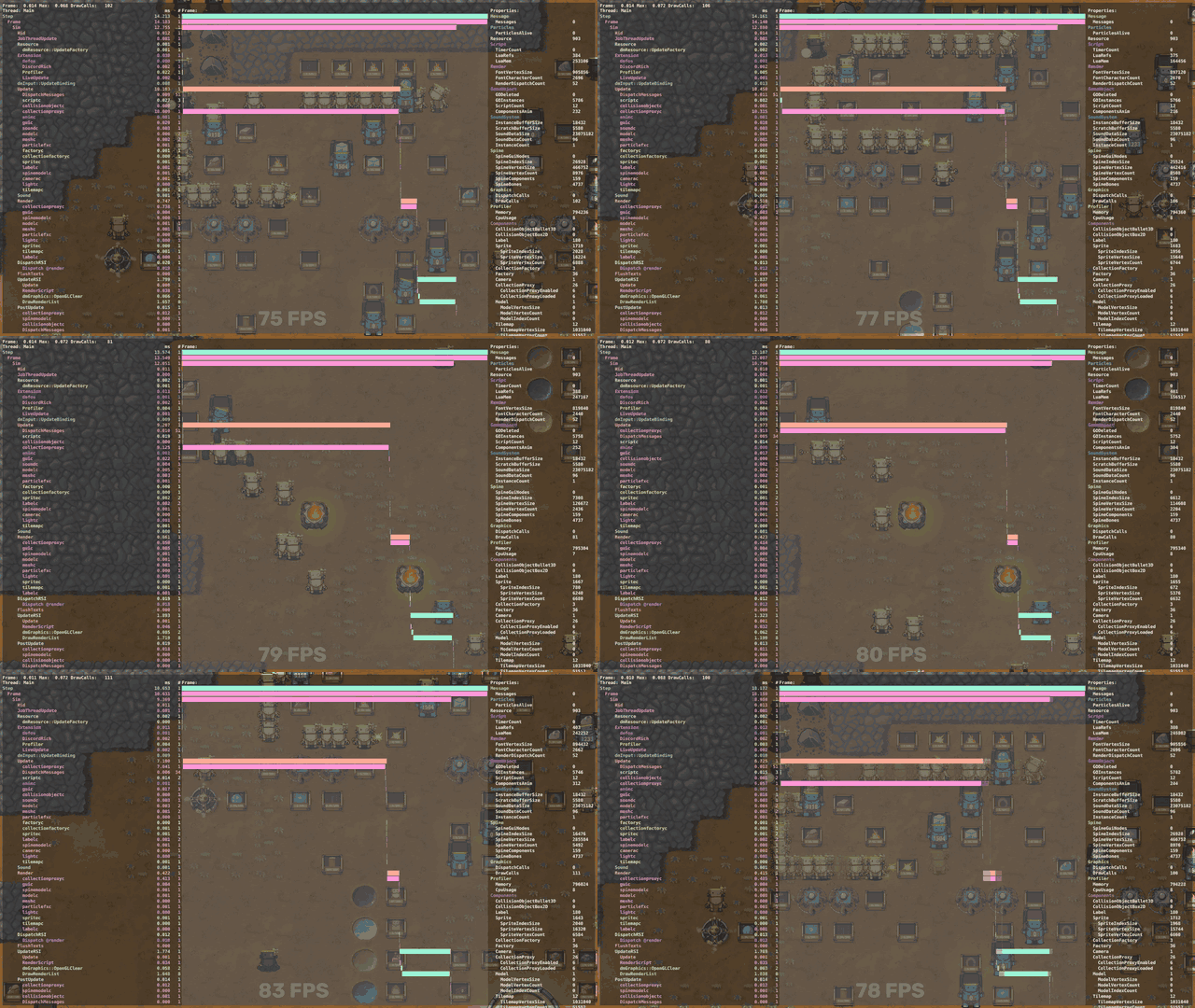
The clearest example is how robots look. On every step of its program, every robot set its appearance all over again: charge, colour, holiday outfit, upgrades. Even though it looked exactly the same as a second ago. Probably someone wrote it that way long ago so that nothing would glitch. There's no need for that now. Now a robot is redrawn only when its look actually changes. The time spent in that one function dropped by 96%, and the whole stage gave about 10% more FPS.
Another story like that lived in the code editor. If you selected a robot with a big program, FPS dropped and the connections between blocks flickered. It turned out that not just the selected robot but every robot was asking to refresh the values on the blocks: about two thousand messages a second. Now only what you can see gets refreshed. On a big function it was 9 FPS, now it's 25, and nothing flickers.
What we got
On our 157-robot save the average was 29 FPS. Now it's 95. That's 3.2 times faster. On my computer the release build stays above 90 FPS on it. So I hope that even on a really weak computer, a hundred and fifty robots will run fine.
Everyone gets the speed-up. Our game logic runs in a single thread, on a single processor core, so it doesn't matter whether you have Intel, AMD, an ARM laptop with Windows or a Mac with M1 or M2. The optimisations are in both the full game and the demo, on all platforms.
Oleg asked me: don't you feel a bit silly when you find something like this? Like, there it is, so obvious, why didn't we do it before? Honestly, no. I'm used to leaving optimisation for the end. First you make it work at all. And the extreme cases (a huge save, hundreds of robots, a weak computer) can be optimised forever: sit there for a year and you'll still find something. Right now I think we've squeezed out everything we could without redoing how robots run their programs. And that's not optimisation anymore, that's a different game.
The game starts in a couple of seconds, not ten
One more story, and you can't even call it a bug. More like an annoying loose end.
Every time it started, the game went through all your saves, unpacked the custom functions from each of them, and not once but twice, checked them and... wrote nothing. The check was needed long ago for old saves, but then it just stayed forever. The more saves you had, the longer the black screen lasted: every big save added a second and a half. It had been like that since March, and nobody really sounded the alarm.

Now the game only checks the save you're loading. With my eight big saves, the menu used to appear after 11.5 seconds, now after 1.8. We also sped up the save list: before, every time the game looked at it, it re-read every file in full, and with hundreds of saves that also meant seconds of black screen.
We also updated the engine
The game has moved to a fresh version of Defold, 1.14.0. In the meantime the engine authors fixed a lot of issues that other developers had reported to them. Maybe this will also help with the rare problems we never managed to catch ourselves. For example, the one we wrote about in the last post: for a few players the game simply stopped launching. If that happened to you, please check again and tell us how it goes now.
How a tester hunts bugs with an AI
Sasha speaking
I'm not a programmer. I'm a tester, and a lot of games have passed through my hands. Usually that means: you play, and play, and play in the weirdest situations until something breaks.
Now I have one more tool: Codex. It's an app from OpenAI, an AI that sits next to the engine and can read the game's code. I started by asking it how best to work with it and in which mode. In the medium mode, when I just asked it to "find bugs", it did a poor job. But in the deepest one, ultra, it thinks for a long time and does an interesting thing: it compares how you can reach the same point in the program from two different directions. If the expectations from those two directions don't match, there's most likely a bug there.
For example: in one place in the code an object has already been deleted, while in another place the program can still try to use it. It reaches for something that isn't there, and the game crashes with an error. Programmers call that a runtime error. And here's the most valuable part: Codex explains to me in plain human language how to reproduce it. "Put this here, that there, build this waiting program, and you'll get an overflow." I do it by hand in the game and look: yes, it really happens.
Towards the end it got funny. I'd say: "In this chat you and I have been hunting bugs for two weeks. Look at how we worked, and let's carry on in a new one." And it did.
Everything it finds, I then check by hand in the game, and only after that does the bug go to the programmers.
The bugs I remember most
CargoMates on the tunnel map. Players wrote that CargoMates (the big carrier robots) were sometimes missing commands. I could never reproduce it. Codex found the cause: with a certain order of buying upgrades and building CargoMates, three commands were simply never given to them. And I couldn't reproduce it because in free play and on the ring map CargoMates are on the map from the very start, and that hid the bug. They're missing only on the tunnel map. One workaround was covering up a whole bug.

The ale that worked the other way round. Energy use depended not on the energy-saving ale but on the speed ale. So it promised one thing and did another. The reason was trivial: two variables had swapped places. Now the energy-saving ale really saves energy.
The bonfire that pretended to be a tree. The Check Plant command asks a tile: "Who are you?" And a bonfire answered: "I'm a plant, trust me." Now only plants count as plants, and everything else goes to on error.
The CargoMate that steals backpacks. One CargoMate could take a chest right off another one's back. The chest goes, but the straps stay hanging. And if you then quit, came back and removed the CargoMate, there were suddenly two chests, plus an error on top.
Hungry but still working. Some robots with zero charge kept running their program as if nothing had happened.
Numbers that got too big. If a number in a program grew to infinity, calculations broke. Now the robot goes to on error in that case.
The Command Center expands its territory. After loading a save, the tile where you hand in quest items became part of the Command Center.
Speed 100. You could type any number into the Set Speed command, even though there are only three speeds. Now you can't enter more than three, and saves broken by this bug fix themselves on load.

The function that swapped someone else's result. If you called the same custom function twice in a program, the second call replaced the result of the first one. Also, the edit label used to disappear from function blocks.

And the rest of the fixes
- Find no longer goes to on error if the item it found earlier is still in place.
- Renaming a chest now also updates references to it inside closed custom functions.
- The game no longer crashes if you release a line after closing the editor, or use characters like %, < and > in robot and function names.
- Looped data connectors no longer freeze the game.
- Big robot groups in the list are dragged correctly, and an autosave during dragging no longer loses the group.
- Several robots reset quickly one after another no longer try to put items on the same tile.
- When you replace a chest in a tight spot, its body no longer disappears.
- Selecting a CargoMate no longer resets its speed.
- A repeated ale no longer shortens the remaining time of a longer effect. Is Buffed no longer stops the program when Any or Nothing is selected.
- Items handed to a busy robot are no longer lost.
- Bonfire upgrades that increase burning time are kept after loading.
- Fixed conflicts between lighting a bonfire and its tile freezing, and emergency ignition in deep cold.
- Text no longer disappears in a long save list.
- The array type menu no longer slides off the edge, and the names of dyed robots in the list are readable again.
- Texts and hints update after you change the language or rebind keys.

A few small things
- Tech tutorials with fire now give you six fires at the start instead of three.
- The Repeater tutorial asks you to launch the program again if you changed one that was already finished.
- In chest and bonfire tooltips, the item name and your label are now shown separately.
- Renaming a function group no longer hides its icon and colour.
By the way, about the Craftopedia
If you're just starting out or got stuck on a program: we recently made a web version of the Craftopedia, Craftomation 101 Craftopedia. It has all the visual programming commands (including Find, Check Plant and Set Speed from above), items and buildings with recipes, basic concepts and search. Every command has a detailed explanation of how it really works. It's handy to keep it open in a second tab while you play.

Show us your nastiest save
We never managed to find a save on which the game still lags after the patch. Maybe you can? If you have a factory that still lags, come to our Discord and show it to us. We'll be very happy to take a look, maybe optimise something else, and we'll definitely be incredibly grateful.
And one more thing. Under the post about the Hardcore difficulty, a player called fed1s wrote that making resources and cold harsher isn't real hardcore yet. Real hardcore in a programming game is when you can't do anything by hand: no dragging, no moving things around. You can only program the robots so they do everything themselves. We really liked this idea, and we're thinking about it. We won't promise anything yet, but we're curious: would you play something like that?

As for Sasha, new interesting bugs are very welcome. Given how many things in the game can combine with each other, there are surely hundreds more under the hood.
Thank you for playing, building huge factories and writing to us, even when you write that everything lags. That's exactly why this patch happened.
Kolya and Sasha
By the way, a little more Craftomation 101
If you'd like a bit more Craftomation 101, these extras are available too:
Soundtrack — the game's music by Arman Mkhitaryan, in FLAC and MP3.
https://store.steampowered.com/app/2795680/Craftomation_101_Soundtrack/
Art Pack — more than 90 images from development: never-before-published art of every robot, the very first sketches, and wallpapers.
https://store.steampowered.com/app/2795690/Craftomation_101_Art_Pack/
Mega Map of Self-Replicating Machines — a big printable poster about the history of self-replicating machines, from Full HD to 16K and in PDF. You can hang it in a computer science classroom or set it as your desktop wallpaper.
https://store.steampowered.com/app/2832980/Craftomation_101_Mega_Map_of_SelfReplicating_Machines/
How can you join the development?
- Share your ideas and feedback on our Discord server
- Help us translate the game into your native language
- Subscribe to our YouTube channel and follow the studio news
- Follow Craftomation 101 on Twitter
- Tell your favourite content creators about the game
- Sign up for our newsletter
Depot changes
| Depot | New manifest | Previous manifest |
|---|---|---|
| 1724141 | 278379642679277558 | 6303152926335271542 |
| 1724142 | 5268060765740545885 | 1552086174027499081 |
| 1724143 | 6219575827411192297 | 2778838181978945071 |