Build 26200940
buildMech Mechanic Simulator · fixes · first seen
1
Branches
1
Depots changed
—
Download delta
16:23 UTC
Time · UTC
Major update · published by the developer
Major Technical Update Now Available on the Beta Branch!
Hello everyone!
We’ve overhauled the technical side of the game: improved workshop FPS, fixed save issues and infinite loading screens, made minigame speed and mouse sensitivity independent of framerate, reworked graphics settings, and fixed dozens of long-standing bugs. Existing saves are fully compatible.
The update is available to try on a separate beta branch on Steam.
To switch to the beta branch:
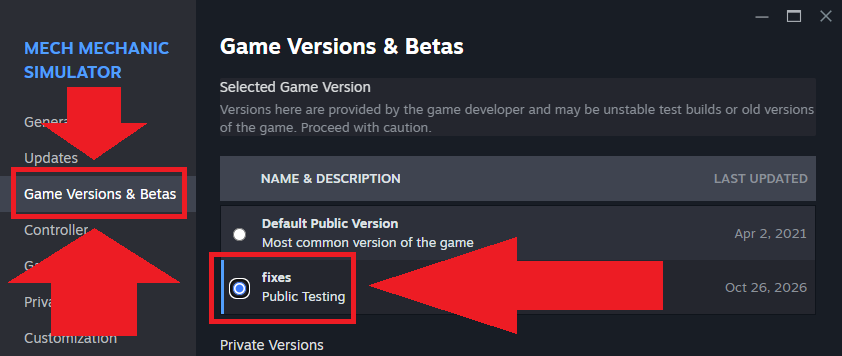
- Open Steam and go to your Library.
- Right-click Mech Mechanic Simulator and select “Properties”.
- Select “Game Versions & Betas” on the left.
- Select the fixes branch from the list of available versions.
- Wait for Steam to download the necessary files, then launch the game.
We’re releasing the update on a separate branch first to make sure the changes work as intended before rolling them out to everyone. This is temporary: the update will be released on the main branch at a later date.
At a glance:
- Performance: 25% higher FPS in the workshop at the same settings, graphics presets that properly improve performance on lower-end PCs, and no more freezes when opening workstations.
- Stability & Saves: protection against corrupted saves and profiles, automatic backups, and fixes for infinite loading screens, black screens on startup, and the game remaining running in Steam after quitting.
- Graphics & Settings: graphics settings now persist between restarts, with new graphics options, AMD FSR 1.0 resolution scaling, and crisp SMAA anti-aliasing.
- Camera & Controls: smooth camera movement while walking, FPS-independent mouse sensitivity, and a camera that returns to where you last worked at each workstation.
- Minigames: reliable completion checks for painting and rust removal, clearer rules for battery repairs, and progress saved between workstation sessions.
- Jobs, Shop & Economy: failed jobs now list exactly which parts are missing, shop search and filters work properly, and the $2 billion debt bug has been fixed.
- Tutorial: fixed softlocks that prevented workstation purchases. You can now disable the tutorial at any time by pressing Ctrl+Shift+T.
- Localization: added Spanish, French, and Korean.
If you encounter any issues, please let us know!
Per-depot manifest changes
Depot changes
| Depot | New manifest | Previous manifest |
|---|---|---|
| 1044981 | 8226421649167854433 | — |