Four video play modes!
There are four video playback modes now!
Besides the syncing up of VJ loops with baked in beat effects and a given BPM, AI VJ can now turn any video into a VJ spectacle!
There's:
- Synced with back jumps and flip, which plays the video comparable to a dance, going three steps forward, followed by one back, while mirroring the video on every other beat!
- Synced with small jumps around and flip, which is the same as the previous dance, but with less predictability, and larger jumps
- Synced with random jumps. Jumps on every beat, all over the video
- And the existing synced mode (still the recommended for DLC and professional VJ videos)
These modes can be selected in the settings menu, for one or multiple selected videos.
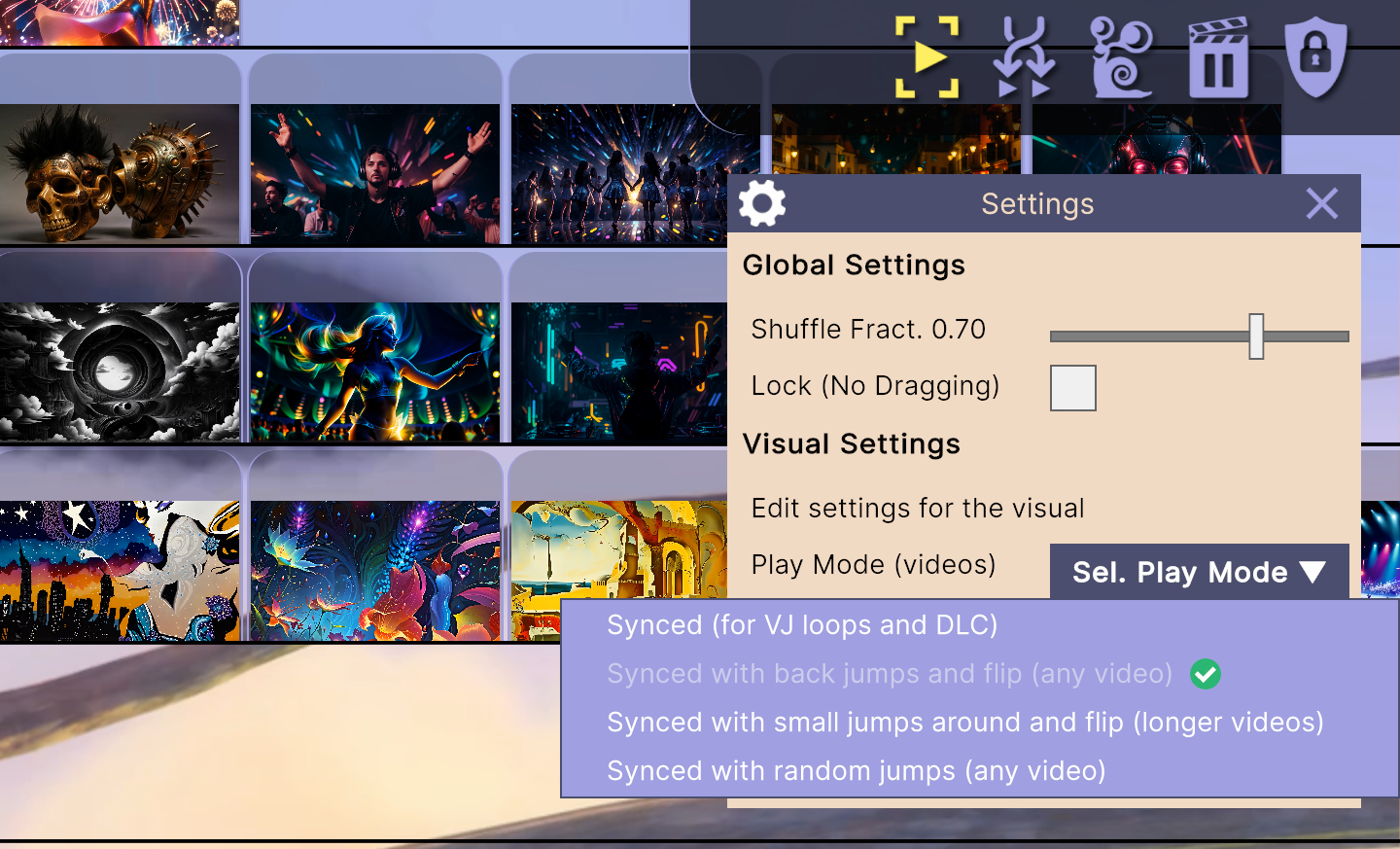
Selecting one of the new play modes! Neat in itself, but also needed for something coming soon!
In addition it is now possible to change the start and end times of videos using two sliders in the settings menu.
Fast custom video playback engine written in C!
It turns out our video playback library (AVPro Video) was utterly slow for seeking to a different start time, than the beginning of the video.
While seeking is essential for 3 of the 4 playback modes! Even if the video was encoded with all keyframes, it would simply ignore these, and decode (and even that slowly) all frames from the beginning of the video until the requested start time.
We tried the library used in the Open Source VLC video player. As it rocks for watching movies. But turns out (after integrating it) that it doesn't support multiple active players at the same time. That is they work, but any other than the first are awfully slow. Something to do with exclusive mode that can't be changed.
Thus we decided to write our own blazingly fast video playback engine in C, using the much more low level LGPL FFmpeg library. My C was a bit rusty to say the least, but I was up for a challenge. All this took much longer than expected, ofc, but it is done now!
This engine does exactly what we need. When we need it, and nothing superfluous. Making it much faster, and especially much smoother than the alternatives! With this AI VJ joins the ranks of other professional VJ software, that have their own playback engines, but are infinitely more expensive! (our free vs hundreds of euros)
In addition to the video engine, the playback logic on the Unity side was also streamlined, and improved, to support the additional video playback modes.
Nearly all codecs supported!
Now that we have a video playback engine based on FFmpeg, AI VJ can play many more video formats. Too many to list in fact!
I recommend you simply try the video format you want to play, and see if it works. 95% of them should!
Also check if it works fast enough on your device, as particularly seeking speed can still differ a lot based on file format and the availability of hardware acceleration.
Note that the fastest format is still mp4 with the H264 codec and 'yuv420p' pixel format, as it has widely available hardware decoding support!
Processing needed!
Note that when first loading an existing save, AI VJ will need to do some processing to collect stats on your videos, for display in the info tool, and for making the new video playback modes work.
Bugs Fixed
Several bugs were fixed, and more small improvements made:
- Code was reviewed and many inefficiencies fixed, for ultimately smooth visuals!
- Fixed a bug affecting the playback of videos that are not 60 fps
- When tasks are ran, the Bank, Deck, and Set now flash, also for info-gathering tasks (previously just for thumbnails)
- When adding DLC Decks to ones Set via the menu, info-gathering tasks would be ran. No more
- When restoring sample Deck and logos, info-gathering tasks would be ran. No more
- Various other minor bugs and memory leaks were fixed
If you reported (other) bugs, we're keeping a list and working through them! Please keep reports coming! We won't know if you don't tell us (best place to do so is in our Discord)
Join us on Discord!
Feature requests & bug reports are welcome. Either here or on our Discord!