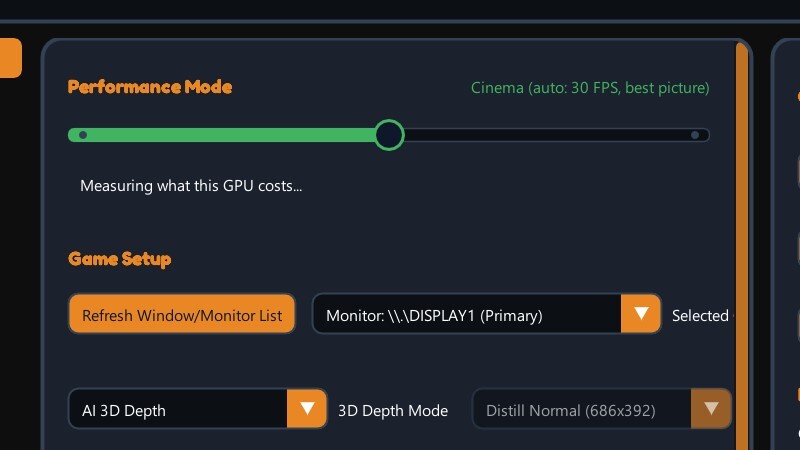
We have pushed a big FlatVR update to the Develop branch and we would like you to test it. Here is what is new. If anything breaks or feels off, tell us - that is what the branch is for.
Performance Mode: Cinema and Game
- One slider instead of a dozen settings. Pick Cinema or Game and the app chooses the best AI depth model for your graphics card by itself.
- It measures how long the model actually takes on your machine and settles on the heaviest one that fits the budget: Cinema - up to 30 FPS and the sharpest picture; Game - up to 60 FPS and the lowest delay.
IPD reworked
- The maximum eye separation is now capped at your real headset IPD, so the image no longer pulls your eyes apart.
- A stray nudge of the slider can no longer ruin the picture.
Settings profiles
- Save your picture settings as profiles.
- Share them in the cloud and pull other people's. Only the picture settings are published - local paths, monitor and screen placement stay on your PC.
Simpler ReShade setup
- Just pick your game from a list - no more hunting for its .exe through a file browser like before.
No more hands as controllers
- With the controllers out of your hands, there are no more accidental button presses or sudden screen jumps.
XR glasses: Screen Glow and Background are back
- The aura (Screen Glow) and Background effects work on XR glasses again - they were not switching on before.
How to join the Develop branch in Steam
- Right-click FlatVR in your Steam library -> Properties -> Betas.
- Pick develop from the dropdown. Steam updates on its own, and your settings are kept.
- To go back at any time, pick last_stable in the same menu.
Thanks for testing - we are listening.
More from FlatVR
Other announcements
FlatVR 1.65 is now the main branch - 1.67 on DevelopThe 1.65 build that has been on the Develop branch since last week - the optimisation update: HAGS on the Status tab, the depth model in pieces paced to your frames, presets that watch the frames, the Cinema Mode fix - is now the main branch for everyone. Nothing to do; Steam updates it. Develop moves on to 1.67 , with two fixes we would like tested: · Real depth from Direct3D 12 games works ag…FlatVR 1.65 on the develop branch - optimisation updateA regular update, about frame rate with AI depth on: hardware GPU scheduling on the Status tab, the depth model in pieces paced to your frames, presets that watch the frames themselves, and a set of fixes. How to get it: right-click FlatVR in your Steam library → Properties → Betas → develop . To go back, pick last_stable . Settings survive either way. Cinema Mode no longer freezes and jumps "S…FlatVR v1.62 - the depth presets, measuredThe AI depth presets had never been measured against each other. They have been now, on real frames, and two of them were not producing a depth map at all. The whole ladder. Top row is the source frames; below them every Distill preset from the cheapest down to the reference, with what each one costs and how closely it agrees with it. Two presets were broken. They have been replaced. Distill Fa…