I have released version 0.30-1 of sfsim.
This release introduces a major overhaul of the rendering code as well as a runway for the spacecraft. The rendering system is implemented using the Clojure programming language as well as GLSL. LWJGL3 is used to access the graphics card’s OpenGL bindings.
The new rendering code uses deferred shading, which first computes and stores per-pixel geometry data in a geometry buffer (G-buffer), then calculates each pixel’s final lighting in a separate shader pass. Deferred shading makes it easy to render decals, which are essentially textures projected onto scene geometry. It also enables efficient real-time rendering of many localized light sources.
Deferred rendering splits rendering into stages so geometry is processed first, lighting later.
Step by step from the images:
Geometry Pass
Projecting Geometry
The scene is made of triangles. A vertex shader is used to project the triangles which are passed to the rasterizer. For the planet mesh, the geometry is further refined through tessellation and geometry shaders. The geometry pass draws all visible geometry and stores per-pixel surface data into multiple buffers (textures) as shown below instead of computing final lighting immediately.
Although the runway could be rendered as a decal in a separate pass, it was chosen to render it within the same shader as the planet. This will make it easier to later adopt runtime virtual texturing, for example to render airport ground surfaces with markings.
Diffuse buffer
The diffuse buffer stores the base RGB color of the material at each pixel. There is also an emissive buffer for light-emitting surfaces which is not shown here.
Material property buffer
The metallic buffer stores a scalar indicating how reflective the material at each pixel is. The buffer with specular strength (inverse roughness) is not shown here.
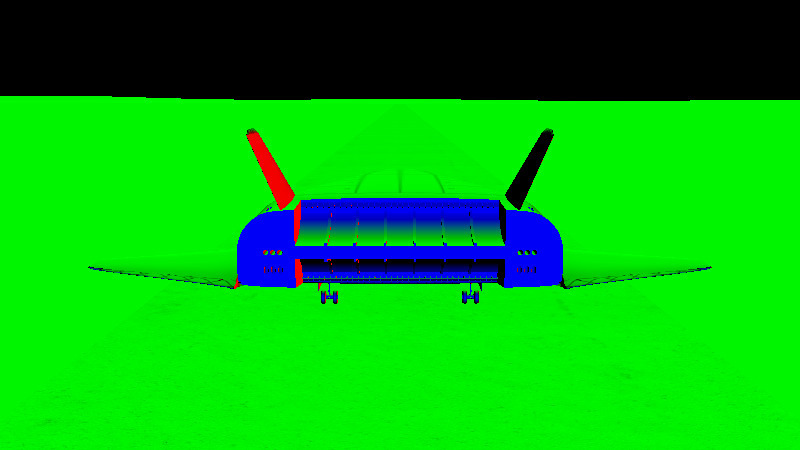
Normal buffer
The normal buffer stores the surface normal vector at each pixel in the camera coordinate system. Normals are useful lateron in order to determine the incident angle of incoming light.
View-space Position buffer
The view-space position buffer stores the 3D position of the surface visible at each pixel. This data is useful for computing atmospheric scattering and the distance to local light sources during the subsequent lighting pass.
Lighting pass
During the lighting pass, the G-buffer and a shadow map are used to calculate per-pixel lighting. Blending can also be used in this pass to update the lighting of only part of the scene, without evaluating every light source at every pixel. This image shows the shaded result produced with a Phong model.
Atmospheric effects
Phong shading computes the surface color after lighting. The lighting shader also accounts for atmospheric scattering. Atmospheric scattering both adds in-scattered light and removes part of the incoming light through scattering.
Final compositing
The volumetric clouds are rendered separately using a lower resolution. The lighting pass then incorporates the cloud layer using depth-aware upsampling.
Let me know any feedback and comments in the sfsim playtest discussion forum.
Don’t forget to wishlist sfsim!