A better day behind the counter
New Game+ - Game Store Simulator Playtest · published · build 25278648
Hi everyone,
I've been working through your recordings and reports. This Demo and Playtest update catches up on the changes since September 6, including fixes that reached the builds between posts.
Quick highlights
- A new first-era computer look, inspired by Windows 2000/XP, with clearer orders and budgets.
- Better trade-ins and repairs, from grading a copy to opening the Nexus cartridge and using the tools.
- More natural hands and customers, with improved shelf pickups, basket unloading and payment.
- Stock you can find, plus clearer skills, shop plans and money tracking.
- A tidier shop and livelier street, with improved placement, glass, lighting and traffic.
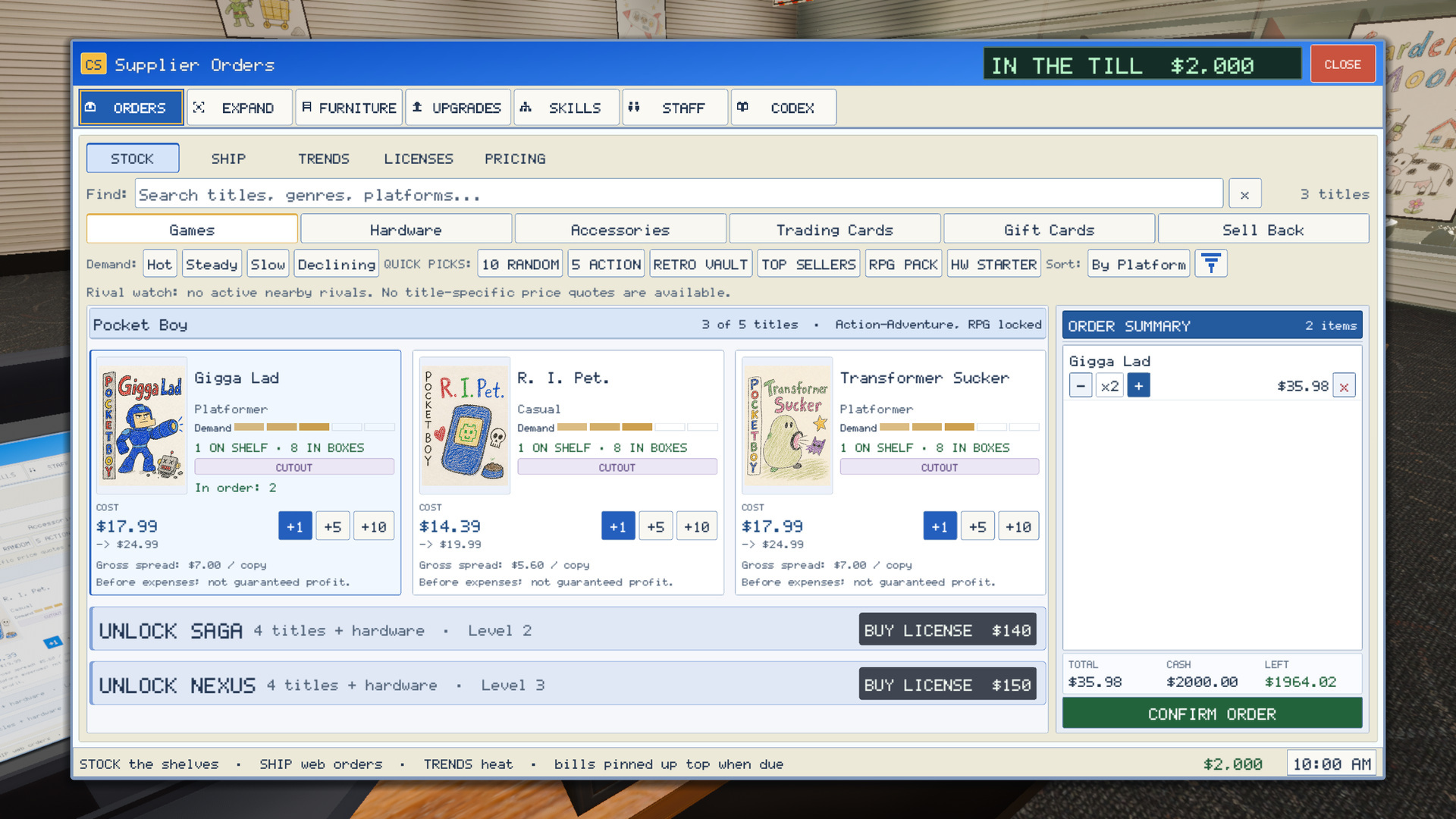
The refreshed first-era computer, with live order counts and a clearer budget.
Full patch notes
The computer and everyday screens
- Reworked the first-era computer with blue title bars, pale toolbars, white product cards and clearer selected buttons.
- Covers fit without cropping. Enlarged previews have more room for long titles and descriptions.
- Product cards show a live In order count.
- The cart separates Total, Cash and Left, and clearly shows when you're short.
- Quantity edits keep your keyboard focus and scroll position. The catalog still rearranges itself when the cart opens or empties.
- Switching tabs keeps your draft, search, filters and place in the list. Clicking the current Orders tab no longer resets it.
- Returning to the cart refreshes its prices. Closing the computer clears the draft.
- Added receipt-style lettering and better layouts at larger text sizes across the computer, inventory, skill map, offers and grading screens.
- Price stickers update as you move the slider, so the preview matches the price you're setting.
- Cleaner hover, press and window animations, with Reduce Motion support.
- Removed repetitive notices and the extra customer-request tracker. Important outcomes still appear.
- The phone's ringing glow is softer, and its choices have visible keyboard focus.
The trade-in counter
- A separate trade fund is available from the first era: $90 to start, $30 each morning, up to $150 before later upgrades.
- Leftover trade funds carry over. You choose whether to cover any shortfall from the register.
- The first offer explains the fund. Appraisals show the remaining balance, and opening help gives you time to read.
- Appraisals show resale value. Damaged copies make it clear that repairs and pricing come before resale.
- Payout receipts explain what to do with your new stock.
- Reading an offer uses the trader's patience instead of a short hidden timeout. Escape pauses; Backspace cancels.
- A trader you're actively serving stops complaining as though you've ignored them.
- Stock becomes yours only when the payout completes. Abandoned payouts clear the drawer so the next checkout can start normally.
Grading and the repair bench
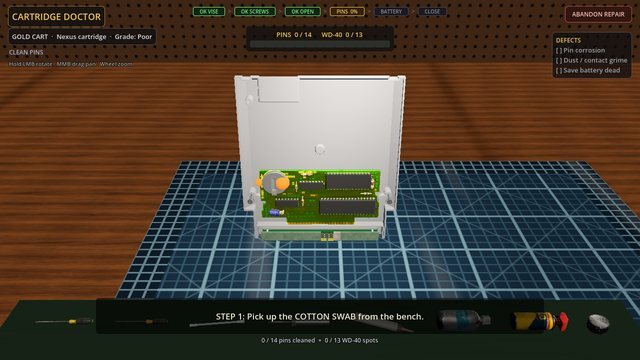
Inside the Nexus cartridge at the repair bench.
- Better grade examples and a clearer first lesson show the difference between dirt, corrosion and damage.
- After the first lesson, the examples tuck away behind Compare Grades.
- Cartridges and discs turn to show the right side. Pins, scratches and smudges are easier to see.
- Reopening a copy no longer changes its underlying condition.
- Quick Look and Counter Assessment offer different shortcuts as you develop the shop. Quick Look still leaves the grade call to you.
- The Nexus cartridge opens to fitted internals, three separate screws and an animated cover.
- New screwdriver and soldering-iron models have corrected size, grip and tip alignment.
- Tools stay within reach when the window or UI size changes.
- Bottle pours, wet swabs and tool returns flow more cleanly. Selected tools appear immediately, without waiting for mouse movement.
- The wear seen during grading carries through to the bench. Clean contacts don't ask for cleaning, and the grade reflects the repair result.
- Added fresh swab, contact-cleaning and shelving sounds, plus a quieter phone ring without the doubled first bell.
Stock you can actually find
- Invisible backstock is gone. Copies are on shelves, behind the counter, in boxes, in your hands, or where you dropped them.
- Inventory shows those locations, and the computer says In Boxes.
- Old backstock in returning saves arrives boxed at the delivery crate. Refill a sold-out facing by carrying a copy to it.
- Staff stocking, phone pickups, counter sales and other stock actions use physical copies.
- Assisted sales no longer leave the sold copy behind or return it twice after cancellation.
- Carried and dropped stock returns to its saved location. Thrown cases bounce off the counter instead of disappearing into it.
- Paid used and special copies keep their condition, cost and sticker price through pricing, storage, sale and reload.
- After paying for a special find, you can price it later or choose an available destination. Backing out keeps the paid copy.
- The gift-card rack won't charge for a restock while you're holding a box or game.
Customers finding their way around
- Shoppers choose reachable stocked displays, pause to inspect them, and look at the game they're considering.
- They remember titles they've just found instead of immediately claiming they weren't there.
- Shelf pickups use the selected copy, with better hand contact and a continuous move into the basket.
- Customers ask for help when a display is out of reach.
- Reduced abrupt turns, repeated walk/stop loops and stalls just short of a shelf.
- Customers walk small queue movements instead of popping forward. Companions follow more reliably, including when their shopper joins a queue.
- Pedestrians keep their appearance and walking motion when they enter the shop.
- Recommendation prompts show whether the game in your hand matches the request before you give it away.
- Customer camera cues release properly. Moving your view takes control back sooner.
Hands, staff and checkout movement
- Reworked customer arm poses for shelf handling, counter placement, basket unloading, payment and bag carrying.
- Cases and basket contents move over the counter surface instead of through its front.
- Better customer phone grips and tapping gestures.
- Staff hold boxes with both hands and grip their phone and vacuum more naturally.
- Demo-station hands line up with the controller or keyboard being used.
- New articulated player hands grip games, stacks, boxes and the vacuum. They lower out of view when you're empty-handed.
- Your shadow has a more human shape.
- Staff keep serving the remaining queue after closing.
Skills and shop plans
These changes also cover longer Playtest runs. Some projects unlock after the six-day demo, and restoration and collector projects require later eras.
- Rebuilt the skill map with clearer branches, connected paths and better previews. Skills give their full benefit in one purchase, and Fit and zoom make browsing easier.
- Cash investments remain separate from skill purchases.
- Plan Member Night, Genre Night, Signature Display, Restoration Workshop and Collector Appointments as their requirements become available.
- These plans use stock and visitors you actually serve. Member and Genre Nights let you choose three games to set aside.
- A restoration buyer wants the particular copy you repaired, priced and displayed.
- Used-game price limits now agree between the sticker gun and computer.
- Skill previews show what a purchase would mean for a copy you own. A higher asking-price limit still needs a willing buyer.
- Timing, patience, pitch and guidance preferences are comfort settings instead of skill-point purchases.
Money, goals and daily plans
- Later-era daily plans use clear count targets that stay completed.
- Order goals account for what can actually be delivered. Irrelevant targets show as unavailable instead of impossible empty bars.
- Goal rewards are awarded when earned. The calendar shows the result instead of asking you to claim it again.
- Browsers and demo visitors leaving normally no longer count as customers you neglected.
- Membership signups pay correctly even when no merchandise sale follows.
- Receipts show what was actually charged. Loyalty credit goes to the right buyer and is based on what they actually paid.
- New games consistently start with $2,000. Removing the extra first-day stocking grant brings the opening balance in line with the welcome.
Arranging and expanding the shop
- More accurate floor, wall and surface placement for corner furniture, hanging signs and small fixtures. Unsupported spots are refused more clearly.
- Grid and furniture-edge snapping work together more predictably. Shift gives finer placement; Ctrl releases the assists.
- Shelving uses quarter-turns to keep stock rows aligned. Decorative pieces retain finer rotation.
- Empty-slot previews use simple shapes that match what fits. Aiming and outlines update more reliably as you move stock.
- Furniture settles into place without shifting stock or changing where you can walk.
- Merchandising ranges sit on the floor, with clearer markers for affected games.
- Repaired expansion floor and ceiling joins, old wall sections left inside expanded rooms, and the gap at the annex edge.
- Furniture colors apply to the parts the model supports. Lighting keeps your settings through room rebuilds and day changes.
The storefront and street
- Reduced bright, displaced lines on the glass, softened harsh morning sunlight, and brightened the shop through its ceiling lights.
- Traffic follows lanes, turns through the junction, responds to working lights and queues more smoothly.
- Turning cars yield and steer their wheels with the turn. Cars brake for you.
- People now sit at the outdoor table, with better seated and walking animation.
Controls, guidance and other fixes
- Added colorblind correction with adjustable strength, plus larger interface scaling.
- Holding a key no longer advances several inspection steps or backs out through several menus.
- Menu focus returns to the right button after closing Settings or rebinding a key.
- Controller confirm and back work in menus. Phone-call keyboard navigation stays inside the call.
- F1 opens Help. Control hints have their own accessibility setting.
- The first-order lesson appears inside the computer instead of covering its tabs.
- Pricing guidance stays until you've priced the first copy. Repair guidance appears while you're at the bench.
- Turning tutorials off also silences automatic hints. Delayed lessons check whether they still apply before appearing.
- The marker back to the shop remains available after ending the day outside.
- Trends avoid unreleased stock and explain a missing console license when it matters.
- Expanded Brazilian Portuguese and Spanish interface translations.
- Fixed the demo ending leaving its overlay over the main menu after returning to it.
I'm still working on brief pauses when loading some things for the first time, and some rough movement during busy launch nights.
Please keep sending the moments that feel wrong, even if they're hard to describe. Seeing them happen helps a lot. F10 sends feedback from inside the game.
Thanks for playing and for helping me make this little shop better.