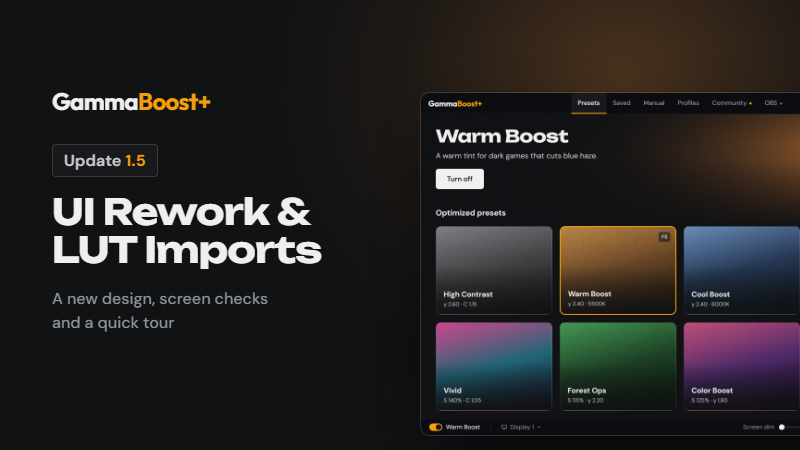
UI rework
- A new design: graphite colors, squared menus and dialogs, cleaner preset and Community art.
- Read before you turn on: clicking a preset card shows it without turning it on. Turn it on from the banner, or double-click the card.
- A small on/off switch in the bottom bar.
- The window resizes smoothly, scales up on big screens and opens a little smaller.
- Rainbow Mode now flows through the logo, the open tab and whatever is on.
- Fewer pop-up messages, and a plainer in-game pop-up.
- A sharper preview in Manual.
- Profiles show their keybinds by default.
New: LUT imports
- Turn a LUT into a preset: Saved → Import .cube. You see the LUT next to what your screen will show, with a match rating, before you save.
- On NVIDIA cards it also uses the driver's color matrix for a closer match.
- Works with .cube files from Adobe and DaVinci Resolve.
- Presets made from a LUT can be shared to Community.
Also new
- Screen not changing? If something on your PC keeps presets from showing, a button in the bottom bar says what and how to fix it: NVIDIA reference mode or color sliders, Windows' automatic color management, apps like f.lux or Iris, another tool's calibration, or a program resetting your screen. Also in Settings → Display.
- Quick tour: a short tour the first time you open GammaBoost+, starting with your language. Replay it from Settings → About.
Presets
- Color Boost replaces Extraction Mode in the optimized presets. Extraction Mode still works in profiles that use it, and Night Vision stays unlocked if you'd tried all of the earlier six.
- High Contrast, Warm Boost, Cool Boost and Forest Ops get deeper blacks; Forest Ops also gets a little more color.
- Shorter preset descriptions.
- Community: the Tactical category is now called Color.
More from GammaBoost+
Other announcements
GammaBoost+ 1.6 : a preset for each monitorA preset for each monitor · Pick a monitor, then a preset: only that monitor changes. All displays still sets every monitor. · The picker shows each monitor's preset. · The on/off switch and key act on the picked monitor. With All displays picked, they act on all of them. · "Apply last preset on launch" restores each monitor's preset. · OBS sync follows your primary monitor. Profiles · Monitors…GammaBoost+ 1.4.1 — Default Profile FixFixes · Your Default profile turns on at launch: GammaBoost+ now opens in your profile with its ★ preset on screen, as the profile's "★ turns on when you switch to this profile" setting says. Before, it opened on the last preset you used, even one from another profile, switched off. · Back to your Default profile after a game: when a game with its own profile closes, your Default profile's ★ pr…Thank You for 1,000 Users!GammaBoost+ just surpassed 1,000 users , and I honestly can't thank you all enough... When I started building GB+, it was simply the tool I wanted for myself and friends: a way to see clearly in dark games and make games more vibrant with ease and without washing everything out. Seeing a thousand of you use it every day is something that im am so very grateful for. A big thank you to those who…