Major update
Update 3 - Themes, Custom Skins & Wider Game Support
Keyboard & Mouse Overlay · published · build 24289060
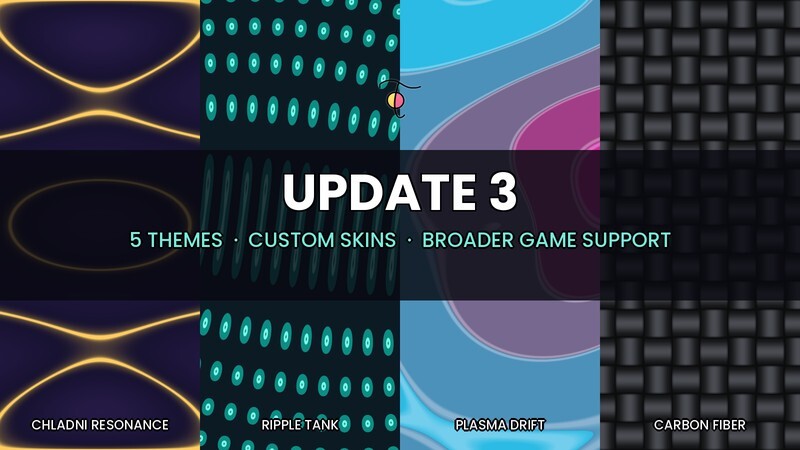
This update is almost a relaunch. We rebuilt how the overlay reads your input, gave it a full visual upgrade, and shipped the most requested feature: full customization with themes and your own images. Thank you to everyone who left feedback — a lot of this update exists because you told us what was broken and what you wanted.
Works In Far More Games
- Some games (especially mobile ports and titles using certain input systems) displayed the overlay but never showed your key presses while the game window was focused. We rebuilt input detection from the ground up with a deeper capture method — key and mouse presses now display correctly in these games, in everything else, and on the desktop.
- Mouse buttons and scroll input use the same new system, so the mouse overlay works in those games too.
- One honest limitation: a small number of games run kernel-level anti-cheat (such as nProtect GameGuard), which blocks all outside programs from seeing your input while that game is focused. That is intentional on their part and applies to every external overlay — no third-party tool can display your key presses in those titles. Everything else in this update still works there, and the overlay returns to normal the moment the game loses focus.
New: Themes
- 5 built-in themes, out of the box: Classic, Chladni Resonance, Ripple Tank, Plasma Drift, and Carbon Fiber.
- Three of them are created from real physics and mathematics — vibrating-plate resonance patterns, wave interference, and classic plasma fields — flowing continuously across your whole keyboard.
- One-click Apply from the setup screen, and you can save your own color/image combinations as personal themes.
New: Custom Skins
- Use your own images! Pick any picture (wallpaper, artwork, screenshot) and it spans the entire overlay, with your keys acting as windows into it.
- Separate images for the keyboard overlay and the mouse overlay.
- Smart scaling keeps images sharp: no stretching, no distortion, proper aspect handling on every key — including wide keys like Space and Shift.
Visual Upgrade
- Refreshed mouse overlay with cleaner, rounded buttons and clear symbols for scroll and clicks.
- Rounded corners across keyboard and mouse — or switch back to sharp squares with a single toggle. Your choice.
- Text now stays crisp at any overlay size — enlarge as much as you like, labels re-render at full resolution instead of blurring.
- Key outlines and letters no longer fade or disappear when shrinking overlays.
- Readability pass on all themes: contrast-tuned label colors with a subtle halo so text stays legible over any pattern or image.
Quality Of Life
- Proper system tray icon (with a fresh new look) — right-click it to reconfigure or exit at any time.
- Reconfiguring from the tray now cleanly closes your running overlays and reopens setup, instead of leaving things stuck.
- Exit now exits. Instantly. Every time.
- Overlays no longer clutter your taskbar or Alt-Tab list.
- Multi-monitor support: overlays can now be placed on any screen, not just the primary one.
- The floating Configure panel stays clickable and no longer wanders off when you click near its buttons.
Under The Hood
- Your statistics, positions, and settings now live in a proper per-user location — they survive updates, reinstalls, and Steam's "verify integrity of game files". Existing data is migrated automatically on first launch.
- Fixed a startup crash that could occur if the statistics file ever got corrupted.
- Fixed dark custom colors rendering as transparent holes in the overlay.
- Fixed the oscillogram's rhythm visually stuttering every few seconds.
- Smaller download: stripped debug files from the build.
- Dozens of smaller fixes and cleanups across the board.
If the overlay wasn't working in your game before — give it another shot. And if you're enjoying the update, a review helps us more than you know!