Major update
2.0 - Redesign, Acheivements & More!
Glyphy - Achievement Guides and Tracker · published · build 25711311
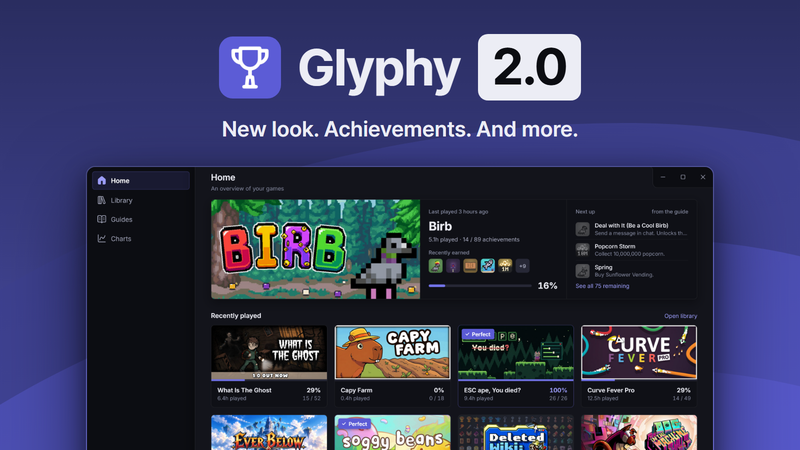
Glyphy 2.0
Glyphy 2.0 is a full redesign of the app and the overlay, with new pages, DLC tags, guide requests, an account switcher and 25 Steam achievements.
Redesign
- New visual design in dark and light, with new icons, buttons, menus and switches.
- No title bar: the page runs to the window edges, with the window buttons in a corner notch.
- New sidebar: Home, Library, Guides, Charts, then your account and Settings. It folds to an icon rail with hover labels (edge tab or Ctrl+B), folds by itself in narrow windows, and remembers its state.
- The account row shows your Steam avatar and sync status, with Refresh now and Retry (F5).
- Library, Guides and Charts fit narrow windows.
- Restyled tray menu.
Home
- Leads with your last played game: art, progress, recently earned icons, and Next up from its guide.
- Two rows of Recently played, plus Almost there (the games with the fewest achievements left).
- Right-click menus on the hero, cards and Almost there tiles.
- Game cards lift and tilt on hover.
Library
- Status segments (All, In progress, Perfect, Not started) with live counts.
- Filter panel: installed, has a guide, requires DLC, hidden, completion, playtime and last played.
- Display menu: sort, order, and Grid or List.
- New List view: a table with sortable headers. Click the current header to flip the order.
- The Library controls are now sticky.
- Card menu (the three dots or right click): Launch in Steam, Preview overlay, Open guide, Automatic overlay switch, Hide.
Game page
- One scrolling page replaces the tabs: hero, progress over time, then the full achievement table with All, Earned, Not earned and search.
- Each row opens that achievement in Guides.
- "Request a guide" button for games without one.
- Removed: the per-game statistics share.
Guides
- One split card: the achievement list on the left, the reader on the right, with a game bar and game picker above.
- Sorts: Guide order, Missable first, Rarest first, A to Z, Steam order, plus reverse.
- Focus mode hides the list.
- Warning and tip steps are marked with an icon.
- Checklists read "Name · Location", can be grouped, and can be marked "In order".
- Glitch risk and DLC flags show in the reader and in the overlay's Before you start.
New pages: What's new and Requests
What's new
- Guides added or updated in the last 90 days, your games first.
Requests
- A public board of the most requested games without a guide.
- Vote for up to five games, search to request any game, and get suggestions from your recently played games.
- Votes respond instantly, and can be taken back after one hour. A countdown shows the minutes left.
- When a game you voted for gets a guide, your vote comes back and What's new tells you.
Needs DLC tags
Games that need DLC to reach 100% are now tagged across the app. This only works for games that have a guide, because Steam does not provide this information through its APIs.
Charts
- Stats strip: overall progress, perfect games, average completion, total playtime.
- Activity chart over 30 days, 26 weeks or 24 months, with a trend line and a details column.
- Library progress, Closest to completion, and Rarest achievements.
- New Unlocks page: every unlock by day, filtered by period (presets or a calendar) and game, searchable.
- Share is now its own page: preview, Show my Steam name switch, Copy image, Save PNG.
Overlay
- Three clear stages: collapsed, at rest, and with controls. The chevron drives them, window focus no longer does.
- New hotkey for showing and hiding the controls (Ctrl+Alt+C by default), separate from the toggle hotkey.
- Restyled card with a Summary / Guide switch, numbered step boxes, and an order menu in the header.
- The opacity slider runs from 0% to 100% in 1% steps, and the chevron stays visible at any opacity.
- The OBS setting now explains how to keep Window Capture attached to the overlay (match by title).
Settings
- Settings is now a floating panel inside the main window, not a separate window. Changes apply as you make them.
- Sections: General, About, Overlay, Shortcuts, with a settings search.
- Shortcuts flag conflicts and can all be reset.
- New "Exit on close" setting: the close button quits Glyphy instead of hiding it in the tray.
- The Overlay section lists the games whose overlay is turned off, with Allow again.
Accounts
- The account menu lists every Steam account that has signed in on this PC and can show any of them.
- Only the signed-in account syncs. Other accounts show their last snapshot and say "Not signed in".
Tutorial
- Restyled to the new design, with a step meter and a new highlight ring.
- 10 steps, rewritten for the new pages.
- A game without a guide no longer stalls the tutorial.
- Escape ends the tutorial, and it can no longer get stuck.
Steam achievements
- Glyphy now has 25 Steam achievements of its own.
- Glyphy now appears in its own library.
Performance
- Faster startup.
- Page switches are near instant, and pages keep their scroll position.
- Long lists (guides, unlocks, What's new, Requests) only build the rows on screen.
- Smooth sidebar fold, including in the first seconds after launch.
Fixes
- Fixed a crash with large libraries.
- Fixed Guides staying on "Loading achievements" with an empty library.
- Fixed the game page saying "Not played yet" for a game with playtime.
- Fixed the account menu's corners on the light theme.
Linux
- Windows and Linux now ship as one Steam build. Linux players just click Install; the linux-beta branch is no longer needed.
More from Glyphy - Achievement Guides and Tracker
Other announcements
v1.0.9 - Bug Fixes & What's Next\ · Fixed a bug where a setting wouldn't save if a shortcut was in conflict, disabled or invalid. What new features to expect in October: · Tags to indicate which games require DLCs for 100% completion · Search filters in the library · New settings · 100 more guides (we already added around 100 in September btw!) · A section in the homepage to see recently added or updated guides · And maybe ac…v1.0.8 - OBS Support & Updated Assets\ · Added OBS support for the overlay. Check the overlay settings in the app to turn it on. Be aware that turning it on will also show the overlay in alt+tab. This can be annoying, that's why we made it possible to turn it off. · Added support for games that use the new hashed path for their assets. What this basically means is that from now on, new games will display their artwork correctly ac…v1.0.7 - Bug Fixes & Improvements\ · The automatic overlay can now be turned off for selected games from the library. \ · Fixed a bug where the Steam Family games would show 0h playtime no matter what. · Fixed a bug in the library that caused the application to crash on game search. In the month of September we'll focus on bringing as many guides as possible to Glyphy. Let us know which games should be prioritized here .