Status
SteamPeaks
ChartsSalesUpcomingPatchesNewsCalculator
New on SteamEvery app, DLC and depot the minute Steam creates itAppsEvery app on Steam, newest change firstPackagesSubs and bundles, and what each containsDepotsDepots, manifests and install sizesTagsSteam's user tags and the games under themDevelopers & publishersCompanies and their cataloguesTechnologiesEngines, SDKs and anti-cheat found in the filesChange historyEvery PICS changelist as it lands
SignalsNineteen readings of the whole catalogueCompareAny games side by sideRecordsAll-time peaks and the days they were setReportsWeekly and monthly write-upsAlerts & newsroomWatch a game, get told when it movesSteam statusIs Steam up, right nowWeb API explorerTry the endpoints in the browser
NewsSteam's own announcements and the sales calendarCalculatorWhat a Steam account is worth, and its pile of shame
/
Sign in
/
SteamPeaks
The ultimate resource for Steam data.
ExploreChartsSalesSales and festsUpcomingPatchesNewsRecordsTrendingSignals
DatabaseAppsPackagesDepotsTagsDevelopersTechnologiesChange history
ToolsCalculatorCompareSearchAlertsSteam statusAPI
SiteMethodologyFAQDiscordSupportSign in via Steam
Not affiliated with Valve or Steam. Game names and artwork belong to their owners. All times UTC.
PrivacyCookiesFair useStatus
Cursor CharmNewsCursor Charm 1.0.2 - Smoother Visuals & Startup Feedback
In-game event

Cursor Charm 1.0.2 - Smoother Visuals & Startup Feedback

Cursor Charm · published 6 Sep 2026, 17:23 UTC

All newsPlayers around this dateRead on Steam

Smoother Visuals & Startup Feedback

Previously, Cursor Charm could appear to freeze during startup while visual effects were being prepared in the background. Sorry about that!

The app was still working, but there was no indication that anything was happening, which made it look like Cursor Charm had crashed.

This update makes that process visible and improves how effects are prepared:

  • Preparing effects on first launch. After this update, the first launch will show a Preparing effects window while Cursor Charm prepares visual effects for your graphics card. It may pause briefly between steps, but the app is still working.

  • Less stuttering later. Preparing these effects ahead of time should reduce hitches when switching between charms or using an effect for the first time.

  • New effects are prepared when needed. You may occasionally see Preparing effects... for a moment when switching charms while something new is being set up.

Most of this preparation only needs to happen once.

New Charm

A new charm has been added:

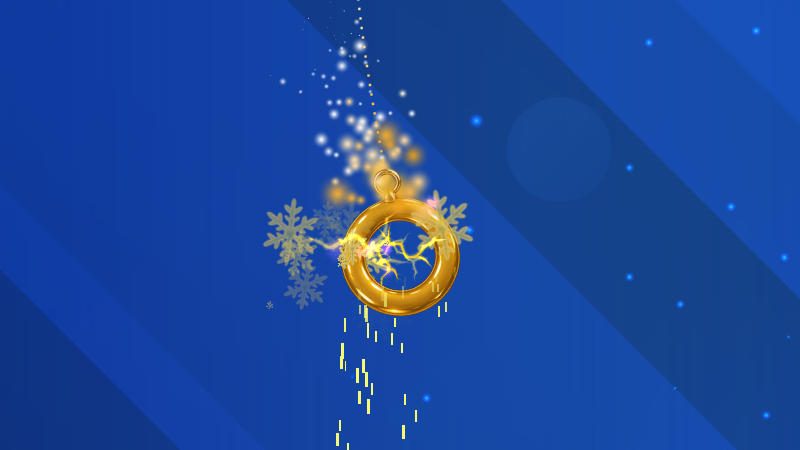
  • Ring of Twii

Ring of Twii comes with a light sparkle effect by default.

New Pulse Effect

There's a new Pulse special effect!

Pulse makes the charm fade and tint in a heartbeat-style rhythm.

  • Effect Intensity controls how quickly the charm pulses.

  • Pulse Color lets you add a color tint to the pulse.

  • Using white keeps the original charm colors and only changes the brightness.

Pulse can be added to any charm from one of the special effect slots.

More Particles and Effects

You can now stack even more effects on a charm:

  • Particle slots have been increased from 3 to 5.

  • Special effect slots have been increased from 3 to 5.

That means a single charm can now have up to five different particle styles and five special effects active at once!

New Trail "Tail" Mode

Trails now have an optional Tail mode.

When enabled, the trail keeps a fixed length behind the charm instead of continuously fading away. The tail pulls back in while the charm is moving, giving it a more connected, tail-like appearance.

Tail mode is off by default.

Updated Default Charms

A few of the built-in charms have received updated default effects:

  • Heart now uses a soft blue Pulse effect instead of pixel particles.

  • Traffic Cone now has reddish pixel particles.

  • 1000cc Charm no longer uses sparkle particles by default.

These changes only affect new installations or charms that are restored to their defaults. Your existing saved charm settings will not be changed.

Thanks for hanging a charm on your cursor! ❤️

More from Cursor Charm

Other announcements

All news
In-game event17 Aug 2026Cursor Charm 1.0.1 - New Charms, Effect Controls, and Smoother ParticlesNew Charms Four new charms have been added: · Coffee Cup · Potato · Rock · Traffic Cone The built-in Orb charm has also been updated with a fuller ring of orbiting lights. Smoke Particles There's a new Smoke particle style! The Coffee Cup uses it by default, but you can add it to any charm from the particle dropdown. More Control Over Special Effects Each of the three effect slots on the Charm…Steam news11 Aug 2026CursorCharm is out now! 🎉CursorCharm started with a pretty simple idea: what if you could have a little physics-based charm hanging from your mouse cursor while you use your PC? From there it grew into something where you can customize your charms, change their physics, add trails, particles and effects, or even import your own images and turn them into charms. At launch, CursorCharm includes: · A collection of built-i…Steam news14 Jul 2026The CursorCharm Demo Is Now Available!The demo gives you a first look at CursorCharm, letting you attach a physics-based charm to your cursor and see how it reacts as you move around your desktop. Development on the full version is nearly complete. Most of the major features are now in place, and release is getting very close. The full version will include many more charms, deeper customization, custom image imports, additional eff…