Status
SteamPeaks
ChartsSalesUpcomingPatchesNewsCalculator
New on SteamEvery app, DLC and depot the minute Steam creates itAppsEvery app on Steam, newest change firstPackagesSubs and bundles, and what each containsDepotsDepots, manifests and install sizesTagsSteam's user tags and the games under themDevelopers & publishersCompanies and their cataloguesTechnologiesEngines, SDKs and anti-cheat found in the filesChange historyEvery PICS changelist as it lands
SignalsNineteen readings of the whole catalogueCompareAny games side by sideRecordsAll-time peaks and the days they were setReportsWeekly and monthly write-upsAlerts & newsroomWatch a game, get told when it movesSteam statusIs Steam up, right nowWeb API explorerTry the endpoints in the browser
NewsSteam's own announcements and the sales calendarCalculatorWhat a Steam account is worth, and its pile of shame
/
Sign in
/
SteamPeaks
The ultimate resource for Steam data.
ExploreChartsSalesSales and festsUpcomingPatchesNewsRecordsTrendingSignals
DatabaseAppsPackagesDepotsTagsDevelopersTechnologiesChange history
ToolsCalculatorCompareSearchAlertsSteam statusAPI
SiteMethodologyFAQDiscordSupportSign in via Steam
Not affiliated with Valve or Steam. Game names and artwork belong to their owners. All times UTC.
PrivacyCookiesFair useStatus
Warrior ArchitectsNewsWarrior Architects Updated to Version 1.0.8.2,Added a part-time job mode
In-game event

Warrior Architects Updated to Version 1.0.8.2,Added a part-time job mode

Warrior Architects · published 16 Dec 2025, 14:58 UTC · build 21208622

All newsPlayers around this dateRead on Steam

Warrior Architects has been updated to version 1.0.8.2 on December 16, 2025.
Below are the update details:

Update Notes

  • Added new building [Stage]

  • Fixed an issue with enemy AI incorrectly allocating population between villagers and combat units

  • Added new building [Tavern]

  • Added new building [Blacksmith]


New Part-Time Job Buildings

Three new buildings have been added to Warrior Architects:
[Stage], [Tavern], and [Blacksmith].

These buildings are unlocked when the player reaches Level 3.
Each building provides a different type of part-time job gameplay.

Stage – Rhythm Game

Entering the Stage opens a rhythm game interface.

Controls

  • ↑ Up Arrow: Hit upper notes

  • ↓ Down Arrow: Hit lower notes

  • ← Left Arrow: Hit left notes

  • → Right Arrow: Hit right notes

Basic Gameplay

  • Notes move from the edges of the screen toward the judgment zone in sync with the music

  • Press the corresponding arrow key when a note enters the judgment zone

  • More accurate timing results in higher ratings and scores

  • Consecutive successful hits increase your Combo

  • Every 100 successful hits grants 1 EXP

  • Each successful hit also has a chance to generate income

Judgment Ratings

  • Perfect: Extremely accurate timing

  • Good: Slight timing deviation

  • Bad: Barely hit

  • Miss: Failed to press the key within the timing window

Score & Combo

  • Hitting notes earns points

  • Continuous hits increase Combo

  • A Miss will break the Combo

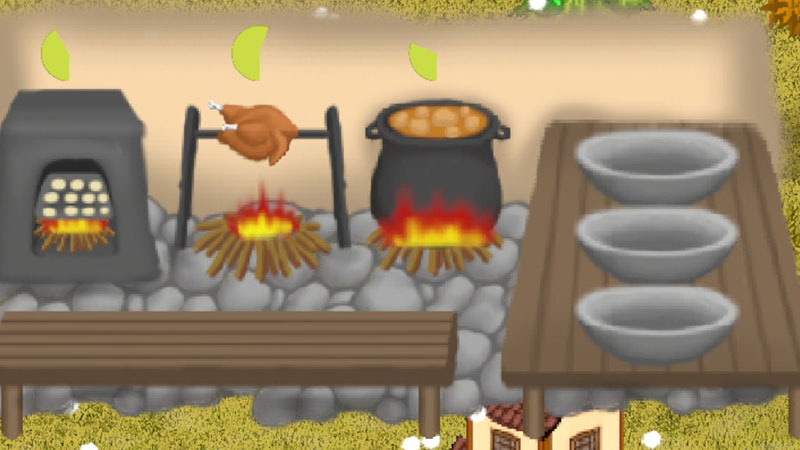
Tavern – Cooking Game

Entering the Tavern opens the kitchen interface.

Basic Gameplay

Three ingredients appear on the table in the lower-left corner:

  • Flour

  • Raw Chicken

  • Potato

Click an ingredient to begin cooking:

  • Flour → Sent to the left oven → Baked Bread

  • Raw Chicken → Placed on the middle grill → Roast Chicken

  • Potato → Cooked in the right pot → Potato Soup

Each dish requires a certain cooking time.
Once completed, the dish is placed on the white plate on the right side.

  • Click the finished dish to earn income

  • New ingredients will then appear on the table, allowing continuous cooking

Blacksmith – Forging Game

Entering the Blacksmith opens the blacksmith interface.

Basic Gameplay

  1. Iron ore appears in the barrel at the top-left corner.
    Click the iron ore to send it to the furnace on the right for heating.

  2. Once the iron turns red-hot, click the anvil in the center to begin forging.

  3. After forging, click the furnace again to reheat the half-finished product.

  4. Click the anvil once more to continue forging.

  5. When the forging reaches a certain stage, click the liquid container in the bottom-right corner to quench the item.

  6. After some time, the completed sword will be placed on the table in the bottom-left corner.
    Right-click the sword to deliver it and earn income.

After delivering the finished product, a new batch of iron ore will appear in the barrel.

More from Warrior Architects

Other announcements

All news
In-game event4 Sep 2026Warrior Architects Update Log — August 19 to September 4August 19 — Update 1.0.9.4 Update Content: · Added Wagons · Added a Trading System · Added battery-powered performance settings , allowing players to switch between different performance modes when using battery power · Enabled Warrior Architects-related Steam Workshop content · Added a Custom Character Sprite Mod — players can place their own character Sprite images in the Mod folder to replac…In-game event19 Aug 2026Warrior Architects Update — New Workshop Custom Building Appearance FeatureOn August 19, 2026 , Warrior Architects received a new Steam Workshop feature: Custom Building Appearance . Players can now customize the appearance of buildings by creating their own building sprites, allowing buildings in the game to have different visual styles. Step 1 — Prepare Your Custom Building Sprite In the following folder: you can find:BuildingSpriteCustom.png,Copy this PNG file and…Major update1 Aug 2026Warrior Architects Update Announcement(Candy World and Dream World) (2026/07/31)This update introduces the brand-new Map Theme System , along with major updates to building appearances, visual assets, and multiplayer gameplay, allowing every playthrough to offer a completely different atmosphere. 🌿 New Map Theme System A new Map Theme feature has been added, allowing players to freely switch between different world styles based on their preferences. Available themes: · Na…