Status
SteamPeaks
ChartsSalesUpcomingPatchesNewsCalculator
New on SteamEvery app, DLC and depot the minute Steam creates itAppsEvery app on Steam, newest change firstPackagesSubs and bundles, and what each containsDepotsDepots, manifests and install sizesTagsSteam's user tags and the games under themDevelopers & publishersCompanies and their cataloguesTechnologiesEngines, SDKs and anti-cheat found in the filesChange historyEvery PICS changelist as it lands
SignalsNineteen readings of the whole catalogueCompareAny games side by sideRecordsAll-time peaks and the days they were setReportsWeekly and monthly write-upsAlerts & newsroomWatch a game, get told when it movesSteam statusIs Steam up, right nowWeb API explorerTry the endpoints in the browser
NewsSteam's own announcements and the sales calendarCalculatorWhat a Steam account is worth, and its pile of shame
/
Sign in
/
SteamPeaks
The ultimate resource for Steam data.
ExploreChartsSalesSales and festsUpcomingPatchesNewsRecordsTrendingSignals
DatabaseAppsPackagesDepotsTagsDevelopersTechnologiesChange history
ToolsCalculatorCompareSearchAlertsSteam statusAPI
SiteMethodologyFAQDiscordSupportSign in via Steam
Not affiliated with Valve or Steam. Game names and artwork belong to their owners. All times UTC.
PrivacyCookiesFair useStatus
CHAQSNewsScheduled custom transactions
Game update

Scheduled custom transactions

CHAQS · published 16 Jan 2023, 19:03 UTC · build 10333685

All newsPlayers around this dateRead on Steam

New Commands
cronjob, provide

cronjob: You can schedule jobs with the cronjob command. Jobs that can be scheduled are predefined methods for the bliss speech recognizer's in the help and guide page. No job can be scheduled other than these jobs. The cronjob executes the valid jobs according to the specified repeat parameter. Repeat parameters are #minute and #hourly. Jobs scheduled with a cronjob are written to the /etc/crontab file and performed when the time comes. The performed job is rescheduled according to the repeat parameter until it is removed.
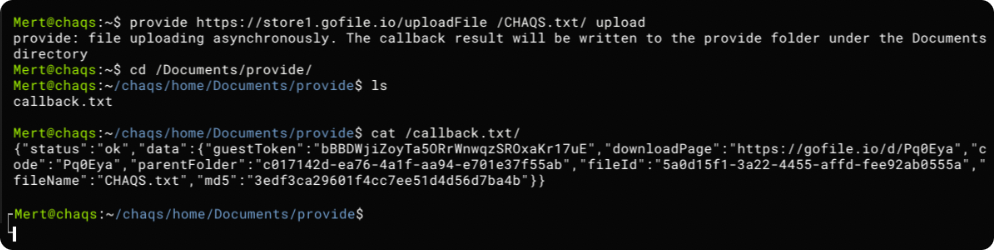
provide: Provide command allows you to make API requests within the game. With the Provide command, file deletion, download and upload operations can also be performed. For file operations, the action after the api call must be specified as a parameter.

Automatic API Calls
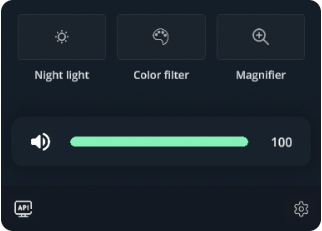
Automatic API calls are made automatically when the game starts in line with the valid API call files in the api folder under the Documents directory. If automatic API call process is desired to be used, api folder should be created under the Documents directory and the call files should be located there. This process is manual. The system does not undertake this operation. The maximum number of auto api calls is 5. If there are more than this number of files in the directory, only the first 5 files are considered. If a valid API call occurs, the relevant interface button in the accessibility panel becomes active. Api call files make requests to the corresponding call on the first line. The file should contain the corresponding json properties in the continuation. Depth is limited to 3 for json properties. If the json property points to an image file, the image is downloaded by adding the attribute to the beginning of the relevant line in the api call file. Detailed information can be accessed from within the game.

Additional
Recovery system was reactivated as optional.
Color adjustments can be made for the particle effect on the game start screen and the video on the menu interface.

More from CHAQS

Other announcements

All news
Major update12 Jul 2023BeautifulNew command: nyx Nyx performs encryption and decryption for the algorithms it supports. Kasiski examination Nyx performs a coincidence analysis on a ciphertext with an unknown key length and then attacks to crack the ciphertext according to the key length returned as a result of the analysis. This process is subject to restrictions. New command: neeko The cute little kitty neeko can accompany y…In-game event9 May 2023Accumulated silence of the greenCommand guide panel The command guide indicator on the taskbar provides one-line manual page description of terminal commands. Now you can quickly search for commands from this panel without having to go to the menu interface. New command: translate The translate command requires an internet connection. You can use it to translate one language to another if you need it. · Terminal's autocomplet…In-game event8 Mar 2023Improvements winking to the windowsSnap layouts Snap layouts are a series of predefined zones where you can place each app for quick access. Snap layouts help users arrange applications in five different ways. As shown in the animation below, you can access this feature from the panel that opens when you drag any application to the middle-upper part of the screen. This feature is disabled by default. Keyboard hook The keyboard h…