Hello again! I'm Nathan, the Lead Level Designer at Malformation Games working on Ground Zero. In this dev diary, I'd like to give some insight into the optimization workflow I use when working with the game's levels.
In general, the primary goal of optimization is to improve the experience for you, the player.
In terms of graphics, this translates to maximizing framerates by reducing rendering loads and, in terms of gameplay, this translates to doing anything that improves the quality-of-life of the overall experience of playing the game. In general, optimization is one of the most important parts of the process as a level designer. It's so important that it's very common to consider it early on in the initial draft stages of creating a level.
There are two "flavors" of level optimization that I'd like to focus on that all levels in the game undergo before reaching their final state:
- Collision Optimization
- Graphical Optimization
Collision Optimization
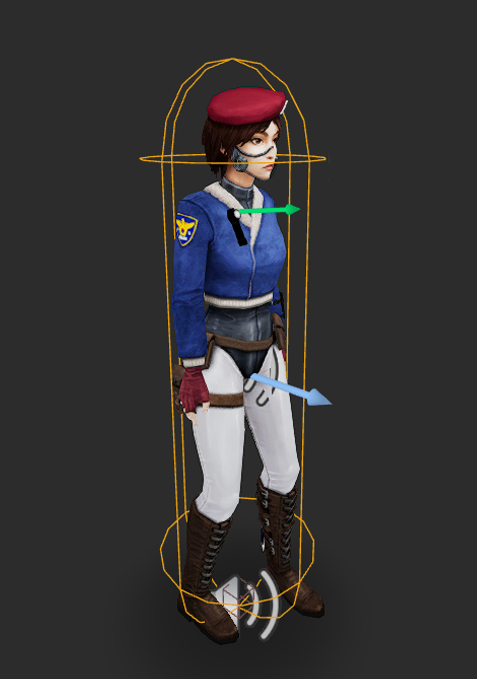
In the game world, where the player can and cannot move is controlled by the collisions of the objects in the level. Most objects have a "collision hull", usually in the shape of a box, pill-shaped capsule, or other polygon that roughly matches the shape of the object. When two objects pass near one another, checks are ran by the game's engine to see if their collision hulls are intersecting. If they are, no movement can occur, and the objects are blocked. This allows for objects obstructing the player's path to block the player from advancing forward, just as one would expect in a real-life scenario.
Here is an example of Seo-Yeon's collision hull (expressed as a capsule):
Snags
Due to the simplistic nature of collision detection in most video game engines, if any part of the player's collision hull is intersecting another object's, the player will be blocked, even if the object in the way is very small or only touching a small part of the player's collision hull.
This collision behavior leads to a common phenomenon that I like to refer to as a "snag".
Snags occur when small objects or edges, which look like they should not obstruct the path, block player movement unnaturally. This can lead to very frustrating situations for the player during high-intensity moments.
A common way of fixing snags is to disable the collisions of objects, which allows the player to move through them without being blocked. We do this in many places in the game as it is, however it can sometimes look strange to see the player move directly through larger objects. In those situations, we have to seek alternative solutions.
The most common secondary solution involves the usage of invisible walls. Using invisible walls, we can construct new collision regions that patch up gaps and allow the player to move past snag geometry without becoming stuck.
An example of this can be seen below:

After adding the invisible walls in the above image, the player will now nicely "glide" along the pink surface, instead of getting caught on each of the small edges of the cars, growth, and other geometry. We use invisible walls all over the place in GZ to prevent snags. Maybe you'll notice some of them next time you play!
Stairs
Stairs present an interesting scenario.
Aiming is crucial to the gameplay in Ground Zero and, while aiming, walking on a set of stairs causes the player's laser sight to "jump" or "bounce" each time they walk onto a new step, which can throw off their aim. Similarly, enemies that are traversing stairs will also appear to abruptly "bounce" while walking on the steps, making it harder to hit them.
Just as with snags, we can use invisible walls to improve this. By filling in the negative space of the stairs, we can effectively convert it into a ramp:
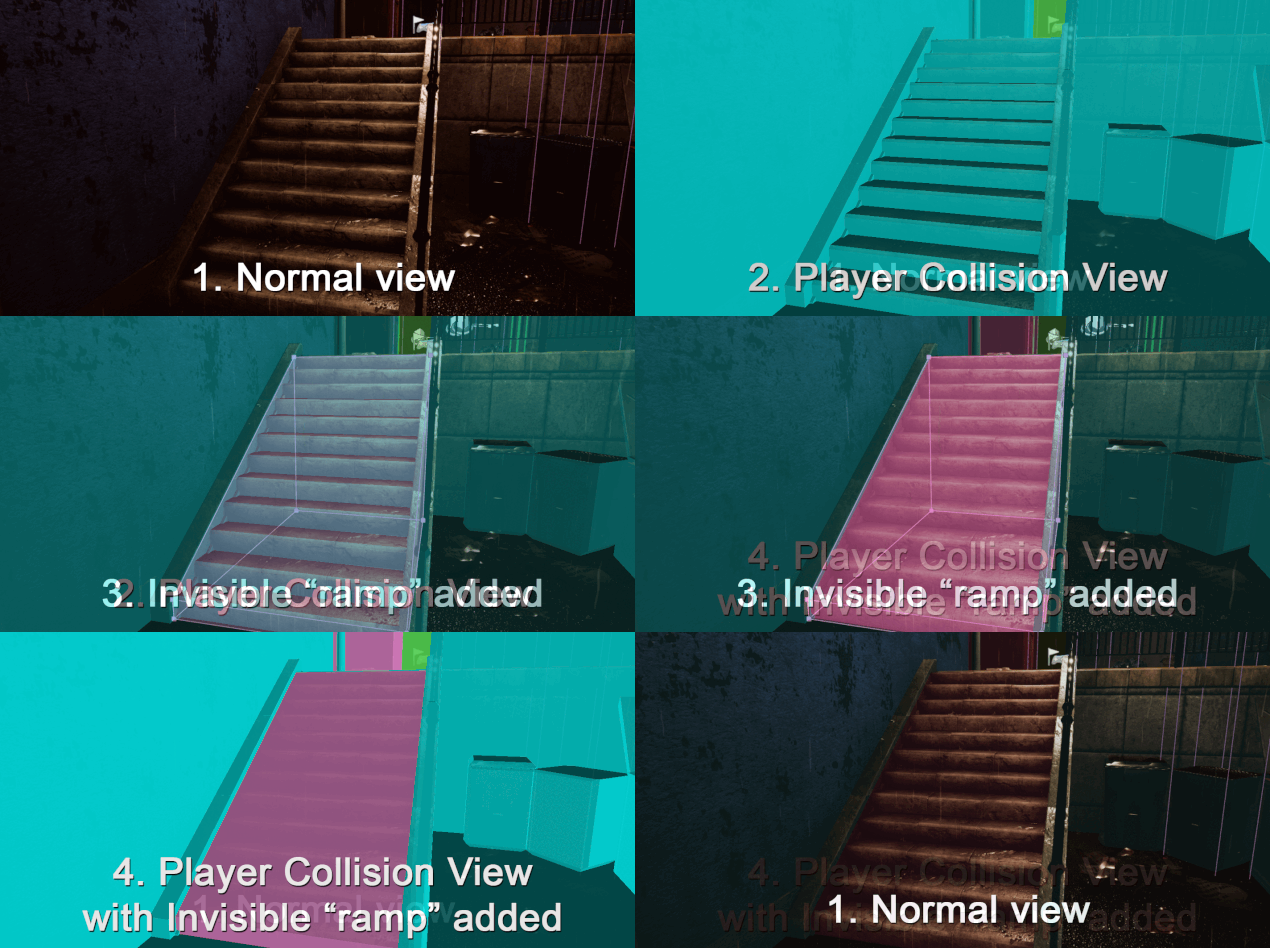
This new invisible sloped surface makes vertical movement much more gradual, which in turn makes it possible to move on the stairs while also keeping your aim on-target at the same time. Enemies will now also move smoothly up and down, making hitting shots on them much more reliable.
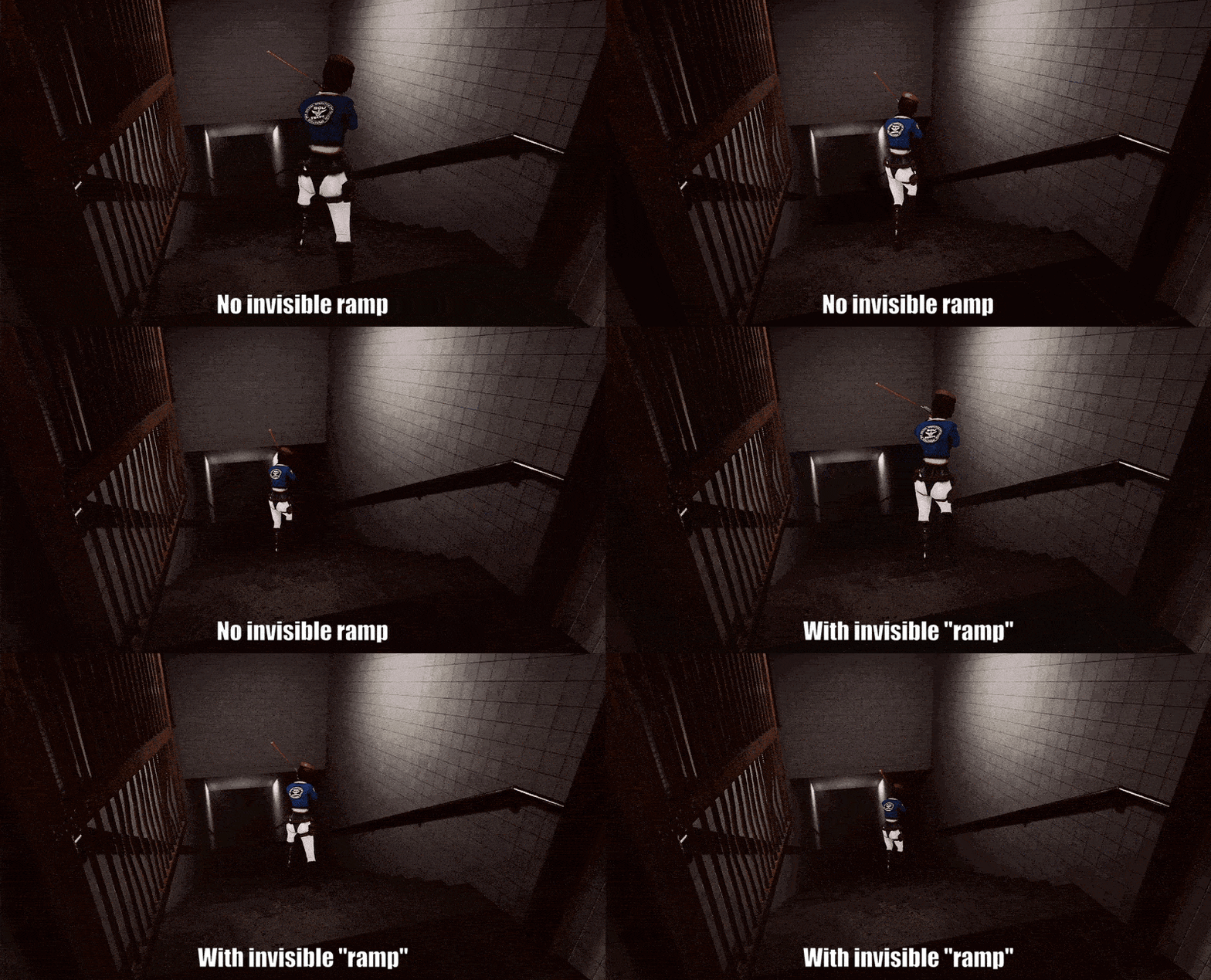
This is a very minor, but welcome quality-of-life improvement to the combat experience, and one that many other games employ as well. Almost every single staircase in Ground Zero has had this treatment, especially in combat areas.
Graphical Optimization
This is the meat of the optimization workload, and also the most noticeable to the average player. A lacking or insufficient graphical optimization pass results in bad framerates, and bad framerates lead to an unplayable and frustrating experience for the player.
The main way we improve framerates is by reducing the amount of objects that the game engine needs to render at the same time. Thanks to Ground Zero being a fixed-perspective and prerendered game, there are several clever approaches we can take to achieve good results with minimal effort.
Fixed Perspective
We can take advantage of the fixed-perspective nature of the game by removing objects from the scene that the camera (and player) will never actually see. This is different from other games, where the player could potentially move the camera wherever they'd like.
In Ground Zero, there are a handful of places where the areas just behind the camera or around corners are entirely nonexistent or very minimally detailed. Because we can guarantee that the camera never shows those regions, there's no reason to make anything there, saving precious frames as well as development time!
The Facade Layer
We can take advantage of the prerendered nature of the game by removing objects which are only necessary for the sake of producing the background image.
To accomplish this, we utilize a special "facade layer", which is a special sublevel that is removed in the final game. By placing objects into this special layer, they are available to be captured as part of the prerendered background, but are then removed automatically during regular gameplay, significantly reducing the amount of objects in the scene and improving framerates.
The prime candidates for objects to be moved into the facade are objects that the player will never interact with, due to being in one of the following categories:
- Objects that are out of reach of the player (e.g. out-of-bounds or are high up on walls / on top of buildings)
- Objects that are extremely small or non-solid (e.g decals and very thin objects such as papers on the ground, small rocks/pebbles, etc)
The magical thing about this solution is that because the game is prerendered, the player will never actually notice this massive removal of objects, because the background being shown was created before their removal. After removing the facade layer, the only objects physically remaining in the level are those objects which are necessary for gameplay, either because they form the boundaries of the playable space, or because they are objects that the player interacts with directly.
After stripping out the facade layer, what is leftover tends to be much simpler than the fully detailed version, improving the framerate significantly in most areas.
Here's an example of this:
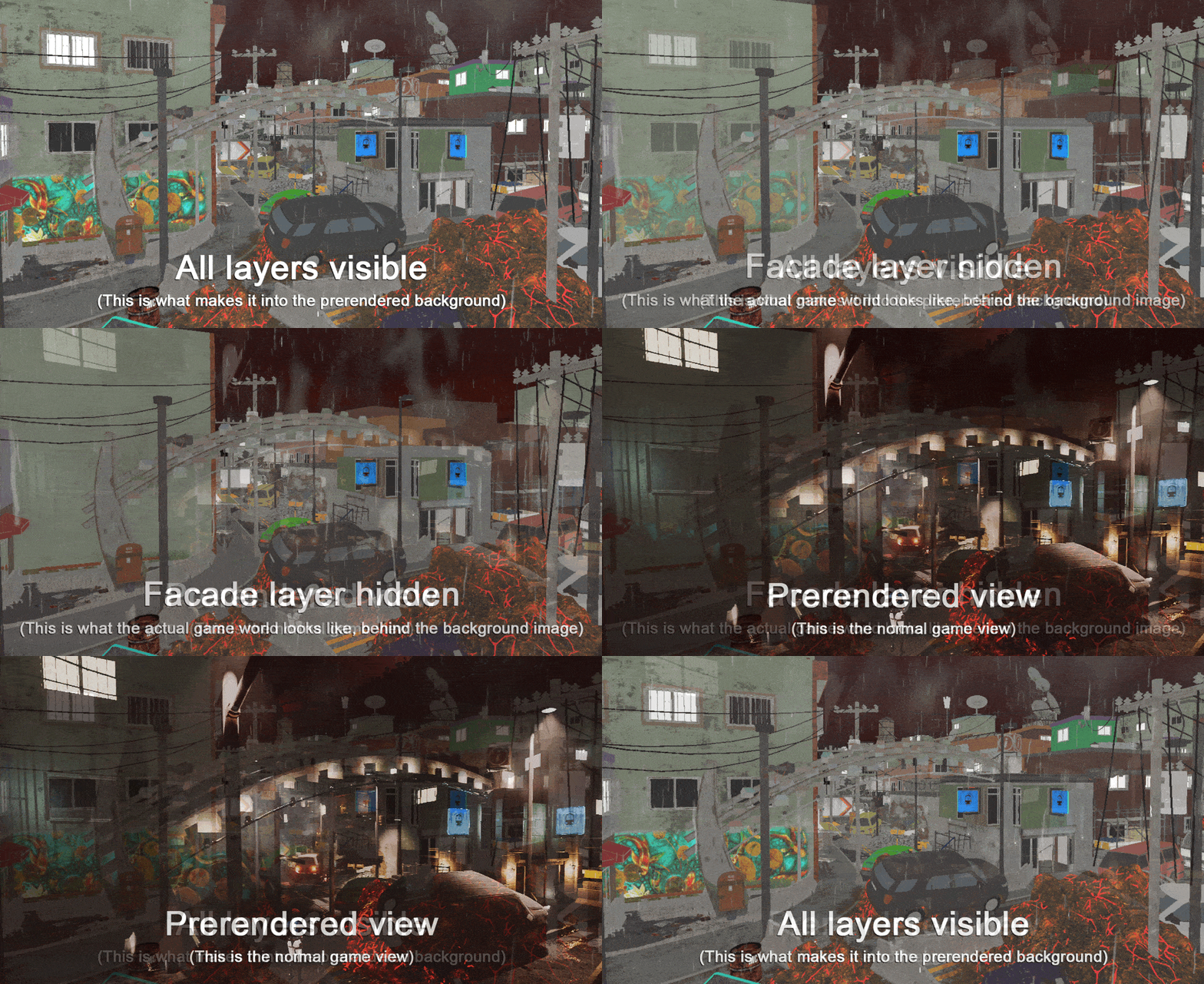
One of the best things about the facade layer is that it provides the means for us to add a theoretically infinite amount of additional details to our prerendered backgrounds with absolutely zero graphical performance cost, something that would not be possible in any real-time graphics game.
There are several other creative methods we utilize to optimize the experience for players (for example distance culling), but writing about all of that would make this a pretty long diary, so I've only included the most interesting ones (in my opinion). Maybe someday I can show off some more cool stuff.
Hopefully this diary gives you more of an insight into what goes on under the hood!
Thanks for reading!
Until next time, Nathan
https://store.steampowered.com/app/2340130/Ground_Zero/
What aspects of Ground Zero would you like to know more about in future developer diaries?Let us know in the comments 💬