Status
SteamPeaks
ChartsSalesUpcomingPatchesNewsCalculator
New on SteamEvery app, DLC and depot the minute Steam creates itAppsEvery app on Steam, newest change firstPackagesSubs and bundles, and what each containsDepotsDepots, manifests and install sizesTagsSteam's user tags and the games under themDevelopers & publishersCompanies and their cataloguesTechnologiesEngines, SDKs and anti-cheat found in the filesChange historyEvery PICS changelist as it lands
SignalsNineteen readings of the whole catalogueCompareAny games side by sideRecordsAll-time peaks and the days they were setReportsWeekly and monthly write-upsAlerts & newsroomWatch a game, get told when it movesSteam statusIs Steam up, right nowWeb API explorerTry the endpoints in the browser
NewsSteam's own announcements and the sales calendarCalculatorWhat a Steam account is worth, and its pile of shame
/
Sign in
/
SteamPeaks
The ultimate resource for Steam data.
ExploreChartsSalesSales and festsUpcomingPatchesNewsRecordsTrendingSignals
DatabaseAppsPackagesDepotsTagsDevelopersTechnologiesChange history
ToolsCalculatorCompareSearchAlertsSteam statusAPI
SiteMethodologyFAQDiscordSupportSign in via Steam
Not affiliated with Valve or Steam. Game names and artwork belong to their owners. All times UTC.
PrivacyCookiesFair useStatus
BodyWalk VR Motion MapperNewsBodyWalkVR Major Update v1.32 → v1.40
Major update

BodyWalkVR Major Update v1.32 → v1.40

BodyWalk VR Motion Mapper · published 15 Aug 2026, 17:43 UTC

All newsPlayers around this dateRead on Steam

Required Plugin Updates (v1.40)

  • SteamVR Driver v2.0, OpenXR Layer v1.9 & Joy-Con Driver v1.2: All plugins must be updated from the Plugins tab to use v1.40. They enable thumbstick direction reading and per-controller stick suppression.

Locomotion — Controller Stick Direction & Suppression

  • Aim with the stick, move with your feet: Use your controller thumbstick to set the walking direction while your actual steps control movement speed across SteamVR, OpenXR, and FlatVR.

  • Stick Suppression: Hide the locomotion controller's thumbstick from the game so aiming no longer triggers double-walking. Applied per controller on the specific side read by the game.

Unified Engine Selector

  • One Engine Switch for the App: Select a single runtime—SteamVR, OpenXR, OpenComposite, FlatVR (or Custom)—above all tabs to ensure input/output compatibility.

  • Per-Engine State Memory: Switching engines remembers your tracker configuration, device pickers, and hook settings without touching non-VR input sources.

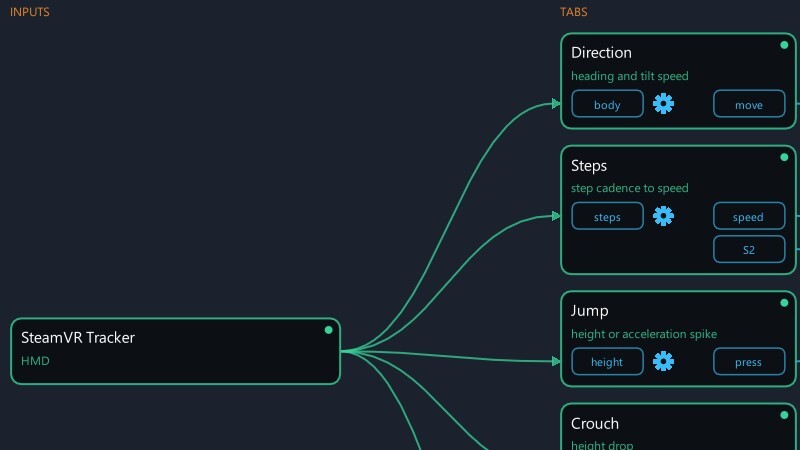
Status Tab — Input → Output Visual Diagram

  • Real-Time Signal Pipeline: Visual flowchart mapping signals from source to output. Each block indicates Off, Ready, or Live status with direct shortcuts to underlying settings.

🖥️ FlatVR & 3D Depth Engine

  • Distill Any Depth Model Lineup: High-resolution AI depth models ranging from Distill Fast (518×294) up to Ultra (1232×686) for powerful GPUs.

  • FlatVR 3D Engine: In-house depth projection algorithm with color-guided edge restoration (30% sharper edge alignment), edge smoothing, and smooth opening fill around foreground objects.

  • Cinema Mode & Frame Efficiency: Synchronizes video frames with depth map generation latency. Includes Skip Repeated Frames to save GPU resources on static/paused content.

  • Depth Scale Stabilization: Inter-frame depth scaling eliminates visual "breathing" and flicker on low-light footage.

  • Controller Screen Placement: Grab and position the virtual 3D screen using VR controllers, scale with two hands, and save up to 3 spatial presets (Sofa, Desk, Bed).

  • Movable In-VR Dashboard: Grab, reposition, and scroll the overlay menu in headset, with full access to FlatVR 3D sliders and algorithm settings.

  • Calibration & Visual Diagnostics: Real millimeter separation readouts against your measured IPD, Test Card generator, live contour/wash overlays, and Centre Probe distance gauge.

  • Experimental Depth Mesh: Render video as actual 3D geometry for realistic head-movement parallax.

  • ReShade Direct Capture & Inverted Depth: Direct frame capture from the ReShade addon and an Invert Depth Map switch for reversed-Z game engines.

  • Custom Depth Algorithm Removed: Legacy SuperDepth3D port removed at author's request; saved profiles migrate automatically to FlatVR 3D.

↩️ Rolling Back

  • Right-click the app in your Steam library → Properties → Betas.

  • Select last-stable to revert to the previous release at any time. Your settings will be preserved.

More from BodyWalk VR Motion Mapper

Other announcements

All news
In-game event11 Sep 2026BodyWalkVR - v1.58 → v1.67Nine builds in one update. Your chest and waist can now go to SteamVR as trackers, a phone compass keeps your heading straight, the Steps tab was reworked from tester feedback, several turning and input fixes landed, and the built-in FlatVR tab - watching a flat screen in 3D inside the headset - got a large update of its own. Phone compass, so your heading stops drifting · A compass on the phon…Game update25 Aug 2026BodyWalkVR - v1.51 → v1.56Walking got a clearer, more honest axis-mapping screen and a working head-decouple; the FlatVR tab picked up Vulkan support and two stability fixes. Axis mapping you can actually read · The rows are named after what they carry. For headset sources (SteamVR, OpenXR, FlatVR) the rows now say Lean Fwd/Back , Lean Sideways and Turn instead of Roll, Pitch and Yaw. On a headset the "roll" channel act…Game update23 Aug 2026BodyWalkVR v1.50 Test Room 1.07, DIY Magnetic TreadmillSix releases in one post. Walking gained a new input device and a clearer view of what it is doing; the FlatVR tab - watching a flat screen in 3D inside the headset, which ships as part of BodyWalkVR - got most of the rest. DIY Magnetic Treadmill A manual treadmill can now drive walking directly. Put a magnet on the roller and a reed switch or Hall sensor beside it, wire it to an Arduino, and B…