Status
SteamPeaks
ChartsSalesUpcomingPatchesNewsCalculator
New on SteamEvery app, DLC and depot the minute Steam creates itAppsEvery app on Steam, newest change firstPackagesSubs and bundles, and what each containsDepotsDepots, manifests and install sizesTagsSteam's user tags and the games under themDevelopers & publishersCompanies and their cataloguesTechnologiesEngines, SDKs and anti-cheat found in the filesChange historyEvery PICS changelist as it lands
SignalsNineteen readings of the whole catalogueCompareAny games side by sideRecordsAll-time peaks and the days they were setReportsWeekly and monthly write-upsAlerts & newsroomWatch a game, get told when it movesSteam statusIs Steam up, right nowWeb API explorerTry the endpoints in the browser
NewsSteam's own announcements and the sales calendarCalculatorWhat a Steam account is worth, and its pile of shame
/
Sign in
/
SteamPeaks
The ultimate resource for Steam data.
ExploreChartsSalesSales and festsUpcomingPatchesNewsRecordsTrendingSignals
DatabaseAppsPackagesDepotsTagsDevelopersTechnologiesChange history
ToolsCalculatorCompareSearchAlertsSteam statusAPI
SiteMethodologyFAQDiscordSupportSign in via Steam
Not affiliated with Valve or Steam. Game names and artwork belong to their owners. All times UTC.
PrivacyCookiesFair useStatus
TBAS Study ProNewsTBAS v1.3.5 - Leaderboards Percentile Scoring, and Other Changes
In-game event

TBAS v1.3.5 - Leaderboards Percentile Scoring, and Other Changes

TBAS Study Pro · published 6 Oct 2025, 04:06 UTC
All newsPlayers around this dateRead on Steam

A small update this time.

New Percentile Scoring System:

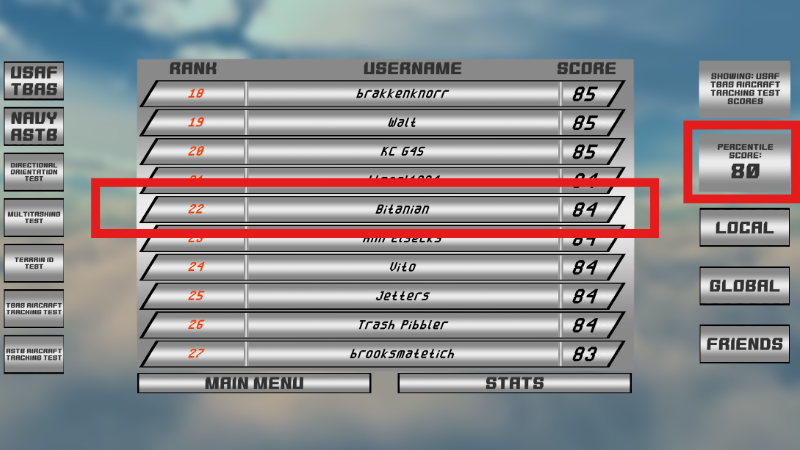
  • Per user request, the online Leaderboards screen now features a "Percentile Scoring" system that shows you what percentile you've scored in compared to your peers, in addition to the usual ranking system. The closer your score is to 99, the better!

Minor Changes:

  • The Dichotic Listening Test has been changed so that the voices speak in your left and right ears simultaneously, as opposed to the previous system whereby they alternated instead.

  • The "Pause" button now has binding options for gamepads and joysticks. To prevent soft-locking, the Keyboard "Pause" button is still permanently locked to the "ESCAPE" key, but the new binding options for the gamepads and joysticks are unrestricted,

Major Unity Vulnerability Patched:

  • Three days ago, Unity (the game engine TBAS Study Pro is built with) released a notification that ALL old versions of Unity spanning back for several years were compromised by way of a discovered software vulnerability. This update features the most recent version of Unity which does NOT have that vulnerability. For your safety, please ensure that you download and use only this version or later of TBAS Study Pro (and for that matter, avoid running any Unity-based software that hasn't been updated yet to address this issue!)

More from TBAS Study Pro

Other announcements

All news
In-game event16 May 2026TBAS Study Pro v1.3.6 - Directional Orientation Visual OverhaulWhat's New: The Directional Orientation test has been visually overhauled to better match the real TBAS/ASTB. What Are You Talking About?: I recently receive feedback that the Directional Orientation test in TBAS Study Pro was so visually different from the real TBAS that it was causing users trouble when taking the real thing. Obviously, this was unacceptable. A user was kind enough to link me…Game update13 Mar 2026(WINDOWS ONLY) TBAS v1.3.5c - Adjustments and Bug FixesAdjustments - In response to popular user feedback: · Terrain ID: The opacity of the Terrain ID test compass buttons can now be adjusted allowing for them to be translucent. · Multitask Test - Dial Subtest: You are now only awarded points when the dial is in motion. You accrue points slowly when the dial is in the Green, and quickly when it is in the Yellow. · Aircraft Tracking Test - Horizonta…Game update8 Feb 2026(WINDOWS ONLY) TBAS v1.3.5b - Navy/ASTB Emergency Test Input HotfixBUG FIXES: An issue with the Navy/ASTB "Emergency" Aircraft Tracking submode was introduced in the previous update whereby inputs that cause the Fuel/Power gauge dials to "Snap" to a color (e.g. Yellow or Red) would not properly register in the program. "Knob"-type inputs that gradually move the dial positions up and down instead of via a "Snapping" behavior would still work fine, for the most…