This week I'm going to start a multi-part deep dive to talk about how I implemented mission logic, with code examples.
But first I wanted to remind new players that there's an updated build on the beta branch. It's mostly changes to improve Steam Deck support, but also includes a few minor fixes.
I've been doing some kind of software development for about 25 years and game development for maybe half that. As an indie developer, I have to learn to be good enough in a lot of different skills, which reduces the potential to gain expertise of any specific discipline. So sometimes I come across a topic or question in game dev forums and think, "I know how to do that" but then check myself with, "there are definitely people who are better qualified to talk about this than me."
That said, there are topics where I haven't seen the kind of resources that would have helped me when I first started to tackle them.
One of the areas where I've learned an enormous amount that I think would of use to aspiring developers is in the area of missions and quests, not only from the design perspective but also from a technical architecture standpoint. Like, "what should mission code even look like"? This is an area where I went down some definitely wrong paths when starting out.
I'm very happy with the mission system which is both flexible enough to create a lot of interesting stories and gameplay, robust enough to have very few game-breaking issues, and efficient enough to allow a single designer (me) to create all of the game's content. While I think most of the decisions I made ended up being good ones, there are still things I would do differently if and when I were to create another game in this space.
But before I share the things I would do differently, I wanted to spend a couple updates talking about how the current mission system works at a technical level, both to give some context and as a potential starting point for other developers.
Mission Logic atop Game Logic atop Engine Logic
Starcom: Unknown Space is built in the Unity game engine. Without going into a lengthy segue, there are things that virtually every modern game needs to do. It rarely makes sense for every game developer to re-invent all of:
- Reading various asset file formats from disk
- Calculating what's in the view frustum
- Sending a group of triangles that represent some model to the GPU
- Processing and outputting sound
- Reading input from devices
- Simulating rigidbody physics
- Calculating collisions
- Modeling and rendering particle systems
- Etc., etc.
An engine provides these common features and functions within a standardized API, plus other tools intended to streamline the development process.
Starting from a point with all this functionality already available is an enormous leg up.
Using the engine's functionality, I implement the logic that's specific to my games:
- What information belongs in save file and how is it formatted?
- How to make a model of a sphere look like a planet in space?
- When a player pushes the "fire missile" button, how does a missile come into existence in the game and what does it do?
- When a projectile impacts an enemy ship, what happens? How do we determine which modules are still attached after some have broken off?
This is all game logic: the code that defines how the game works.
But on top of that, the game needs an additional layer of logic that can examine and take control of those systems in very specific scenarios to create the illusion of a narrative driven story that the player is a part of and being driven by. This "ad hoc" logic applies only in very specific scenarios: While it would be technically possible to put code inside the projectile logic to see if the thing we just blew up was a piece of debris that kicks off the "Priority Override" mission, it would be a nightmare from a software maintainability perspective. So it would be good to have a more abstracted level of logic that runs atop the game logic and can look at and modify what's going on in the game without being a part of the core game code.
The following is not the only way to implement a mission system, but at this point I feel confident saying that it is a good way. The game has had over 100,000 players, the vast majority of whom loved the overall experience. While there are have been some complaints related to missions, these are almost all on the design/guidance side and not the result of the technical architecture.
Mission Overview
The Mission Manager keeps track of all missions that are active for the player's current game. These may be actual missions that are visible in the game's Mission Log (or Journal), but they also handle many invisible paths where the game flow needs to deviate from the default game logic: adding in helpful prompts for game controls that some players may have missed, triggering achievements, activating random void encounters, expediting playtests, etc.
Each mission consists of one or more "lanes". A lane is a linear sequence of nodes that must progress in order.
A node consists of any number of conditions and any number of actions. When ALL conditions are true, ALL the actions are executed, then the lane progresses to the next node.
The save state for the mission system is simply the current index for each lane. The game persists other kinds of data about the world, and the mission system can know and interact with that data, but from the perspective of the save system, the state of a mission is just a list of integers.
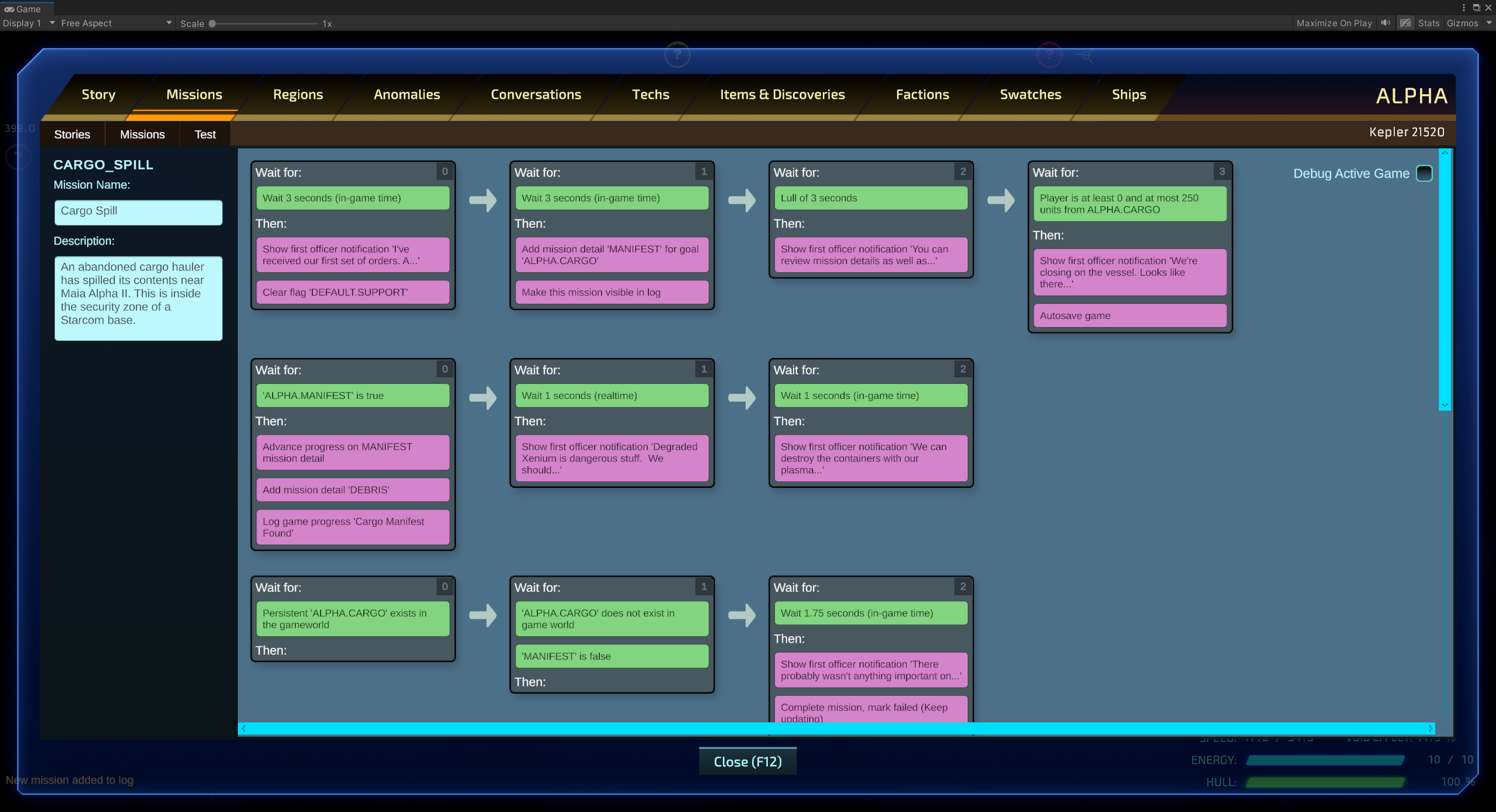
Here is the first mission in the game as visualized through the mission authoring tool. This particular mission is also the basic controls tutorial. The player is asked to investigate a cargo ship that has spilled debris nearby. From the ship's manifest they learn it has spilled some dangerous materials and the first officer suggests destroying the containers.
The grey blocks are nodes. The green entries in each block are the conditions that the nodes wait for and the pink entries are the actions that will execute:
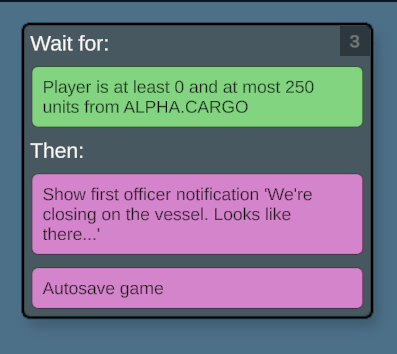
As you can see from a close up of the last node in the first lane, as soon as the player is within 250 units of the ship with id "ALPHA.CARGO", they will receive another notification from their first officer, the game will autosave and that lane will be done:
If you're curious, you can see the object structure of the above mission as JSON in your game's install folder at:
Starcom Unknown Space_Data\StreamingAssets\Content\Kepler\Stories\ALPHA\Missions\CARGO_SPILL.json
In the tool, I can visualize the state of a current in-progress game like so:
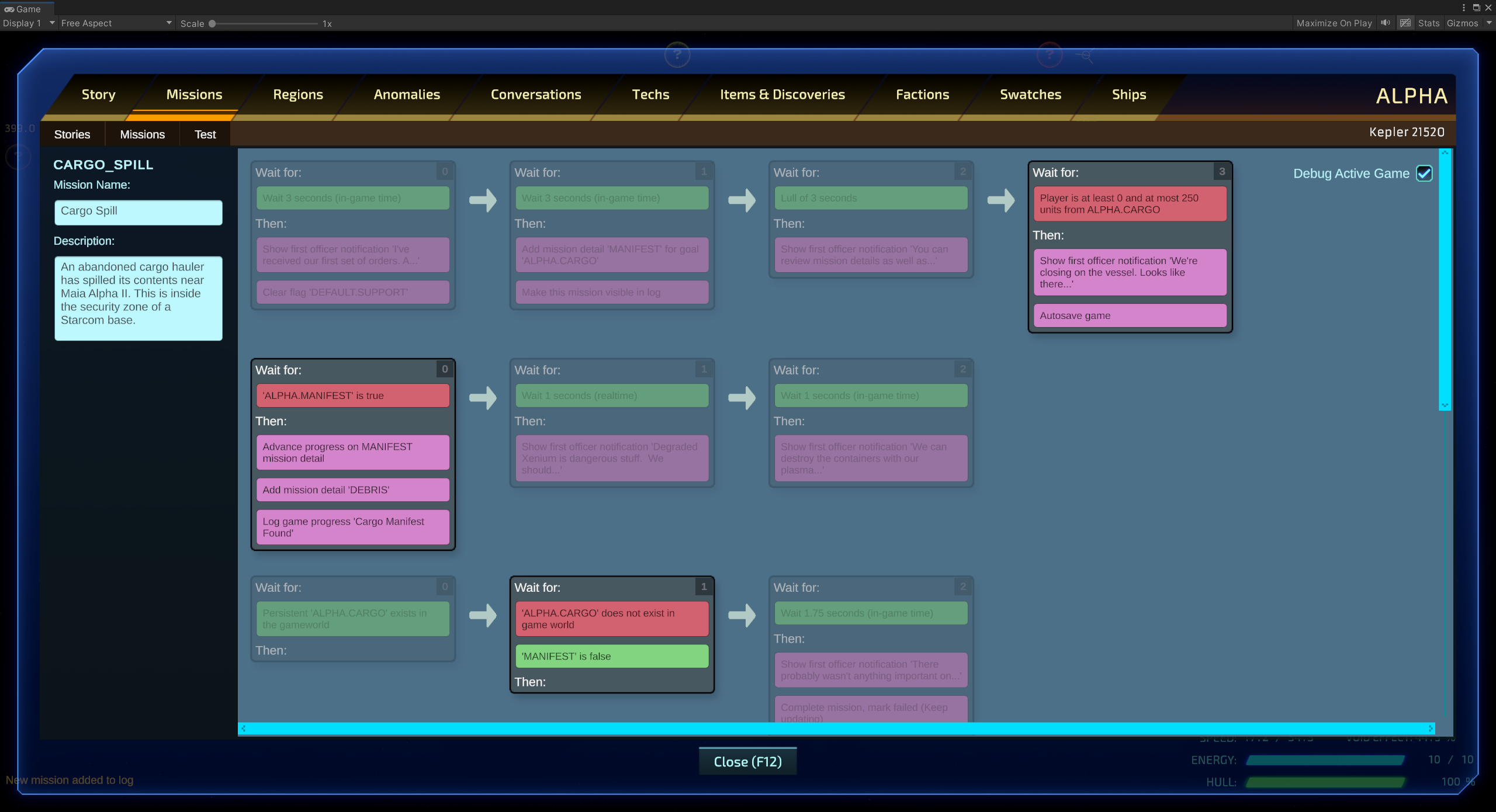
Here the red blocks are the conditions that each active node is waiting on. This view is helpful when players submit their save in-game with bugs or other issues, I can immediately see what's blocking any particular mission. It's also helpful during mission design and testing.
Mission Update Loop
Several times a second (there's no particular reason to tie the mission update loop to the frame rate and we can save a lot on performance by doing it less frequently) the mission manager iterates over every active mission for the player and calls UpdateMission method on it. Again, the state of any particular mission is defined solely by a single integer for each lane, representing the current active node.
Here is the code, (warts and all, slightly simplified for clarity):
    public void UpdateMission(MissionManager missionManager, MissionSave save, List<GameEvent> gameEvents, float deltaTime, float unscaledDeltaTime)
    {
        // If the save has fewer lanes than the mission, then the mission has changed since our
        // save (e.g., as part of a content update to the game). Expand the save's lane count
        // to accommodate:
        if (save.LaneCount < lanes.Count)
        {
            save.ExpandLanes(lanes.Count);
        }
        for (int i = 0; i < lanes.Count; i++)
        {
            // The save contains the current node index for each lane:
            int currentNodeIndex = save.GetLaneNodeIndex(i);
            MissionLane lane = lanes;
            MissionNode currentNode;
            if (currentNodeIndex < lane.nodes.Count)
            {
                currentNode = lane.nodes;
                MissionUpdate update = new MissionUpdate(missionManager, this, currentNode, save, gameEvents, deltaTime, unscaledDeltaTime);
                // Satisfied defaults to true, but if any condition check fails,
                // it fails:
                bool satisfied = true;
                foreach (MissionCondition condition in currentNode.conditions)
                {
                    if (!condition.IsSatisfied(update))
                    {
                        blockingConditions = condition;
                        satisfied = false;
                        break;
                    }
                }
                // If the conditions are satisfied, we still
                // need to check if any actions are blocked:
                if (satisfied)
                {
                    foreach (MissionAction action in currentNode.actions)
                    {
                        if (action.IsBlocked(update))
                        {
                            satisfied = false;
                            break;
                        }
                    }
                }
                if (satisfied)
                {
                    int branchIndex = -1;
                    foreach (MissionAction action in currentNode.actions)
                    {
                        action.Execute(update);
                        // Branch actions are a special case that conditionally change
                        // the lane flow, most commonly used to implement lane "loops":
                        if (action is BranchAction)
                        {
                            BranchAction branch = action as BranchAction;
                            string fullFlag = update.FullId(branch.branchFlag);
                            if (update.GameVars.GetFlag(fullFlag))
                            {
                                if (branch.branchNode >= 0 && branch.branchNode < lane.nodes.Count)
                                {
                                    branchIndex = branch.branchNode;
                                }
                                else
                                {
                                    Debug.LogWarning("Invalid branch node");
                                }
                            }
                        }
                    }
                    ExitNode(update);
                    if (branchIndex > -1)
                    {
                        currentNodeIndex = branchIndex;
                    }
                    else
                    {
                        ++currentNodeIndex;
                    }
                    save.SetLaneNodeIndex(i, currentNodeIndex);
                }
            }
        }
    }
Hopefully that's mostly self-explanatory for anyone with some coding background. But some require additional explanation for the method's arguments:
The MissionManager provides a reference that lets the actions and conditions call on any of the public methods or properties of other game systems. It's the only way for mission logic to hook into "the rest of the game" without relying on Singletons. The usage of Singletons is a moderately controversial topic: public static objects that can be accessed by any code. I think there's a general distrust of them because of their similarity to one of the stinkiest code smells: global variables. I used them pretty liberally in Starcom: Nexus and I think with careful design they can be a clear and efficient solution to a lot of problems. But in Unknown Space I elected to avoid them for game instance subsystems.
The missionSave is the state the player's current mission. Which as discussed earlier, is mostly just a list of integers representing the current nodes.
The gameEvents is a list of any GameEvents that have transpired since the last mission update. While the Missions can use the MissionManager to check the current state of the game, there may have been transitory events that represented something instantaneous, like a ship taking damage or the player picking up a drop.
The deltaTime and unscaledDeltaTime are the amount of time that has elapsed since the last mission update.
Thanks for reading! Next week we'll take a look at what goes on in the Condition and Action objects, until then,
- Kevin