Patch Released - User Properties for Scenes, Fixes (Build 1.1.31)
Wallpaper Engine · published
Solutions for common issues caused by Steam/Windows
Steamworks unavailable
Verification issue while updating
Content file locked / Disk write error / Content encrypted
Follow-up Update 1.1.42 (10MB as usual)
- Fixed audio response option being inaccessible in particle editor.
- Added property linking to particle instance options.
- Added preset publishing from existing presets (resolves dependency to root wallpaper).
- Added 'Customizable' tag which is automatically set if any custom properties exist.
Hey all,
This patch makes it possible to add custom properties like colors, sliders and checkboxes to scene wallpapers and brings a few miscellaneous improvements and fixes.
Custom Properties
You can now bind certain properties in the wallpaper editor to 'user properties' that will show up in the browser later, this will allow users to control colors of certain effects or show/hide certain objects in the wallpaper.
Make sure to check out the tutorials for a custom tint color and toggling a particle on and off:
Tint color
Particle visibility
Each property that supports this will have a small gear button next to it now that you can use to access a menu and set up the binding:
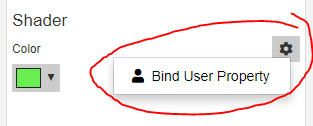
You can create new user properties there and link them to the effect property:
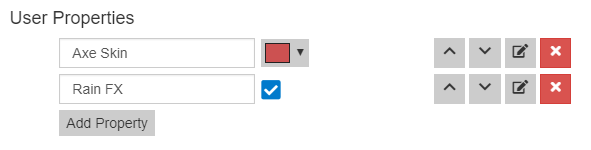
You can also edit and sort these properties later in the Edit -> Project Settings menu.
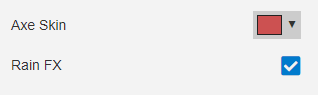
These will show up in the browser and everyone can further customize parts of your wallpaper:
Scene Unpacker
Scene wallpapers are uploaded as .pkg files, which means they cannot be edited from Workshop directly. There are several types of compilation and conversion going on, the first conversion being a file archive (.pkg). The Steam user Squee made a web based tool to unpack .pkg files, this makes it possible to open the project in the editor again, make changes and upload it from there: https://wetranslate.thiscould.work/scene.pkg/
However, compiled resources inside the .pkg are not unpacked, like textures or models. I might add a full and official system to unpack .pkg files later, but this can only happen after I'm done adding new features to scenes.
Misc
I've added a work-around for Corsair mice so that the LEDs on mice should light up now and all scene wallpapers got a new iCUE effects option right in the wallpaper browser. This option replaces the global iCUE setting for scenes and it only shows up when iCUE has been found up and running.

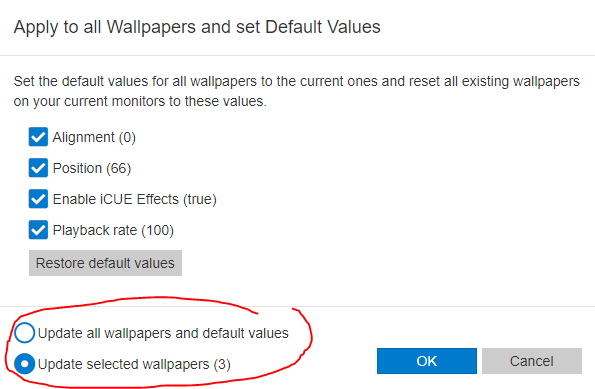
The 'Apply to all wallpapers' option has radio buttons now so it's possible to choose whether all wallpapers will be affected or only all selected ones.
The hide icon hotkey uses the actual 'Show desktop icons' setting of Windows now instead of using a trick, this makes the web keyboard input more stable. The icon state is persisted after Wallpaper Engine is closed.
Wallpaper Engine will automatically unpause when the Windows 10 start menu is opened in fullscreen, like it unpauses for alt-tab or Aero Peek already.
Full changelog
Additions
- Added user property UI editor to project settings.
- Added config button to properties that support linking.
- Added option to mass update certain properties on all selected wallpapers.
- Added shared playlist timer so it's possible to sync playlist properly if they are started at the same time.
- Added 'open in editor' button to browser for user projects.
- Added visual cue to scene stats if recommended resources are exceeded.
- Added iCUE toggle option to scene and web wallpapers in-browser.
- Added tint blend option.
- Added special visibility button for image effects.
- Added automatic unpausing for fullscreen start menu (disable via the existing Aero peek option).
Fixes
- Fixed double slashes in URLs being reduced to single slash.
- Fixed CSS bugging out after minimize.
- Fixed clip space not being identical between graphics APIs.
- Fixed on-screen keyboard not being able to restore focus after alt-tab.
- Fixed UI being launched after pinning UI to taskbar by redirecting the task bar command to the main process.
Misc
- Updated SFML to 2.5.1.
- Changed hide icons hotkey to use official Windows hide icons function.
- Made filter button more obvious.
- Disabled opening of pkg files since they can't be uploaded afterwards and it's just confusing.
- Removed 'all documents' from file dialog since opening unsupported formats makes no sense.
- Updated GLM.
- Changed editor property layout to compensate for new controls.