Status
SteamPeaks
ChartsSalesUpcomingPatchesNewsCalculator
New on SteamEvery app, DLC and depot the minute Steam creates itAppsEvery app on Steam, newest change firstPackagesSubs and bundles, and what each containsDepotsDepots, manifests and install sizesTagsSteam's user tags and the games under themDevelopers & publishersCompanies and their cataloguesTechnologiesEngines, SDKs and anti-cheat found in the filesChange historyEvery PICS changelist as it lands
SignalsNineteen readings of the whole catalogueCompareAny games side by sideRecordsAll-time peaks and the days they were setReportsWeekly and monthly write-upsAlerts & newsroomWatch a game, get told when it movesSteam statusIs Steam up, right nowWeb API explorerTry the endpoints in the browser
NewsSteam's own announcements and the sales calendarCalculatorWhat a Steam account is worth, and its pile of shame
/
Sign in
/
SteamPeaks
The ultimate resource for Steam data.
ExploreChartsSalesSales and festsUpcomingPatchesNewsRecordsTrendingSignals
DatabaseAppsPackagesDepotsTagsDevelopersTechnologiesChange history
ToolsCalculatorCompareSearchAlertsSteam statusAPI
SiteMethodologyFAQDiscordSupportSign in via Steam
Not affiliated with Valve or Steam. Game names and artwork belong to their owners. All times UTC.
PrivacyCookiesFair useStatus
Abyss Crew Friend PassNews[Devlog #4] Using particles to display a picture in Game Maker
Community

[Devlog #4] Using particles to display a picture in Game Maker

Abyss Crew Friend Pass · published 29 Aug 2019, 20:18 UTC
All newsPlayers around this dateRead on Steam

-- Greetings, fellow devs,

I'd like to share a cool effect I found with Game Maker Studio, which can be adapted for many other projects.

To give a little bit of context, in the game, the sonar player has to scan objects, and I wanted to make an image appear progressively on the screen.
I found it worked well by using particles!

The principle is to pick places randomly in a box around the shape we'd like to have, and to create particles only if the place is inside the shape.

1) First, you need to create the particles system you wish. I personally like the spheres, but there are many other possibilities.


global.particlesUI = part_system_create();
analyzerBlip=part_type_create();
part_type_shape(analyzerBlip,pt_shape_sphere);
part_type_size(analyzerBlip,.1,.1,0,0);
part_type_speed(analyzerBlip,0,0,0,0);
part_type_direction(analyzerBlip,0,0,0,0);
part_type_orientation(analyzerBlip,0,0,0,0,1);
part_type_color1(analyzerBlip,merge_colour(c_lime,c_white,0.25));
part_type_alpha2 (analyzerBlip,1,0);
part_type_scale(analyzerBlip,1,1);
part_type_blend(analyzerBlip,true);
part_type_life(analyzerBlip,60,60);

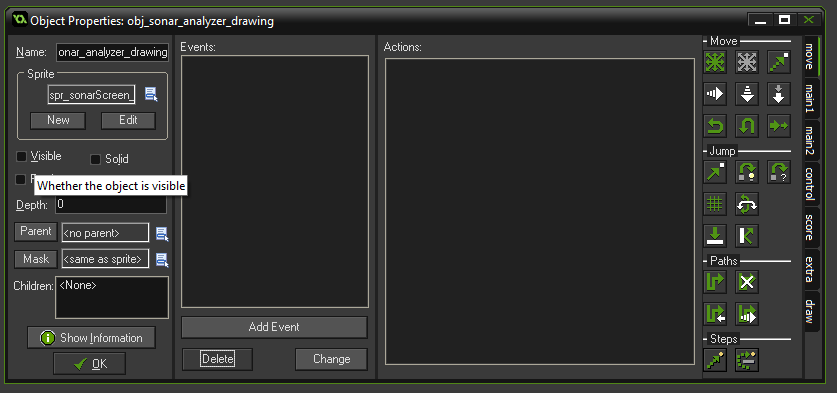
2) Then, draw the sprite you wish to use (in my case, a whale silhouette). Tick "Use precise collision".

3) Create an object with this sprite. Remove the "visible option".

4) In a step event, create the particles randomly around the object. If the place is inside the shape, create the particle, if not, do nothing.


for (var ii=0;ii<100;ii++){
var randX = 500+random(200);
var randY = 300+random(150);
if collision_point(randX,randY,obj_sonar_analyzer_drawing,true,true){
part_particles_create(global.particlesUI, randX, randY, analyzerBlip, 1);}
}
}

5) Test it!

Other ideas:
-making lines for a CRT screen.
-exploding object

Question: Which version of Game Maker to use?
I am using GMS 1.4 but code for GMS2 should be identical.

Question: Do I need one object per sprite?
You can use multiple sprites for the same object. Remember to put an image_speed = 0 in the Create event.
You could even make an animation, although I didn't test it.

Other questions? Answer here or send me an email at contact AT abysscrew.com , I'll update the questions list here to share it with the community :)
Hope it helped some of you!

Captain Pol, out --

More from Abyss Crew Friend Pass

Other announcements

All news
Game update19 Aug 2026Minor change-Changed online party finder server IPSteam news1 Apr 2025Abyss Crew is out!-- Greetings, crewmembers, After 10 years of development and 5 years in Early Access... Abyss Crew officially launches today! If you've played the game a while back, many elements have been improved. A sneak peek at the final version: - 4 detailed levels, spanning multiple depths, each with a unique story and final boss - 4 submarines available, with different appearances and capabilities - 4 p…Announcement30 Mar 2025Abyss Crew official releaseAfter 10 years of development and 5 years of Early Access, we are pleased to finally announce: ABYSS CREW WILL OFFICIALLY RELEASE MONDAY, MARCH 31., 2025! There will be many new features, a better tutorial, new levels, improved graphics, bug fixes, a more stable network...