Word Play is designed and developed to be played in English. Not only is all the text in English, and the dictionary only has English words, but much of the game is specifically and carefully balanced around the unique properties of English words, spelling, letter use, and so on.
However - the game does have a secret way to play with other languages.
This is an advanced, experimental, and largely unsupported way to play the game. Please do not attempt this if you're not familiar with modding games!
Also, please note that this does not work with the pre-release demo version of the game.
With all those caveats out of the way, here's how to play with non-English words.
Finding Your Save Location
First, you'll need to find the folder with your save game in it. Here's where to get it:
Mac
Users/YourUserName/Library/Application Support/com.GMTK.WordPlay
PC
YourUserName/AppData/LocalLow/Game Maker's Toolkit/Word Play
You may need to show hidden files or folders to get here!
Making a Custom Dictionary
Inside this folder, create a text file called customdictionary.txt
The text file should contain every word that you want the game to accept, in CAPITAL LETTERS, and in alphabetical order. You can include non-Latin characters.
For instance, if you wanted to create a German dictionary you might make a file starting with...
AACHEN
AACHENER
AACHENERIN
AACHENERINNEN
AACHENERN
AACHENERS
AACHENS
AALÄHNLICH
AALÄHNLICHE
AALÄHNLICHEM
AALÄHNLICHEN
AALÄHNLICHER
AALÄHNLICHES
AALANGELFISCHEREI
You should be able to find word lists online - try a search like "German word list Github" or "plain text German word list".
When you next play Word Play, it will look for this file at the start of the game. You'll know you did it right if you see the tag "Custom Dictionary" in the bottom left corner (see above). Otherwise it will use the standard English dictionary.
Making a Custom Letter Bag
Having a dictionary full of non-English words is one thing - but the game will feel very strange with the English letter bag! For instance - a Z tile is worth 10 points because it's rarely used in English... but it's very common in Czech! And try playing in Hungarian without an Ö Tile!
So, you can also make a custom letter bag, with unique tiles, letter values, and letter distributions. Here's how.
In the same location as before, make a text file called customletterbag.txt
On each line, write a 5 character code.
- The first character is for the actual letter. For example: A.
- The next two characters must be two digits, that represent the tile's value. For instance, if you want A to score 6 points, write 06.
- The final two characters must be two digits, that say how many of this tile should be in the bag. So if you want 4 A tiles, write 04.
As an example, the bag for a Czech mod might look like this:
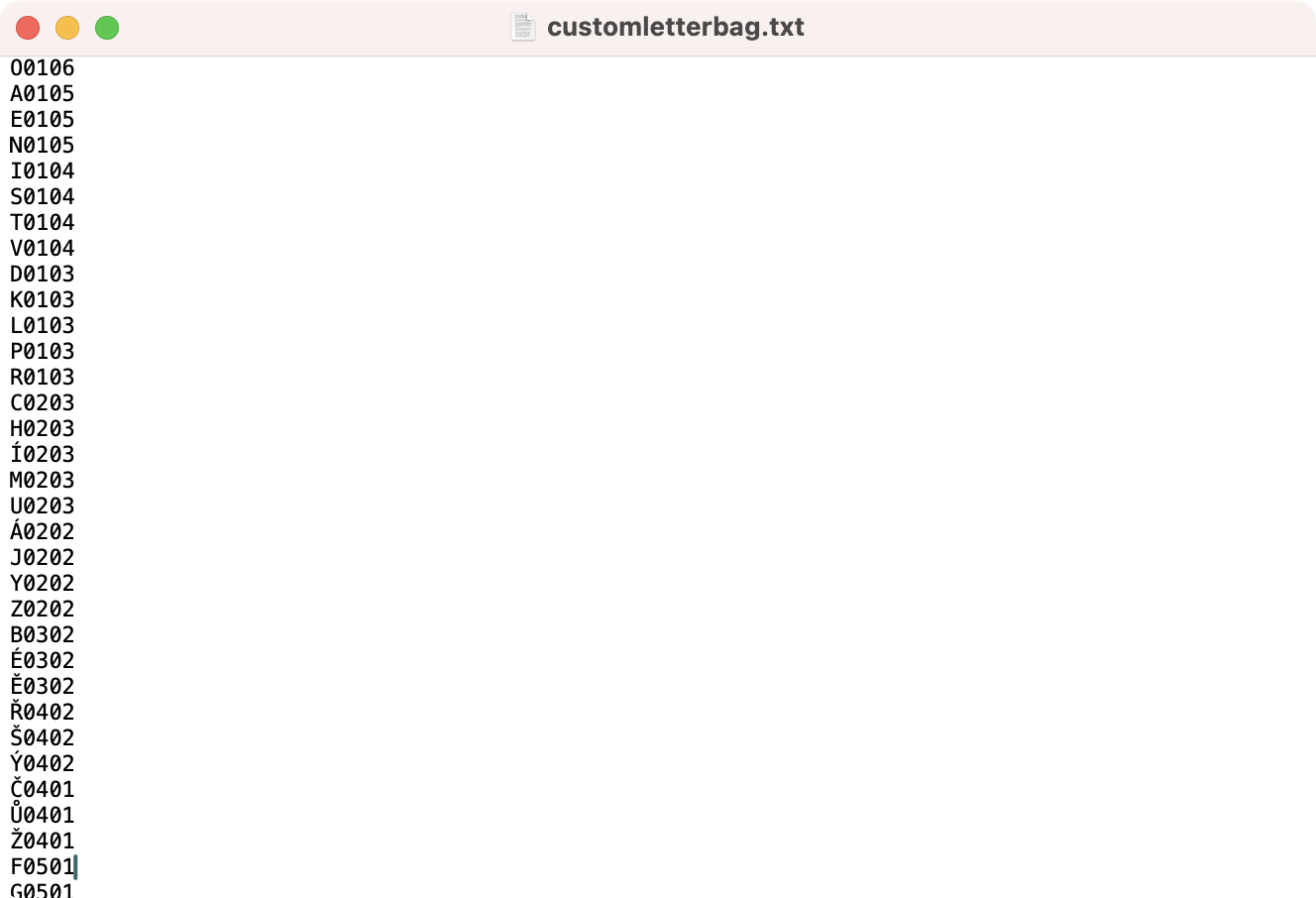
Where to get these values? You might get inspiration from an existing word board game that I will not name for legal reasons! See what values and distributions they use in your language and borrow those!
Errors, Limitations, and Reverting to English
As I say, this is a totally experimental and unsupported feature. It's totally possible to break the game if you do not follow the instructions carefully! I did not have time to code in complete error prevention - that's on you!
The game also does not feature every non-Latin character - they will show as a square if not supported.
Finally, if you wish to revert the dictionary or letter bag back to English, simply delete one or both txt files and next time you open Word Play it will be back to normal!
Lemme know how you get on!
Mark