Status
SteamPeaks
ChartsSalesUpcomingPatchesNewsCalculator
New on SteamEvery app, DLC and depot the minute Steam creates itAppsEvery app on Steam, newest change firstPackagesSubs and bundles, and what each containsDepotsDepots, manifests and install sizesTagsSteam's user tags and the games under themDevelopers & publishersCompanies and their cataloguesTechnologiesEngines, SDKs and anti-cheat found in the filesChange historyEvery PICS changelist as it lands
SignalsNineteen readings of the whole catalogueCompareAny games side by sideRecordsAll-time peaks and the days they were setReportsWeekly and monthly write-upsAlerts & newsroomWatch a game, get told when it movesSteam statusIs Steam up, right nowWeb API explorerTry the endpoints in the browser
NewsSteam's own announcements and the sales calendarCalculatorWhat a Steam account is worth, and its pile of shame
/
Sign in
/
SteamPeaks
The ultimate resource for Steam data.
ExploreChartsSalesSales and festsUpcomingPatchesNewsRecordsTrendingSignals
DatabaseAppsPackagesDepotsTagsDevelopersTechnologiesChange history
ToolsCalculatorCompareSearchAlertsSteam statusAPI
SiteMethodologyFAQDiscordSupportSign in via Steam
Not affiliated with Valve or Steam. Game names and artwork belong to their owners. All times UTC.
PrivacyCookiesFair useStatus
Borderless GamingNewsBorderless Gaming v1.0.21
Game update

Borderless Gaming v1.0.21

Borderless Gaming · published 3 Oct 2025, 07:09 UTC · build 20234541

All newsPlayers around this dateRead on Steam

Key Fixes:

  • Resolves issues with older Unreal Engine games that historically haven't worked with Borderless Gaming (see details below)
  • Fixes profiles for certain Unity and Google Play on PC games
  • Corrects state synchronization issues in foreground tracking

Unreal Engine Compatibility

Many Unreal Engine 3 games from the 2010s were never designed with windowed mode in mind. As a result, each game responds differently to being resized or moved while in windowed mode, and even fewer support dynamic resizing. This update implements a new strategy that successfully enables Borderless Gaming functionality for these problematic titles. However, since these older games behave differently despite sharing the same engine, no single profile configuration will work universally.

Example 1: LET IT DIE

Recommended profile settings:
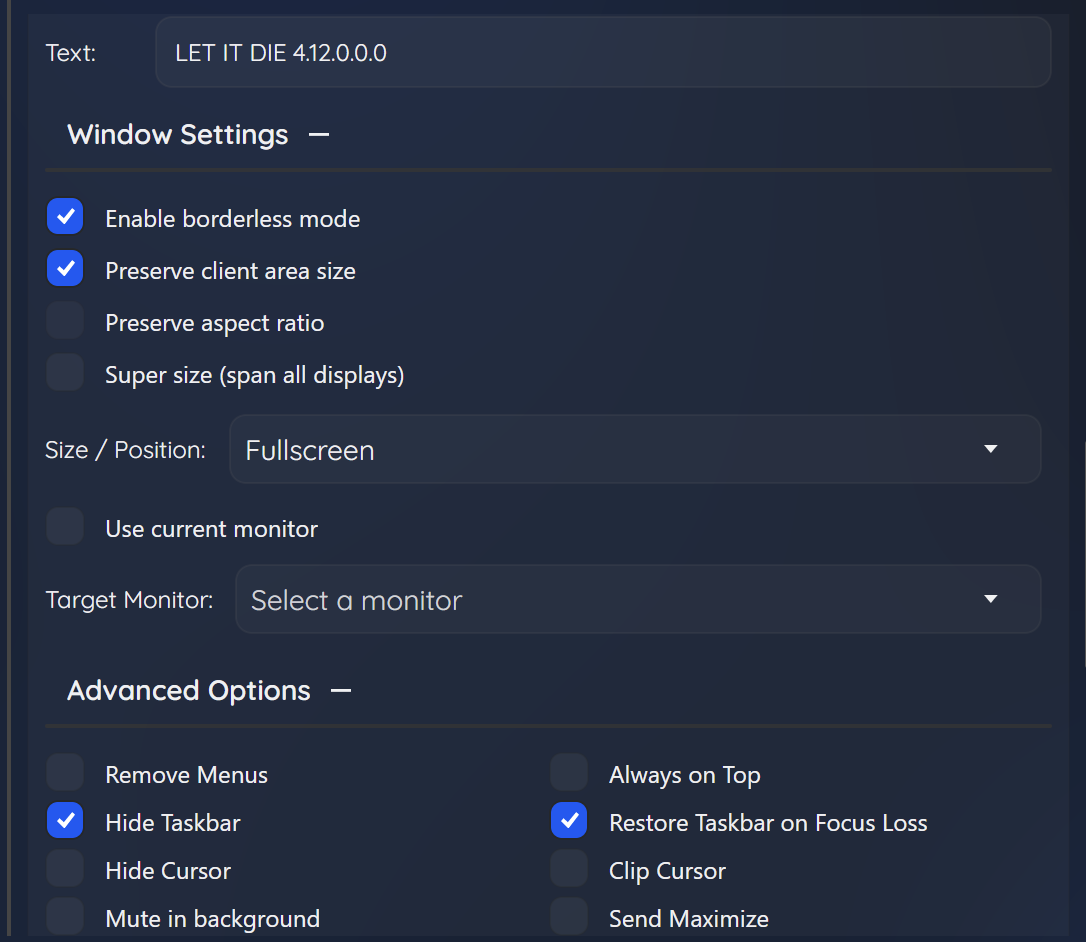
LET IT DIE properly detects when the display's working area changes and adjusts its height to fill the space left by the taskbar. It also handles dynamic taskbar restoration smoothly. The "Preserve Client Area" option should be enabled because while the game doesn't initially know how to handle window maximization, after the initial positioning it maintains borderless fullscreen without the window constantly resetting (avoiding the repeated brute-force adjustments that Borderless Gaming would otherwise apply).

Example 2: Dishonored

Recommended profile settings:
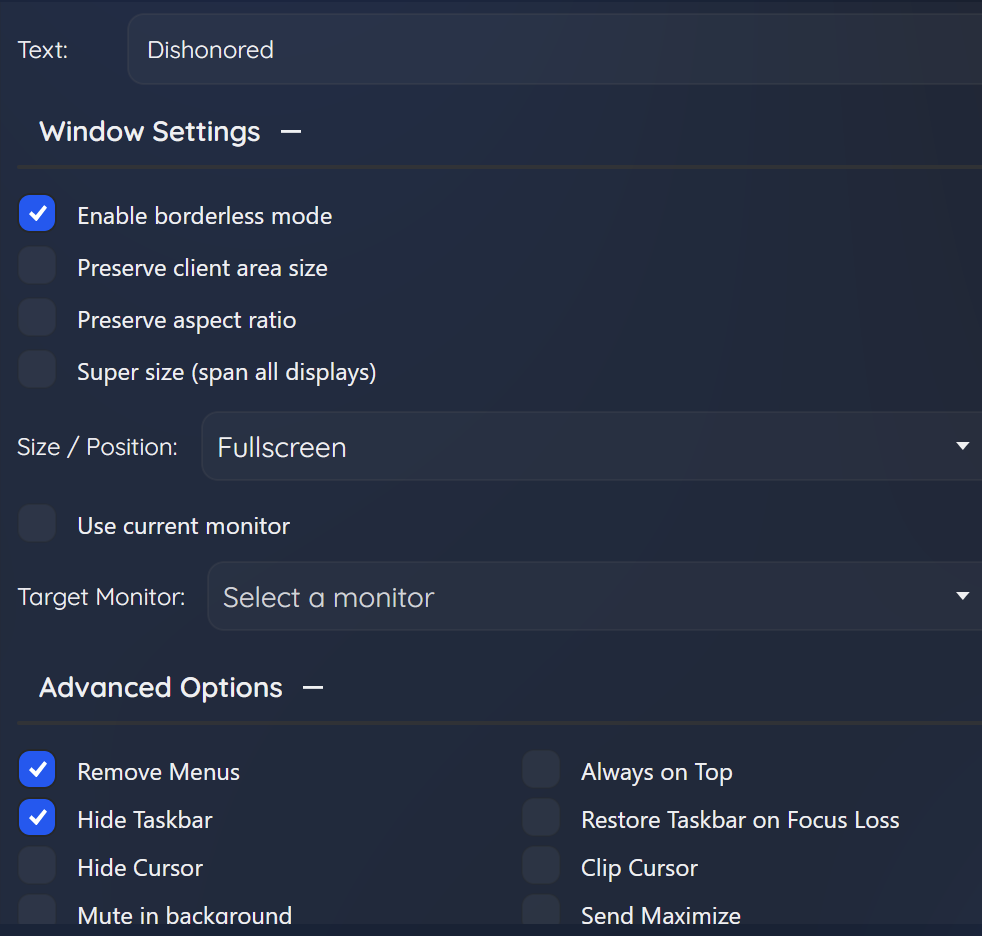
Until now, achieving true fullscreen with Dishonored (without mods) has been impossible. This is because the game completely resets its size and window styles whenever the window is moved, making borderless mode nearly impossible to maintain. Unfortunately, it also resets when the taskbar is dynamically restored. Therefore, the best approach for Dishonored is to hide the taskbar to preserve the borderless fullscreen state.

Note: If the default settings don't produce the desired results for your specific game, we recommend experimenting with different profile options until you find the combination that works best. Each game may require unique settings to achieve optimal borderless fullscreen performance.

More from Borderless Gaming

Other announcements

All news
Game update12 Sep 2026Legacy BranchHello all, For those that have been asking - if you prefer the legacy version of Borderless Gaming (9.6.0) and want to use it on Steam - you can now do so by setting your branch to 'legacy'.Game update25 Aug 2026Code Signature Temporarily RemovedWe’re experiencing an issue with our code-signing vendor that caused prior builds of Borderless Gaming to stop working. As a temporary fix, we’ve removed the EV code-signing signatures from BorderlessGaming.exe and appcontainer.exe . Because these files are temporarily unsigned, Windows may display an “Unknown publisher” warning and some antivirus products may flag them. We have no indication t…Major update2 Mar 2026v1.4.0 - Steam DeckBGFX now works on Steam Deck. How it works Install Borderless Gaming from Steam, open the app, pick a game, choose your effects. Borderless Gaming installs a Vulkan layer that hooks into your games automatically — you launch games the way you always do, from Steam, and the effects are just there. No desktop mode, no scripts, no extra software. Your presets are saved per game. Set it once and fo…