Status
SteamPeaks
ChartsSalesUpcomingPatchesNewsCalculator
New on SteamEvery app, DLC and depot the minute Steam creates itAppsEvery app on Steam, newest change firstPackagesSubs and bundles, and what each containsDepotsDepots, manifests and install sizesTagsSteam's user tags and the games under themDevelopers & publishersCompanies and their cataloguesTechnologiesEngines, SDKs and anti-cheat found in the filesChange historyEvery PICS changelist as it lands
SignalsNineteen readings of the whole catalogueCompareAny games side by sideRecordsAll-time peaks and the days they were setReportsWeekly and monthly write-upsAlerts & newsroomWatch a game, get told when it movesSteam statusIs Steam up, right nowWeb API explorerTry the endpoints in the browser
NewsSteam's own announcements and the sales calendarCalculatorWhat a Steam account is worth, and its pile of shame
/
Sign in
/
SteamPeaks
The ultimate resource for Steam data.
ExploreChartsSalesSales and festsUpcomingPatchesNewsRecordsTrendingSignals
DatabaseAppsPackagesDepotsTagsDevelopersTechnologiesChange history
ToolsCalculatorCompareSearchAlertsSteam statusAPI
SiteMethodologyFAQDiscordSupportSign in via Steam
Not affiliated with Valve or Steam. Game names and artwork belong to their owners. All times UTC.
PrivacyCookiesFair useStatus
TBAS Study ProNewsNEW: Online Leaderboards - v1.3 Update
Major update

NEW: Online Leaderboards - v1.3 Update

TBAS Study Pro · published 27 Mar 2025, 03:06 UTC

All newsPlayers around this dateRead on Steam

Through the use of the Steam API, Online Leaderboards are now available for TBAS Study Pro.

The Online Leaderboard is accessible either from the Main Menu or the Stats Menu, and lets users compare their performance to their peers. If you ever wanted to know how your performance measures up to the national community, now you can know!

Have a really good score in your save files, and you don't want to go through the effort of running a new assessment to place yourself on the leaderboard? Don't worry! When you select a category in the Online Leaderboard screen, your top score from that category is immediately loaded from your system files to the leaderboards. In other words: if it's available in your Stats screen, it'll be loaded to the Leaderboards!
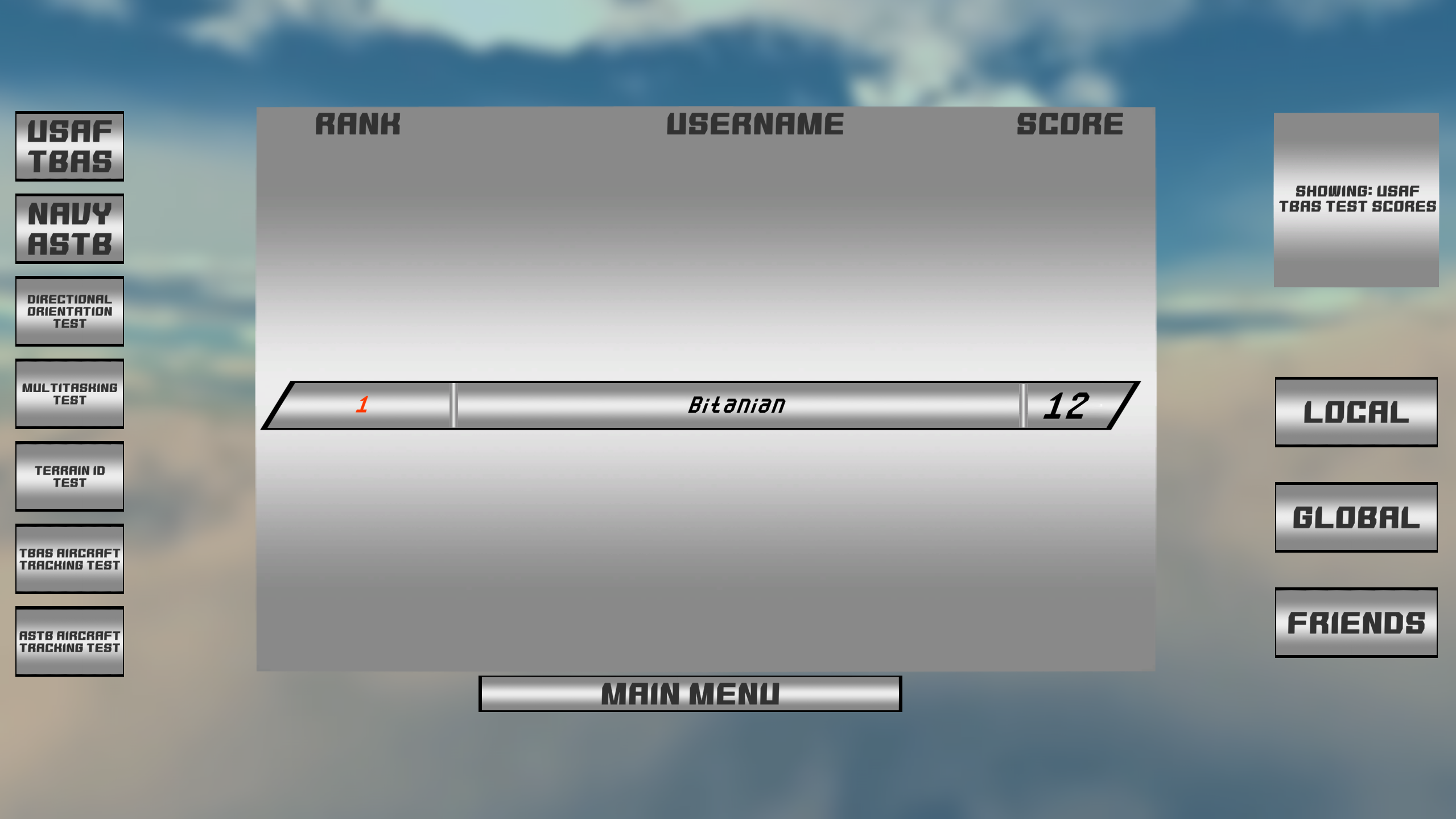

Left-hand Side Selections:

  • USAF TBAS: Shows results for the highest overall USAF (TBAS) Assessment scores. This is the default selection.
  • NAVY ASTB: Shows results for the highest overall Navy (ASTB-E) Assessment scores.
  • Directional Orientation Test: Shows results for the highest Directional Orientation Test scores. This score will populate whether you completed the Directional Orientation test in the USAF or Navy Assessment Modes.
  • Multitasking Test: Shows results for the highest Multitasking Test scores, available in the USAF Assessment Mode.
  • Terrain ID: Shows results for the highest Terrain Identification scores, available in the Navy Assessment Mode.
  • TBAS and ASTB Aircraft Tracking Test buttons: Shows best scores for Aircraft Tracking test completed via the USAF and Navy Assessments respectively.


Right-hand Side Selections:

  • Local: Displays your position in the global leaderboard, with the 9 people closest in score to you. This is the default selection.
  • Global: Displays the all-time top 10 performers in TBAS Study Pro. If you're here (and you didn't cheat!), you're practically guaranteed to become a pilot in your service of choice!
  • Friends: Displays your friends' scores. See how well your scores compare to theirs!

    Note: The Online Leaderboards will not populate if you're not logged in to Steam, as they operate through the Steam API. If you're logged into Steam but the leaderboard still is not populating, try restarting the program.

    If you ever want to be at the top of the leaderboard, now's the time to log in! Good luck out there, future pilots!

  • More from TBAS Study Pro

    Other announcements

    All news
    In-game event16 May 2026TBAS Study Pro v1.3.6 - Directional Orientation Visual OverhaulWhat's New: The Directional Orientation test has been visually overhauled to better match the real TBAS/ASTB. What Are You Talking About?: I recently receive feedback that the Directional Orientation test in TBAS Study Pro was so visually different from the real TBAS that it was causing users trouble when taking the real thing. Obviously, this was unacceptable. A user was kind enough to link me…Game update13 Mar 2026(WINDOWS ONLY) TBAS v1.3.5c - Adjustments and Bug FixesAdjustments - In response to popular user feedback: · Terrain ID: The opacity of the Terrain ID test compass buttons can now be adjusted allowing for them to be translucent. · Multitask Test - Dial Subtest: You are now only awarded points when the dial is in motion. You accrue points slowly when the dial is in the Green, and quickly when it is in the Yellow. · Aircraft Tracking Test - Horizonta…Game update8 Feb 2026(WINDOWS ONLY) TBAS v1.3.5b - Navy/ASTB Emergency Test Input HotfixBUG FIXES: An issue with the Navy/ASTB "Emergency" Aircraft Tracking submode was introduced in the previous update whereby inputs that cause the Fuel/Power gauge dials to "Snap" to a color (e.g. Yellow or Red) would not properly register in the program. "Knob"-type inputs that gradually move the dial positions up and down instead of via a "Snapping" behavior would still work fine, for the most…