Status
SteamPeaks
ChartsSalesUpcomingPatchesNewsCalculator
New on SteamEvery app, DLC and depot the minute Steam creates itAppsEvery app on Steam, newest change firstPackagesSubs and bundles, and what each containsDepotsDepots, manifests and install sizesTagsSteam's user tags and the games under themDevelopers & publishersCompanies and their cataloguesTechnologiesEngines, SDKs and anti-cheat found in the filesChange historyEvery PICS changelist as it lands
SignalsNineteen readings of the whole catalogueCompareAny games side by sideRecordsAll-time peaks and the days they were setReportsWeekly and monthly write-upsAlerts & newsroomWatch a game, get told when it movesSteam statusIs Steam up, right nowWeb API explorerTry the endpoints in the browser
NewsSteam's own announcements and the sales calendarCalculatorWhat a Steam account is worth, and its pile of shame
/
Sign in
/
SteamPeaks
The ultimate resource for Steam data.
ExploreChartsSalesSales and festsUpcomingPatchesNewsRecordsTrendingSignals
DatabaseAppsPackagesDepotsTagsDevelopersTechnologiesChange history
ToolsCalculatorCompareSearchAlertsSteam statusAPI
SiteMethodologyFAQDiscordSupportSign in via Steam
Not affiliated with Valve or Steam. Game names and artwork belong to their owners. All times UTC.
PrivacyCookiesFair useStatus
SUPERVERSENewsGame controls extended in SUPERVERSE Update #18
In-game event

Game controls extended in SUPERVERSE Update #18

SUPERVERSE · published 15 Jun 2021, 09:29 UTC

All newsPlayers around this dateRead on Steam

The 18th update of SUPERVERSE extends the options to maneuver the spaceship using a game controller and introduces one more way to play the game.

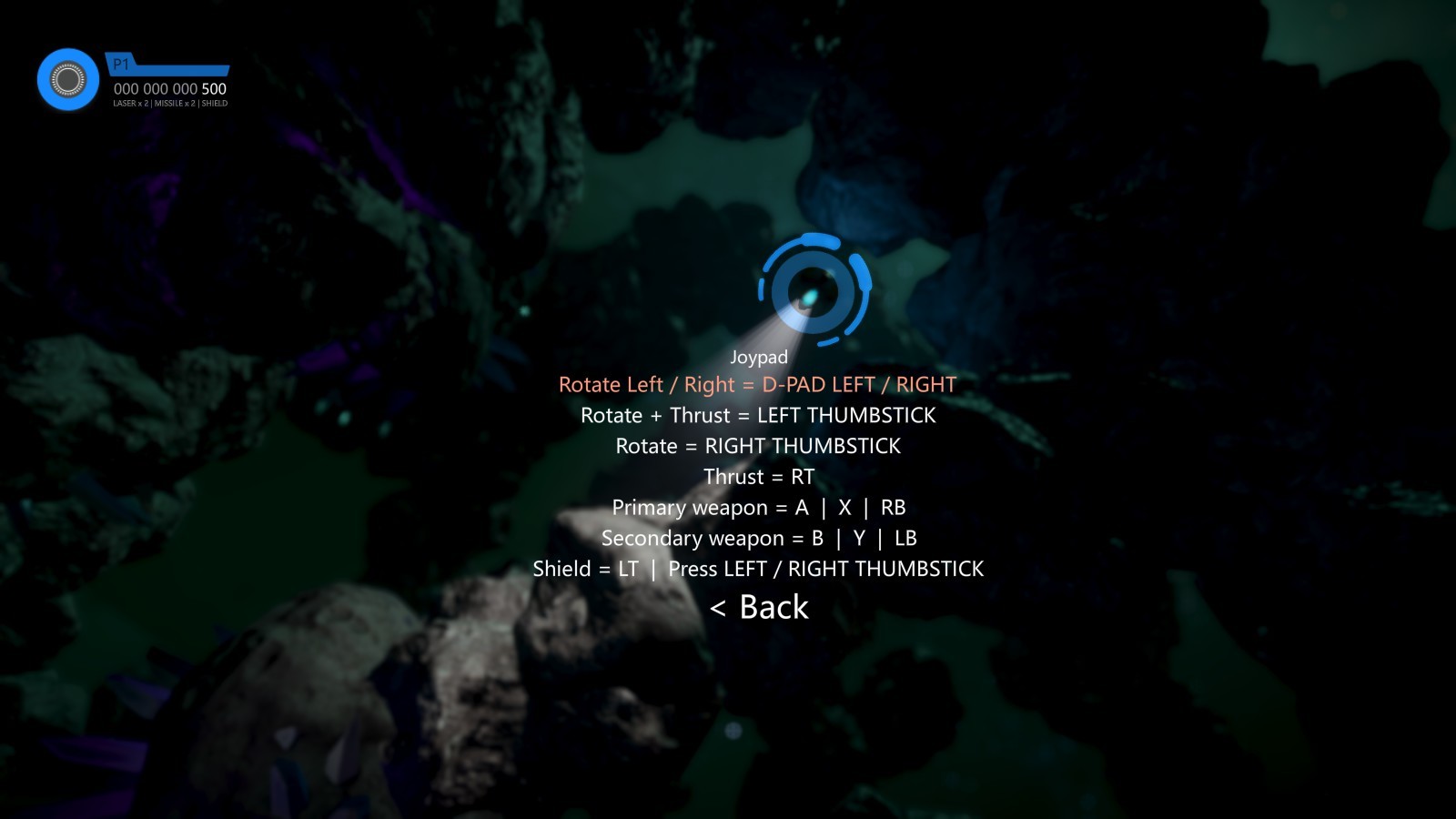
You can now use the D-Pad on a game controller to rotate the spaceship in a clockwise direction by pressing RIGHT on the D-Pad and to rotate the spaceship in a counterclockwise direction by pressing LEFT on the D-Pad.

The Thruster can now be activated and precisely controlled by pressing the Right Trigger (RT).

Using D-Pad for rotation and RT for controlling the speed of the spaceship matches the controls you can find in many racing games with top-down view. This also matches the controls you have when playing the game using a keyboard.

We shuffled the default buttons layout and the buttons for activating Primary and Secondary Weapon have been moved to Right Bumper (RB) and Left Bumper (LB).

The Shield can be activated by pressing the Left Trigger (LT).

To summarize, you can now use the game controller to maneuver the spaceship using one of the following combinations:

  • D-PAD LEFT / RIGHT for rotation and RT for thrust
  • LEFT THUMBSTICK for rotation and thrust combined
  • RIGHT THUMBSTICK for rotation and RT for thrust
Changelog

Update #18 | 2021-06-14

    Added

  • Extended game controller usability: D-Pad Left / Right can be used for rotating the spaceship Counterclockwise / Clockwise.

    Changed

  • Thrust control moved to Right Trigger (RT).
  • Shield control moved to Left Trigger (LT).
  • Primary Weapon control moved to Right Bumper (RB).
  • Secondary Weapon control moved to Left Bumper (LB).
  • Settings menu options order changed.
  • Localizations updated.
More from SUPERVERSE

Other announcements

All news
Game update8 Sep 2026Smaller Install, Smoother HelpA small follow-up to the last update, with two improvements worth mentioning. SUPERVERSE now takes up about 20% less space on your drive, and loading times have come down a little along with it. Nothing changes on your end — the game is just leaner. Scrolling through the Help sections with a game controller has also been improved. If you were fighting the analog stick to read through Controls o…Major update4 Sep 2026Take Aim: Mouse Controls & In-Game HelpThe first update of September brings three big additions to SUPERVERSE: a brand new mouse and keyboard control scheme, a full in-game Help system, and on-screen glyphs that finally show you which button to press. Mouse and keyboard controls You can now play SUPERVERSE the way you'd play any shooter on PC: aim with the mouse, move with the keyboard . Your pointer sets the direction, WASD does th…In-game event16 Aug 2026Every Day, in Every Way, We're Getting Better and Better!A smaller update this time, all about clarity: a better tutorial, cleaner menus, and improved text throughout SUPERVERSE. The tutorial has had another pass. Text has been corrected and expanded, new messages have been added. The starting camera also sits at a tilted angle for a more cinematic opening. The Settings > Controls menus have been updated for both Keyboard and Joypad, and the Steam Li…